

Runalyzer
Runalyzer is made and published by Chad Johnson. AppBrain is an independent app data site and isn't affiliated with Chad Johnson. The app name, icon, screenshots and description belong to Chad Johnson and are shown as published on the App Store.
AppBrain's verdict
- Rating on App Store
- 3.67
- 6 ratings
- Last updated
- May 4, 2026
It doesn't have enough ratings yet to judge what users think.
Rankings
App Store top chartsApp Store Rankings for Runalyzer
Competitors
Similar apps and more from Chad JohnsonAlternatives to Runalyzer





Releases
Updates seen on the App Store- Version
- 2.0
- Launched
- December 2021
No changelog data
User feedback
Ratings and reviews on the App StoreComments on Runalyzer for iOS
We don't have enough comments to show example comments. Please check back later.
Technology
Found in the app by AppBrain- Price
- $1.99
- App size
- 10.9 MB
- Content rating
- Everyone
Technologies used by Runalyzer
About the app and developer
About Runalyzer
Runalyzer is a health & fitness app developed by Chad Johnson.
User Ratings
Runalyzer is rated 3.67 out of 5 stars. The rating is based on 6 ratings.
App Information
Runalyzer costs $1.99. The app size is 10.93 MB. The latest version available is 2.0. The last update was on May 4, 2026.
Technical Requirements
The app has a content rating of Everyone. The app has been available on the App Store since December 2021.
Developer information for Chad Johnson
Address:
Store listing
By Chad Johnson, from the App Store



Description by Chad Johnson Written by the developer, not by AppBrain. Click to read.
Build your own dashboard of workout tiles. Each one answers a specific question: How many miles have I run this month? How many 5Ks have I done this year? What's my weekly cycling distance? Tap + and tell Runalyzer what you want to track — it does the rest.
Every tile is yours to configure
Choose what to display (total distance or workout count), which activities to include (running, walking, hiking, or cycling), your time range, and your preferred units. Add a custom name and pick a color. Stack as many tiles as you want and drag them into the order that makes sense to you.
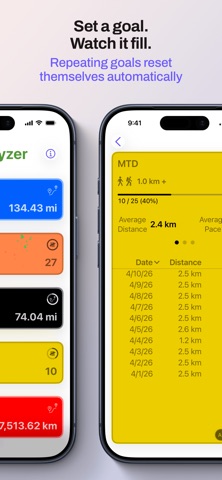
Set a goal, watch it fill
Add an optional goal to any tile and a progress ring appears. Hit it and Runalyzer celebrates. Set repeating goals and they reset automatically — your weekly mileage goal is ready again every Monday without you touching a thing.
On your home screen
Add a Runalyzer widget to your iPhone home screen and your metric is always visible — current value and goal progress, right there without opening the app. Add as many widgets as you like, one for each metric you want at a glance.
Dig into any metric
Tap a tile to see the full story: your total front and center, average distance, average pace or speed, and a complete list of every workout that went into the number. Sort by date, distance, or pace. Group by day, week, month, or year to see how your training adds up over time. Two charts — distance and pace or speed — show how you're trending.
Only count what qualifies
Distance filters let you tell Runalyzer exactly which workouts belong in a tile. Count only your 5K efforts, only your long runs, only your rides over 30 km — you set the rules.
Pace or speed, your call
Running and walking metrics show pace. Cycling metrics show speed. Or override any tile to display whichever you prefer.
Your data stays on your phone
Runalyzer reads directly from Apple Health and does everything locally. No account. No server. No ads. Apple Health's own permissions control what the app can see.
Available in English, Spanish, French, and Brazilian Portuguese.