

S4N: WiFi Analyzer & Scanner
S4N: WiFi Analyzer & Scanner is made and published by Wlodzimierz Grzywacz. AppBrain is an independent app data site and isn't affiliated with Wlodzimierz Grzywacz. The app name, icon, screenshots and description belong to Wlodzimierz Grzywacz and are shown as published on the App Store.
AppBrain's verdict
- Last updated
- August 21, 2026
Rankings
App Store top chartsApp Store Rankings for S4N: WiFi Analyzer & Scanner
Competitors
Similar apps and more from Wlodzimierz GrzywaczMore from Wlodzimierz Grzywacz


Releases
Updates seen on the App Store- Version
- 1.42
- Launched
- February 2022
No changelog data
User feedback
Ratings and reviews on the App StoreComments on S4N: WiFi Analyzer & Scanner for iOS
We don't have enough comments to show example comments. Please check back later.
Technology
Found in the app by AppBrain- Price
- $3.99
- App size
- 6.76 MB
- Content rating
- Everyone
Technologies used by S4N: WiFi Analyzer & Scanner
About the app and developer
About S4N: WiFi Analyzer & Scanner
S4N: WiFi Analyzer & Scanner is an utilities app developed by Wlodzimierz Grzywacz.
User Ratings
The app has no ratings yet.
App Information
S4N: WiFi Analyzer & Scanner costs $3.99. The app size is 6.76 MB. The latest version available is 1.42. The last update was on August 21, 2026.
Technical Requirements
The app has a content rating of Everyone. The app has been available on the App Store since February 2022.
Developer information for Wlodzimierz Grzywacz
Address:
Frequently asked questions about S4N: WiFi Analyzer & Scanner
Is S4N: WiFi Analyzer & Scanner free?
No. S4N: WiFi Analyzer & Scanner costs $3.99 on the App Store.
Is S4N: WiFi Analyzer & Scanner still available?
Yes. S4N: WiFi Analyzer & Scanner is on the App Store, and the last update we saw was on August 21, 2026.
How large is S4N: WiFi Analyzer & Scanner?
S4N: WiFi Analyzer & Scanner is 6.76 MB.
Is S4N: WiFi Analyzer & Scanner suitable for children?
App Store rates the content of S4N: WiFi Analyzer & Scanner as suitable for everyone.
Who made S4N: WiFi Analyzer & Scanner?
S4N: WiFi Analyzer & Scanner was developed by Wlodzimierz Grzywacz. It is listed in the utilities category on the App Store.
Store listing
By Wlodzimierz Grzywacz, from the App Store


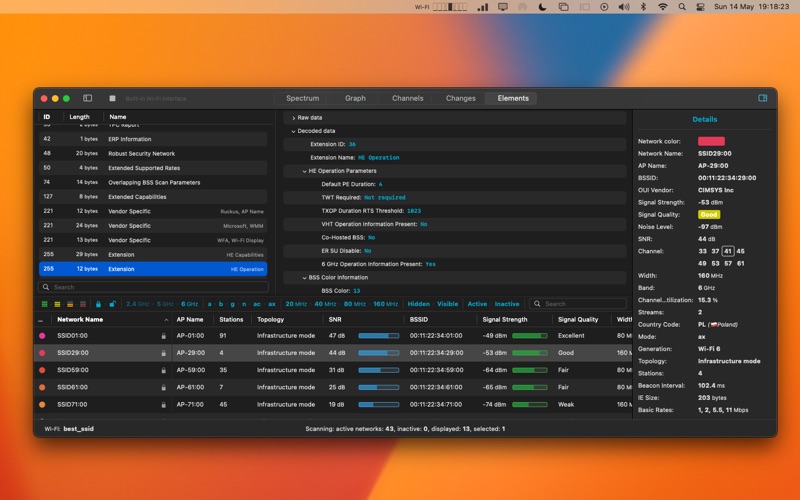

Description by Wlodzimierz Grzywacz Written by the developer, not by AppBrain. Click to read.
The app offers multiple levels of functionality - Base, Basic, Standard, and Professional versions.
Base version features:
1. Supports Wi-Fi 4, 5, 6, 6E, and 7 generations.
2. Supports 802.11a/b/g/n/ac/ax/be standards.
3. Supports 2.4, 5, and 6 GHz frequencies.
4. Supports 20, 40, 80, 160, and 320 MHz channels.
5. Detects security types:
- WEP
- WPA Personal/Enterprise.
- WPA2 Personal/Enterprise.
- WPA3 Personal Only/Transition/Compatibility Mode.
- WPA3 Enterprise Only/Transition/192-bit Mode.
- Enhanced Open (OWE).
6. Displays Wi-Fi network information in a table, such as: SSID, BSSID, signal strength, noise level, max data rate, SNR, channel width, channel band, channel number, generation, PHY Mode, and security type.
7. Simple filtering.
8. Custom layouts for the main view.
Basic version features:
1. Detailed information about the selected Wi-Fi network in the inspector (right panel).
2. Graphs such as: signal strength, noise level, and SNR.
Standard version features:
1. All features of the Basic version.
2. Displays Wi-Fi network information in a table, such as: authentications, basic rates, beacon interval, channel utilization, country, encryptions, number of stations, streams, supported rates, topology, AP Name, and WPS Status.
3. Graphs such as: channel utilization, and number of stations.
4. Advanced filtering in the sidebar (left panel) with multi-select support for filtering Wi-Fi networks by information that can be displayed in a table, including filtering by overlapping networks.
5. Displays channels as a graph.
6. Information about changes in the Wi-Fi network.
7. Saving and loading of scan results.
8. Annotations.
9. Apply as Filter.
10. Secondary graph to compare with another graph.
11. Displays the AP Name in network label.
12. Importing and exporting of settings.
Professional version features:
1. All features of the Standard version.
2. More information about Wi-Fi networks in the table, with over 1000 available columns.
3. Graph of IE size.
4. Graphs for imported data from capture files or sensors: signal strength and noise level per antenna, stats by frame, retry frames, retry rate, traffic, and data rate.
5. Information Elements.
6. Comparison of Information Elements between two networks.
7. Comparison of two Information Elements within one network.
8. Pinnable columns.
9. Profiles.
10. Imports data from capture files with Radiotap Headers (PCAP and PCAPNG).
11. Remote sensors (PCAP-over-IP and PCAPNG-over-IP).
12. Copy selected rows as CSV or JSON.
13. Customizable information about the Wi-Fi network in the sidebar.
14. Custom status bar items.
Basic, Standard, and Professional versions can be unlocked through subscription or one-time payment via Apple's payment system, ensuring convenience and compliance with App Store policies.
The app is available only in English.
Privacy & Security:
- No ads.
- No registration required.
- Zero telemetry.
- No data collection.
- No trackers.
Terms of Use (Standard Apple Terms of Use): https://www.apple.com/legal/internet-services/itunes/dev/stdeula/