

Safelight Darkroom Timer
Safelight Darkroom Timer is made and published by Nhu Nam Vo. AppBrain is an independent app data site and isn't affiliated with Nhu Nam Vo. The app name, icon, screenshots and description belong to Nhu Nam Vo and are shown as published on the App Store.
AppBrain's verdict
- Rating on App Store
- 4.00
- 1 ratings
- Last updated
- May 10, 2026
- Size
- 47.7 MB
It doesn't have enough ratings yet to judge what users think.
User feedback
Ratings and reviews on the App StoreComments on Safelight Darkroom Timer for iOS
We don't have enough comments to show example comments. Please check back later.
Store listing
By Nhu Nam Vo, from the App Store




Description by Nhu Nam Vo Written by the developer, not by AppBrain. Click to read.
Use the darkroom-friendly timer for Focus, Expose, and Process timing with large controls, red/amber/green display themes, optional haptic feedback, completion sound, and keep-screen-on behavior when enabled.
Turn one base exposure time into a stop-based table with the F-Stop Calculator. Use free 1/4 and 1/3 stop steps, send a result to the timer, or run a test strip one exposure at a time.
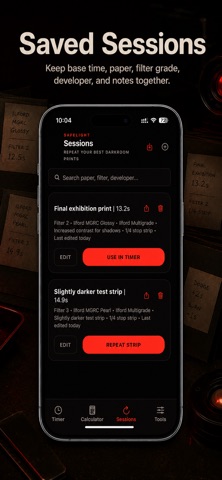
Save print sessions with base exposure, stop step, paper, filter grade, developer, and notes so you can repeat or adjust your best darkroom prints later. Search, edit, delete, repeat, and use saved sessions from the Sessions screen.
Use the Print Process Timer for expose, develop print, stop bath, fix, and optional wash steps. Manage darkroom metadata presets for paper, developer, and filter grades.
Safelight Pro unlocks unlimited saved sessions, advanced stop steps, Dodge & Burn planning, memory banks, run plans, and CSV/Text export and sharing.
Important: Safelight is a darkroom-friendly display and timing utility. It is not a flashlight, photo editor, AI app, lab ordering service, hardware enlarger controller, or guarantee that a phone screen is safe for every photographic paper or film. Always test your own paper and darkroom conditions.
Privacy Policy: https://hearthmesa.com/apps/safelight/privacy
Terms of Use (Apple Standard EULA): https://www.apple.com/legal/internet-services/itunes/dev/stdeula/
Support: https://hearthmesa.com/apps/safelight/support
Safety and technology
Found in the app by AppBrain- Price
- Free
- App size
- 47.7 MB
- Content rating
- Everyone
Technologies used by Safelight Darkroom Timer
Releases
Updates seen on the App Store- Version
- 1.0
- Launched
- May 2026
No changelog data
Alternatives
Similar apps and more from Nhu Nam VoAlternatives to Safelight Darkroom Timer


More from Nhu Nam Vo


Rankings
App Store top chartsApp Store Rankings for Safelight Darkroom Timer
About the app and developer
About Safelight Darkroom Timer
Safelight Darkroom Timer is a photo & video app developed by Nhu Nam Vo.
User Ratings
Safelight Darkroom Timer is rated 4.00 out of 5 stars. The rating is based on one rating ratings.
App Information
Safelight Darkroom Timer is freely available from the App Store. The app size is 47.70 MB. The latest version available is 1.0. The last update was on May 10, 2026.
Technical Requirements
The app has a content rating of Everyone. The app has been available on the App Store since May 2026.
Developer information for Nhu Nam Vo
Address: