

Sakura - Voice Expense Tracker
Sakura - Voice Expense Tracker is made and published by ANH KHOA TRUONG NGUYEN. AppBrain is an independent app data site and isn't affiliated with ANH KHOA TRUONG NGUYEN. The app name, icon, screenshots and description belong to ANH KHOA TRUONG NGUYEN and are shown as published on the App Store.
AppBrain's verdict
- Last updated
- October 2, 2026
- Size
- 36.1 MB
User feedback
Ratings and reviews on the App StoreComments on Sakura - Voice Expense Tracker for iOS
We don't have enough comments to show example comments. Please check back later.
Store listing
By ANH KHOA TRUONG NGUYEN, from the App Store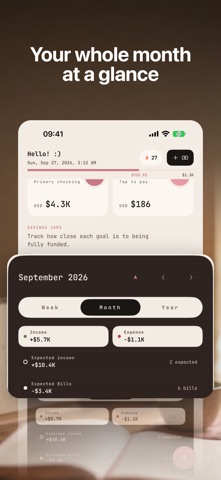



Description by ANH KHOA TRUONG NGUYEN Written by the developer, not by AppBrain. Click to read.
Sakura is a calm personal finance app for everyday spending, budgets, and savings goals. Speak naturally, review your transaction drafts, and keep your money organized without spreadsheets or a bank connection.
SPEAK, REVIEW, SAVE
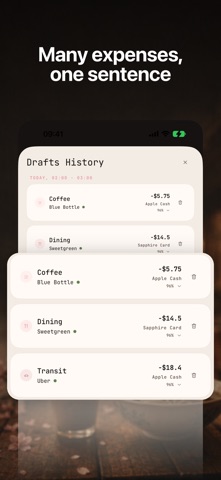
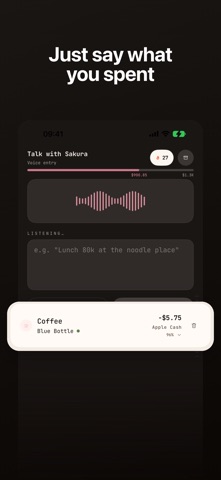
Say "15 dollars for lunch yesterday" or describe several expenses in one go. Sakura turns your words into editable drafts with amounts, currencies, categories, dates, and wallet suggestions. Check the details before saving. Prefer typing? Add transactions manually anytime.
SEE YOUR MONEY CLEARLY
- Track expenses, income, and transfers across cash, bank, credit-card, and digital wallets.
- Use multiple currencies and view converted totals in your preferred currency.
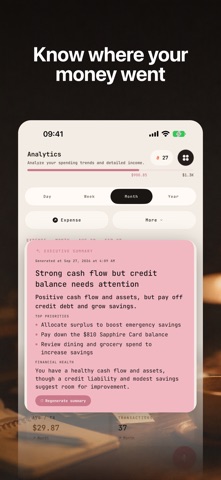
- Explore spending by category, follow income and expense trends, and browse your transaction history.
- Hide balances across the app when you want more discretion.
MAKE ROOM FOR YOUR PLANS
- Create budgets and track category limits with spending warnings.
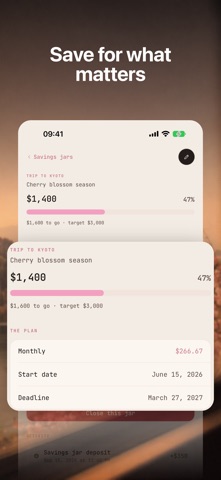
- Set up savings jars with targets and deadlines, and record contributions toward each goal.
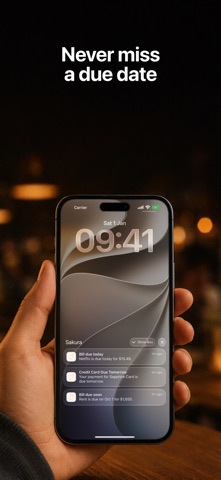
- Organize recurring bills, subscriptions, and income with reminders.
- Track credit-card statements, payment dates, and installments.
BUILD A SMALL DAILY HABIT
Start with guided setup and voice practice. Use the calendar, daily streaks, and Home Screen widgets for budgets, quick voice entry, and your logging streak.
MAKE SAKURA YOURS
Choose Sakura or Matcha themes, light or dark mode, and language-appropriate fonts with adjustable text sizes. Available in English, Vietnamese, Japanese, Korean, Simplified Chinese, French, and Spanish.
LOCAL RECORDS. NO ACCOUNT REQUIRED.
Your saved financial records are stored on your device. Manual tracking and local charts work offline, and you can export and restore your data with backups. Sakura does not connect to your bank or move real money.
AI features require an internet connection. Voice transcription uses Apple Speech and may be processed on your device or by Apple. For AI processing, relevant text and financial context are sent to Sakura's backend and its AI provider, Groq. See the Privacy Policy for details.
START FREE. ADD PREMIUM WHEN YOU NEED IT.
Free features include manual tracking, wallets, local charts, unlimited budgets and savings jars, backup and restore, and a daily AI Voice allowance.
Sakura Premium adds:
- Premium AI Voice access, with the current allowance shown in the app.
- AI-generated financial insights.
- Advanced budget tools, including custom warning thresholds, templates, and history.
- Automatic recording of scheduled bills, income, and savings contributions when you open the app.
Automation updates your records in Sakura; it does not make bank payments or transfers. AI insights are informational, not financial advice.
SUBSCRIPTION INFORMATION
Sakura Premium is available as monthly or yearly auto-renewable subscriptions. Prices are displayed in the app for your App Store region.
Payment is charged to your Apple Account at confirmation of purchase. Subscriptions renew automatically unless canceled at least 24 hours before the current period ends. Your account is charged for renewal within 24 hours before the end of that period. Manage or cancel your subscription in your Apple Account settings.
Privacy Policy: https://sakuramoney.app/en/privacy/
Terms of Service: https://sakuramoney.app/en/terms/
Terms of Use (EULA): https://www.apple.com/legal/internet-services/itunes/dev/stdeula/
A little less effort. A clearer picture of your money.
Safety and technology
Found in the app by AppBrain- Price
- Free
- App size
- 36.1 MB
- Content rating
- Everyone
Technologies used by Sakura - Voice Expense Tracker
Releases
Updates seen on the App Store- Version
- 2.1
- Launched
- June 2026
No changelog data
Alternatives
Similar apps and more from ANH KHOA TRUONG NGUYENAlternatives to Sakura - Voice Expense Tracker


Rankings
App Store top chartsApp Store Rankings for Sakura - Voice Expense Tracker
About the app and developer
About Sakura - Voice Expense Tracker
Sakura - Voice Expense Tracker is a finance app developed by ANH KHOA TRUONG NGUYEN.
What is the rating of Sakura - Voice Expense Tracker?
Sakura - Voice Expense Tracker has no ratings yet.
Is Sakura - Voice Expense Tracker free?
Sakura - Voice Expense Tracker is free. The app size is 36.12 MB. The latest version available is 2.1. The last update was on October 2, 2026.
What are the requirements for Sakura - Voice Expense Tracker?
The app has a content rating of Everyone. The app has been available on the App Store since June 2026.
Developer information for ANH KHOA TRUONG NGUYEN
Address: