





AppBrain's verdict
- Last updated
- November 22, 2026
- Size
- 86.6 MB
User feedback
Ratings and reviews on the App StoreComments on SameFont: Edit PDF Text for iOS
We don't have enough comments to show example comments. Please check back later.
Store listing
By ali sarsur, from the App StoreDescription by ali sarsur Written by the developer, not by AppBrain. Click to read.
YOUR FILES STAY ON YOUR IPHONE
No cloud, no account, no upload. SameFont reads and edits your documents on the phone itself and never sends them to a server, so contracts, forms and personal papers stay with you. Editing works without an internet connection.
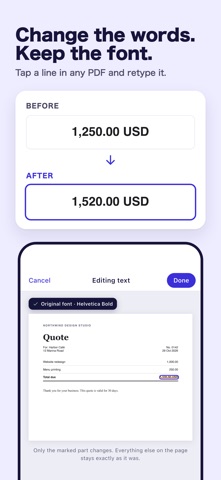
EDIT PDF TEXT IN ITS OWN FONT
Tap any line, retype it, done. SameFont uses the PDF's own embedded font when it has the letters you need, and the closest free font when it doesn't, so your change matches the page. Size, colour and position stay where they were.
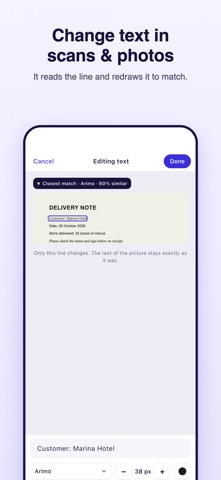
CHANGE TEXT IN SCANS, PHOTOS AND SCREENSHOTS
Open a scanned PDF, a photo or a screenshot and tap a line. SameFont reads it, clears it and redraws your text in the closest matching font, size and colour, keeping the lines and underlines around it. English, Arabic and Japanese lines are read for you (Japanese on iOS 16 or later). Hebrew lines are found but not read yet, so you type the new text.
ARABIC, HEBREW AND JAPANESE TOO
Full right-to-left editing, with joined Arabic letters and numbers in the right order. Japanese text is edited with matching gothic and mincho fonts (horizontal text). The app itself is in English, Arabic, Hebrew, Japanese, French, German, Spanish and Turkish.
75+ FONTS, OR YOUR OWN
Take the suggested match, pick any font from the list, or load your own .ttf file.
SIGN, FILL AND MARK UP
Draw your signature once and place it on any page; up to three are kept on your iPhone. Fill in PDF forms (text fields, checkboxes and choices) and lock the answers when you save. Highlight lines, add rectangles, circles, lines and arrows, or drop in a photo or logo.
TICK AND FILL FORMS WITHOUT FIELDS
Marks puts a tick, a cross or a dot in a printed box and today's date on a line, on any form, even a photo of one. My details keeps your name, ID number and more on your iPhone and writes them into a form for you.
PAGES AND SMALLER FILES
Reorder, rotate, delete and add pages, and open several photos as one PDF. Before you send a file you can make it smaller: this shrinks photo and scan pages, and leaves pages that are already text as they are.
SCAN AND OPEN FROM ANYWHERE
Scan a paper document with the camera and edit it straight away. Or send a PDF or photo to SameFont from Mail, Files and other apps.
YOUR ORIGINAL IS SAFE
Edits are saved as a new file, and undo and redo are always there.
Also: add new text anywhere on a page, save as a PDF (photos and screenshots also as an image), and share to any app.
Please only edit documents you have the right to change.
SAMEFONT PRO
Editing is free. The free version saves and shares a picture of each page with a SameFont watermark across it. SameFont Pro saves a clean copy with real text, monthly or yearly. Or pay once for a single file. Payment is charged to your Apple ID. Subscriptions renew automatically unless cancelled at least 24 hours before the end of the current period, in Settings > Apple ID > Subscriptions.
Terms of Use: https://samefont.vercel.app/terms
Privacy Policy: https://samefont.vercel.app/privacy
Safety and technology
Found in the app by AppBrain- Price
- Free
- App size
- 86.6 MB
- Content rating
- Everyone
Technologies used by SameFont: Edit PDF Text
Releases
Updates seen on the App Store- Version
- 1.0.5
- Launched
- November 2026
No changelog data
Alternatives
Similar apps and more from ali sarsurAlternatives to SameFont: Edit PDF Text


More from ali sarsur


Rankings
App Store top chartsApp Store Rankings for SameFont: Edit PDF Text
About the app and developer
About SameFont: Edit PDF Text
SameFont: Edit PDF Text is a productivity app developed by ali sarsur.
What is the rating of SameFont: Edit PDF Text?
SameFont: Edit PDF Text has no ratings yet.
Is SameFont: Edit PDF Text free?
SameFont: Edit PDF Text is free. The app size is 86.57 MB. The latest version available is 1.0.5. The last update was on November 22, 2026.
What are the requirements for SameFont: Edit PDF Text?
The app has a content rating of Everyone. The app has been available on the App Store since November 2026.
SameFont: Edit PDF Text is made and published by ali sarsur. AppBrain is an independent app data site and isn't affiliated with ali sarsur. The app name, icon, screenshots and description belong to ali sarsur and are shown as published on the App Store.
Developer information for ali sarsur
Address:
Frequently asked questions about SameFont: Edit PDF Text
Is SameFont: Edit PDF Text free?
Yes. SameFont: Edit PDF Text is free on the App Store.
Is SameFont: Edit PDF Text still available?
Yes. SameFont: Edit PDF Text is on the App Store, and the last update we saw was on November 22, 2026.
How large is SameFont: Edit PDF Text?
SameFont: Edit PDF Text is 86.57 MB.
Is SameFont: Edit PDF Text suitable for children?
App Store rates the content of SameFont: Edit PDF Text as suitable for everyone.
Who made SameFont: Edit PDF Text?
SameFont: Edit PDF Text was developed by ali sarsur. It is listed in the productivity category on the App Store.
What are the best alternatives to SameFont: Edit PDF Text?
People looking at SameFont: Edit PDF Text also look at these productivity apps: PDF Editor : Edit Text & Sign, PDF Genius: AI PDF Text Editor, XBANQ Focus: Writing Timer, Formo PDF Editor, PDFCompare: Compare PDF & DOC.