

Sanbra Driver
Sanbra Driver is made and published by JEREMIAH KWESI RHULE. AppBrain is an independent app data site and isn't affiliated with JEREMIAH KWESI RHULE. The app name, icon, screenshots and description belong to JEREMIAH KWESI RHULE and are shown as published on the App Store.
AppBrain's verdict
- Rating on App Store
- 4.50
- 2 ratings
- Last updated
- October 9, 2026
It doesn't have enough ratings yet to judge what users think.
Rankings
App Store top chartsApp Store Rankings for Sanbra Driver
Competitors
Similar apps and more from JEREMIAH KWESI RHULEAlternatives to Sanbra Driver


More from JEREMIAH KWESI RHULE

Releases
Updates seen on the App Store- Version
- 1.2.0
- Launched
- July 2026
No changelog data
User feedback
Ratings and reviews on the App StoreComments on Sanbra Driver for iOS
We don't have enough comments to show example comments. Please check back later.
Technology
Found in the app by AppBrain- Price
- Free
- App size
- 78.3 MB
- Content rating
- Everyone
Technologies used by Sanbra Driver
About the app and developer
About Sanbra Driver
Sanbra Driver is a travel app developed by JEREMIAH KWESI RHULE.
User Ratings
Sanbra Driver is rated 4.50 out of 5 stars. The rating is based on 2 ratings.
App Information
Sanbra Driver is freely available from the App Store. The app size is 78.28 MB. The latest version available is 1.2.0. The last update was on October 9, 2026.
Technical Requirements
The app has a content rating of Everyone. The app has been available on the App Store since July 2026.
Developer information for JEREMIAH KWESI RHULE
Address:
Store listing
By JEREMIAH KWESI RHULE, from the App Store




Description by JEREMIAH KWESI RHULE Written by the developer, not by AppBrain. Click to read.
Proudly engineered by a Ghanaian, for Ghanaians.
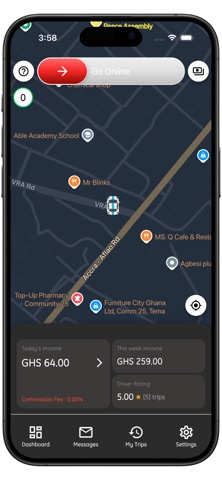
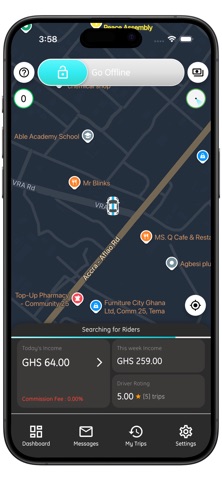
GO ONLINE IN ONE SLIDE
- Slide to go online and start receiving ride requests. Slide again to go offline whenever you like.
- Choose your search radius from 0.5 km to 6 km, right on the map.
- See busy areas on the map with live surge zones and the extra amount you can earn there.
SEE THE WHOLE TRIP BEFORE YOU ACCEPT
- Every request shows the pickup, the drop-off, the fare and the rider's rating.
- Trips with stops show each stop on the map and in order, so there are no surprises.
- Turn on Auto Accept and new requests are accepted for you.
SET YOUR DESTINATION
- Heading home or to work? Set a destination and only get trips going your way.
- Save your Home and Work addresses for one-tap use.
- Use it twice a day. It ends automatically after 2 hours or when you arrive.
NAVIGATE YOUR WAY
- Built-in turn-by-turn route on the map, or open the trip in Google Maps or Waze.
- Voice alerts as you approach each stop and the drop-off.
- A compact driving view keeps the map clear while you drive.
STOPS AND WAITING PAY
- Riders can add stops along the way. The app guides you to each one in order.
- Waiting time at pickup and at every stop is tracked fairly, with free minutes first, then a per-minute fee.
- Waiting fees go to you in full. No commission is taken on waiting time.
- If a rider changes the route or the destination during a trip, you're alerted right away and the new fare is shown.
KNOW WHAT YOU EARN
- Today's income and this week's income on the home screen.
- Daily, weekly and monthly dashboards with charts showing trip fares, waiting fees and commission.
- Full trip history with route maps, stops and a fare breakdown for every trip.
PAY COMMISSION EASILY
- See what you owe at any time and pay your commission inside the app.
STAY CONNECTED AND SAFE
- Messages from Sanbra in your in-app inbox.
- Call your rider from the trip screen.
- Upload and track your documents (Ghana Card, driver's licence and roadworthy certificate) from Settings.
- Sign in quickly and securely with your fingerprint or face.
MADE FOR YOU
- Light and dark mode.
- Kilometres or miles.
- A live speedometer on the map.
HOW TO START
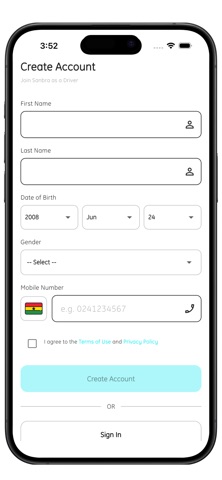
1. Download Sanbra Driver and sign up with your phone number.
2. Upload your documents for verification.
3. Once approved, slide to go online and start earning.
Questions? Open Help and Support in the app's Settings.