

Sanctum: Screen Time Control
Sanctum: Screen Time Control is made and published by Clovinyx. AppBrain is an independent app data site and isn't affiliated with Clovinyx. The app name, icon, screenshots and description belong to Clovinyx and are shown as published on the App Store.
AppBrain's verdict
- Rating on App Store
- 5.00
- 3 ratings
- Last updated
- October 7, 2026
- Size
- 134.0 MB
It doesn't have enough ratings yet to judge what users think.
User feedback
Ratings and reviews on the App StoreComments on Sanctum: Screen Time Control for iOS
We don't have enough comments to show example comments. Please check back later.
Store listing
By Clovinyx, from the App Store






Description by Clovinyx Written by the developer, not by AppBrain. Click to read.
Most app blockers leave an easy back door. A skip. An "extra time" unlock. So the scroll always wins, because it always can, in one tap. Sanctum has no quick exit. Leaving early takes a short mindful practice first. Weakness is never one tap away.
WHY THE COMMITMENT MATTERS
Willpower fails when you need it most. Cutting screen time is a decision your phone makes you re-take every minute. Sanctum moves the choice to before you start, then holds the line.
HOW IT WORKS
Choose a duration. Press start. Sanctum will block apps system-wide until the timer runs out. Leaving early means completing a short reflection first, and by then the urge has usually passed. No categories, no decisions once you begin. Need one app for a few minutes? Unblock it: it opens, the timer runs, and the app blocker comes back on its own. It is the simplest way to block apps you will ever use.
BLOCK APPS ON AUTOPILOT
Beyond one-off locks, Sanctum can block apps and cut screen time on its own:
- Schedules. Block apps automatically on the days and hours you choose. Work mornings, study blocks, sleep.
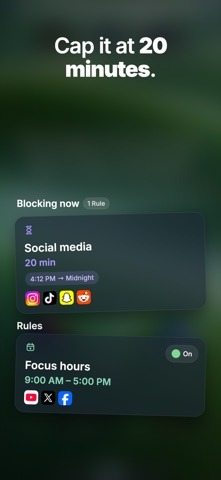
- Daily App Limits. Set app limits that cap screen time on the apps you pick. Shared budget or one each. When the time runs out, they close until midnight.
SOCIAL MEDIA SCREEN TIME, HANDLED
Social media is engineered to beat your willpower. Block social media for an hour, put social media behind daily app limits, and your screen time falls without a fight.
BUILD BETTER PHONE HABITS
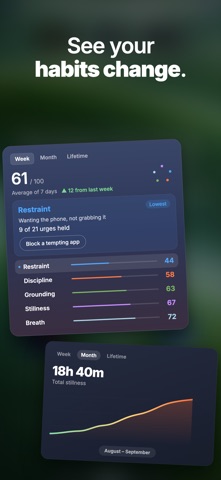
Every lock you finish and every urge you resist scores five traits: Stillness, Discipline, Restraint, Grounding and Breath. Watch them rise as your screen time falls.
WHEN AN URGE HITS
Reach for a blocked app and Sanctum meets you with a moment, not a wall: a short practice. Sit in stillness, breathe it out, walk it off, or write the urge down and watch it burn. By the time it is done the pull is usually gone, and the stress with it.
YOU'RE NEVER TRAPPED
Calls, the camera and the essential system apps iOS protects keep working, so you can reach someone anytime. Sanctum adds friction to a habit, never a lock on your life.
BEAUTIFUL LIVING THEMES
Sanctum is built to be experienced. New immersive scenes arrive regularly, each one transporting you into a living natural world, with a large ambient clock that helps calm the mind. Lock your screen time and your phone becomes a beautiful desk clock with calming sleep sounds, not a thing to escape.
WHO IT'S FOR
- Anyone whose focus is stolen by social media and doomscrolling
- ADHD and executive-function struggles, where "just put it down" never works
- Anyone whose screen time keeps climbing no matter which app blocker they try
PRIVATE BY DESIGN
Offline-first and ad-free. No account, no cloud. Sanctum is built on Apple's own Screen Time framework, and your screen time data never leaves your device.
FEATURES
- Uncompromising system-wide screen time blocker. No pause, no snooze, no one-tap exit
- Block apps right now, on a schedule, or behind daily app limits
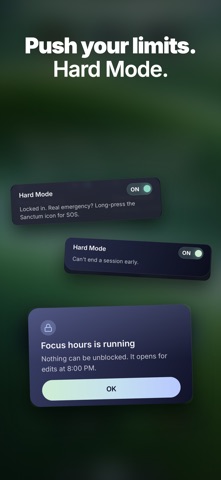
- Hard Mode: the strictest app blocker setting, no unblocks until the timer ends
- Timed unblocks: one app opens for a few minutes, then the block returns by itself
- Block social media on the days and hours you set
- Cap screen time per app with shared or individual app limits
- Streaks, medals and five traits that track your progress
- Live Activity: your countdown and your unblock, right on your Lock Screen
Sanctum is the screen time app for people done negotiating. Block apps, set daily app limits, tame social media, and watch your screen time finally drop.
Not just an app blocker. Your sanctuary from your screen.
Learn more at https://sanctum.clovinyx.io
Terms of Use: https://www.apple.com/legal/internet-services/itunes/dev/stdeula/
Safety and technology
Found in the app by AppBrain- Price
- Free
- App size
- 134.0 MB
- Content rating
- Everyone
Technologies used by Sanctum: Screen Time Control
Releases
Updates seen on the App Store- Version
- 0.1.10
- Launched
- August 2026
No changelog data
Alternatives
Similar apps and more from ClovinyxAlternatives to Sanctum: Screen Time Control


More from Clovinyx

Rankings
App Store top chartsApp Store Rankings for Sanctum: Screen Time Control
About the app and developer
About Sanctum: Screen Time Control
Sanctum: Screen Time Control is a productivity app developed by Clovinyx.
User Ratings
Sanctum: Screen Time Control is rated 5.00 out of 5 stars. The rating is based on 3 ratings.
App Information
Sanctum: Screen Time Control is freely available from the App Store. The app size is 133.96 MB. The latest version available is 0.1.10. The last update was on October 7, 2026.
Technical Requirements
The app has a content rating of Everyone. The app has been available on the App Store since August 2026.
Developer information for Clovinyx
Address:
Frequently asked questions about Sanctum: Screen Time Control
Is Sanctum: Screen Time Control free?
Yes. Sanctum: Screen Time Control is free on the App Store.
Is Sanctum: Screen Time Control still available?
Yes. Sanctum: Screen Time Control is on the App Store, and the last update we saw was on October 7, 2026.
How large is Sanctum: Screen Time Control?
Sanctum: Screen Time Control is 133.96 MB.
Is Sanctum: Screen Time Control suitable for children?
App Store rates the content of Sanctum: Screen Time Control as suitable for everyone.
How do people rate Sanctum: Screen Time Control?
Sanctum: Screen Time Control scores 5.00 out of 5 stars, from 3 ratings on the App Store.
Who made Sanctum: Screen Time Control?
Sanctum: Screen Time Control was developed by Clovinyx. It is listed in the productivity category on the App Store.
What are the best alternatives to Sanctum: Screen Time Control?
People looking at Sanctum: Screen Time Control also look at these productivity apps: Snoozezilla, Vela: AI Planner & Habits, Brio: Focus & App Blocker, BreakOff: Block Apps Together, FaithLock: Pray First.