Sanskrit Lexicon is a Sanskrit–English dictionary for readers who want a clear answer without giving up the original scholarship. Search 250,000+ Sanskrit headwords across 12 classical dictionaries and 9 specialist indexes. Read definitions in the dictionary's own words or in plain English, one tap apart, organized by meaning rather than scattered across separate references.
FREE TO START
Sanskrit Lexicon is free to download and use. Every reader gets 3 dictionary searches a day, plus the Word of the Day, favorites, personal notes, grammar tables, Siri, Shortcuts, Spotlight, the widget and iCloud sync. Context searches on a word you have already opened never count toward the daily three.
DESCRIBE A WORD YOU CAN'T RECALL
Type what a word means, in English or your own language, such as "the churning of the ocean", and see the Sanskrit words that fit, the likeliest marked. Every search is kept under Search Results, synced across your devices.
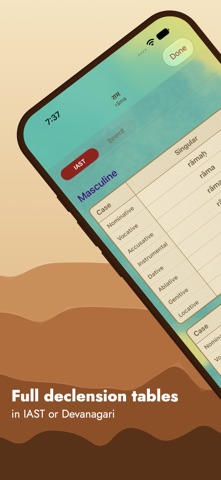
DECLENSIONS AND CONJUGATIONS
• Open a word's grammar tables: declensions for nouns, and conjugations for verbs in every tense and mood.
• Jump to a gender or a tense, or search the tables for a form.
• Search a form such as gacchati or rāmeṇa, and see its word and its place in the tables.
SCHOLAR OR SIMPLIFIED
• Read the dictionary's own Scholar text, with its notation, page references and source links, or a Simplified definition in plain English.
• Switch any card between the two, and choose in Settings which one every card opens on.
• See different senses grouped into clear contexts, with the most common sense first.
• Keep your own note on any word and select or copy text from any definition.
YOUR SCRIPT
Choose Devanagari, IAST or both, in the order you like. Your choice shows in results, definitions, grammar tables, the widget and Siri's cards.
FIND THE MEANING THAT FITS
Describe where you met a word, such as a ritual, a story, grammar, poetry, philosophy or law, and Sanskrit Lexicon finds the definitions that fit.
• Save the best matches as a personal category at the top of the definition screen.
• Create multiple saved contexts for a word and revisit them across devices.
SHARE A WORD
Tap Share on any word or definition to send it as a picture card, with a link that opens it in Sanskrit Lexicon or on sanskritlexicon.com.
FOLLOW THE WORDS AN ENTRY NAMES
Where a definition names other words, a Related line opens them, and Related Definitions gathers entries elsewhere that name your word.
SEARCH THE WAY YOU TYPE
• Use Devanagari, IAST, Harvard-Kyoto, Velthuis, WX, SLP1 or plain ASCII.
• Type "krishna" to find kṛṣṇa; no diacritics or special keyboard required.
• The best match is marked, and similar words follow when the spelling is off.
BUILT INTO YOUR APPLE DEVICES
• Ask Siri to look up a word, or describe one, read today's word, or open a saved word or context.
• Ask Siri to send the word on screen to a friend, and it goes as a card.
• Add Look Up, Word of the Day and Open Word actions in Shortcuts, and pass a word on as a picture.
• Find favorites, recent words, saved contexts and note text in Spotlight.
• Put the Word of the Day widget on your iPhone, iPad or Mac, and favorite today's word from it.
• Continue reading across devices with iCloud sync and Handoff.
MAKE SANSKRIT A DAILY PRACTICE
A hand-curated Word of the Day changes at midnight, is the same on all your devices and never repeats.
DAY AND NIGHT
A painted sky, parchment cards and gilded edges frame every definition, and turn to a starlit dusk in Dark Mode.
MADE TO BE READ
Text follows your Dynamic Type setting. Search, share and note controls are labeled for VoiceOver, results are spoken as they arrive, and Reduce Motion stills the animations.
Searches require an internet connection. Favorites and recent words open without one. No account is required.
Privacy Policy: https://sanskritlexicon.com/privacy
Terms of Use: https://www.apple.com/legal/internet-services/itunes/dev/stdeula/
Show more
Show less