

Savebar – Savings Tracker
Savebar – Savings Tracker is made and published by Minari Taniguchi. AppBrain is an independent app data site and isn't affiliated with Minari Taniguchi. The app name, icon, screenshots and description belong to Minari Taniguchi and are shown as published on the App Store.
AppBrain's verdict
- Best rank
- #96
- Top Grossing, Switzerland
- Last updated
- October 19, 2026
Rankings
App Store top charts- Highest rank
- #96
- Chart
- Top Grossing
- Finance
- Country
- Switzerland
App Store Rankings for Savebar – Savings Tracker
Top rankings
| Rank | Country | Category | List |
|---|---|---|---|
| 96 | Switzerland | Finance | Top Grossing |
Ranking history in Switzerland
Competitors
Similar apps and more from Minari TaniguchiAlternatives to Savebar – Savings Tracker






More from Minari Taniguchi


Releases
Updates seen on the App Store- Version
- 1.4.3
- Launched
- September 2026
No changelog data
User feedback
Ratings and reviews on the App StoreComments on Savebar – Savings Tracker for iOS
We don't have enough comments to show example comments. Please check back later.
Technology
Found in the app by AppBrain- Price
- Free
- App size
- 5.17 MB
- Content rating
- Everyone
Technologies used by Savebar – Savings Tracker
About the app and developer
About Savebar – Savings Tracker
Savebar – Savings Tracker is a finance app developed by Minari Taniguchi.
What is the rating of Savebar – Savings Tracker?
Savebar – Savings Tracker has no ratings yet.
Is Savebar – Savings Tracker free?
Savebar – Savings Tracker is free. The app size is 5.17 MB. The latest version available is 1.4.3. The last update was on October 19, 2026.
What are the requirements for Savebar – Savings Tracker?
The app has a content rating of Everyone. The app has been available on the App Store since September 2026.
Developer information for Minari Taniguchi
Address:
Store listing
By Minari Taniguchi, from the App Store


Description by Minari Taniguchi Written by the developer, not by AppBrain. Click to read.
No bank connection, no account, no subscription. You add what you've saved yourself; your goals and amounts stay on your iPhone.
FREE
• Small widget: one goal, its progress bar and percentage, and a button that adds your set amount without opening the app
• Add a photo of what you're saving for — the Small widget shows it big
• Paste a product link and the photo and name fill in for you
• Save something from a shop page in Safari — or with the Share button — as a goal, with its photo, name and price
• One goal — name, target amount and optional date
• In the app, type any amount or tap one you use often
• Every deposit is kept in a history you can edit or delete
• With a date: how many days are left and how much to set aside per day
• Your device's currency by default, changeable in Settings
• No ads
SAVEBAR PRO — one-time purchase, no subscription
• Unlimited goals: save for several things at once
• Medium and Large widgets: several goals at once, with days left and per-day amounts, and up to two amount buttons for each
• A different currency for each goal
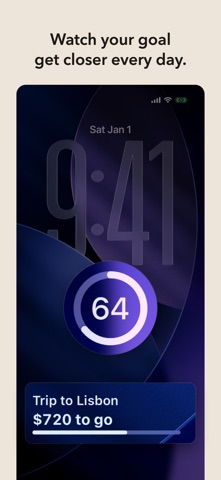
• Lock Screen widgets: a ring with your percentage, what's left to go, and a one-line view
PRIVATE BY DESIGN
• Amounts, goal names and photos are never sent to us. Only when you enter a product link does the app load that store page directly. Anonymous usage events (like "a widget + was tapped") help improve the app; you can turn them off in Settings.