

Scaflow - Barcode for PC
Scaflow - Barcode for PC is made and published by Satoshi Sakuma. AppBrain is an independent app data site and isn't affiliated with Satoshi Sakuma. The app name, icon, screenshots and description belong to Satoshi Sakuma and are shown as published on the App Store.
AppBrain's verdict
- Last updated
- May 24, 2026
- Size
- 5.17 MB
User feedback
Ratings and reviews on the App StoreComments on Scaflow - Barcode for PC for iOS
We don't have enough comments to show example comments. Please check back later.
Store listing
By Satoshi Sakuma, from the App Store


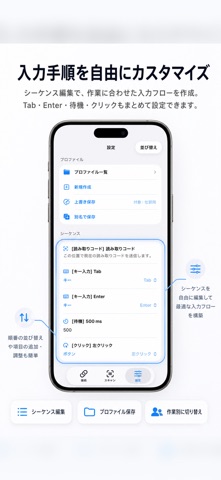
Description by Satoshi Sakuma Written by the developer, not by AppBrain. Click to read.
With Scaflow, you can scan barcodes on your iPhone and automatically enter them on your PC. It helps streamline PC input without needing a dedicated handheld scanner.
PC connection uses the desktop app Koyomi-Link. Connect your iPhone and PC to the same Wi-Fi network, then scan the QR code displayed in Koyomi-Link to set up the connection easily.
This update improves image scanning and history features. You can read barcodes and QR codes contained in images selected from your photo library and save them as history. For images that are difficult to read, the app tries multiple correction processes such as brightness and contrast adjustments to improve detection.
The update also adds progress display during image scanning, a view for checking images that failed to scan, and restoration of the last viewed history page.
■ Main Features
・Fast barcode scanning
・Automatically enter scanned content on your PC
・QR code connection with Koyomi-Link
・Scan barcodes and QR codes from images
・Progress display during image scanning
・Save scan history
・Check recent history
・View history details
・Copy, resend, and delete from history
・Check images that failed to scan
・Manage history by page
・Restore the last viewed history page
・Export history as CSV
・Simple and intuitive operation
■ Supported Barcodes
Scaflow supports major barcode formats including JAN / UPC / Code128 / GS1-128 / Code39 / ITF / Codabar / QR Code / Data Matrix / PDF417 / Aztec.
For Codabar / NW-7, you can change how start and stop characters are handled in settings.
■ PC Connection
A desktop app called Koyomi-Link is required for PC connection.
Connect your iPhone and PC to the same Wi-Fi network, then scan the QR code displayed by Koyomi-Link to set up the connection.
For details, please visit the official website.
https://shopkoyomi.com/app/scaflow/
■ Image Scanning
You can select images from your photo library and read barcodes or QR codes contained in them.
For images that are difficult to read, the app tries multiple correction methods such as brightness and contrast adjustments.
If an image does not contain a barcode or scanning fails, it can also be saved as failed history. In the history detail screen, you can check a thumbnail of the image that failed to scan.
■ History Features
Scanned barcodes can be saved as history.
On the scan screen, you can quickly check recent history, and in the history list you can organize records by page.
From history details, you can copy the value or resend it to your PC.
You can also share history as CSV, making it useful for later review and organization.
■ Recommended For
・People who want to improve barcode input work
・People who want to use an iPhone instead of a handheld scanner
・Inventory management and workflow improvement
・Reading barcodes and QR codes from images
・Checking scanned barcodes later
・Saving and sharing history as CSV
・Switching input sequences depending on the task
■ Pro Version
The Pro version provides the following features:
・Freely edit sequences
・Add text input and key operations
・Change input order
・Duplicate, delete, and reorder sequence rows
・Profile features
- Save profiles
- Load profiles
- Duplicate profiles
- Rename profiles
- Reorder profiles
- Overwrite profiles
- Create new profiles
■ Notes
・Your PC and iPhone must be connected to the same Wi-Fi network
・Initial setup is required on the Koyomi-Link side
・Image scanning accuracy depends on image brightness, focus, angle, and barcode condition
Safety and technology
Found in the app by AppBrain- Price
- Free
- App size
- 5.17 MB
- Content rating
- Everyone
Technologies used by Scaflow - Barcode for PC
Releases
Updates seen on the App Store- Version
- 1.2.3
- Launched
- March 2026
No changelog data
Alternatives
Similar apps and more from Satoshi SakumaAlternatives to Scaflow - Barcode for PC


More from Satoshi Sakuma





Rankings
App Store top chartsApp Store Rankings for Scaflow - Barcode for PC
About the app and developer
About Scaflow - Barcode for PC
Scaflow - Barcode for PC is an utilities app developed by Satoshi Sakuma.
What is the rating of Scaflow - Barcode for PC?
Scaflow - Barcode for PC has no ratings yet.
Is Scaflow - Barcode for PC free?
Scaflow - Barcode for PC is free. The app size is 5.17 MB. The latest version available is 1.2.3. The last update was on May 24, 2026.
What are the requirements for Scaflow - Barcode for PC?
The app has a content rating of Everyone. The app has been available on the App Store since March 2026.
Developer information for Satoshi Sakuma
Address:
Frequently asked questions about Scaflow - Barcode for PC
Is Scaflow - Barcode for PC free?
Yes. Scaflow - Barcode for PC is free on the App Store.
Is Scaflow - Barcode for PC still available?
Yes. Scaflow - Barcode for PC is on the App Store, and the last update we saw was on May 24, 2026.
How large is Scaflow - Barcode for PC?
Scaflow - Barcode for PC is 5.17 MB.
Is Scaflow - Barcode for PC suitable for children?
App Store rates the content of Scaflow - Barcode for PC as suitable for everyone.
Who made Scaflow - Barcode for PC?
Scaflow - Barcode for PC was developed by Satoshi Sakuma. It is listed in the utilities category on the App Store.
What are the best alternatives to Scaflow - Barcode for PC?
People looking at Scaflow - Barcode for PC also look at these utilities apps: Servo Programming, Errand List & To-Do: YABOYO, OCRでテキスト,バーコード一致確認 -OmniCheck-, Barkoder Keyboard, AGFRC LINK.