

Scan IQ : Food & Home Scanner
Scan IQ : Food & Home Scanner is made and published by Lyndon Cole. AppBrain is an independent app data site and isn't affiliated with Lyndon Cole. The app name, icon, screenshots and description belong to Lyndon Cole and are shown as published on the App Store.
AppBrain's verdict
- Last updated
- October 6, 2026
Rankings
App Store top chartsApp Store Rankings for Scan IQ : Food & Home Scanner
Competitors
Similar apps and more from Lyndon ColeAlternatives to Scan IQ : Food & Home Scanner


More from Lyndon Cole


Releases
Updates seen on the App Store- Version
- 1.0.3
- Launched
- March 2026
No changelog data
User feedback
Ratings and reviews on the App StoreComments on Scan IQ : Food & Home Scanner for iOS
We don't have enough comments to show example comments. Please check back later.
Technology
Found in the app by AppBrain- Price
- Free
- App size
- 60.1 MB
- Content rating
- Everyone
Technologies used by Scan IQ : Food & Home Scanner
About the app and developer
About Scan IQ : Food & Home Scanner
Scan IQ : Food & Home Scanner is a food & drink app developed by Lyndon Cole.
User Ratings
The app has no ratings yet.
App Information
Scan IQ : Food & Home Scanner is freely available from the App Store. The app size is 60.09 MB. The latest version available is 1.0.3. The last update was on October 6, 2026.
Technical Requirements
The app has a content rating of Everyone. The app has been available on the App Store since March 2026.
Developer information for Lyndon Cole
Address:
Frequently asked questions about Scan IQ : Food & Home Scanner
Is Scan IQ : Food & Home Scanner free?
Yes. Scan IQ : Food & Home Scanner is free on the App Store.
Is Scan IQ : Food & Home Scanner still available?
Yes. Scan IQ : Food & Home Scanner is on the App Store, and the last update we saw was on October 6, 2026.
How large is Scan IQ : Food & Home Scanner?
Scan IQ : Food & Home Scanner is 60.09 MB.
Is Scan IQ : Food & Home Scanner suitable for children?
App Store rates the content of Scan IQ : Food & Home Scanner as suitable for everyone.
Who made Scan IQ : Food & Home Scanner?
Scan IQ : Food & Home Scanner was developed by Lyndon Cole. It is listed in the food & drink category on the App Store.
What are the best alternatives to Scan IQ : Food & Home Scanner?
People looking at Scan IQ : Food & Home Scanner also look at these food & drink apps: SUPPRO: Supplement Scanner, Squeeze Day, FitFLIX, Med GPT: AI Doctor Assistant, Morsia.
Store listing
By Lyndon Cole, from the App Store





Description by Lyndon Cole Written by the developer, not by AppBrain. Click to read.
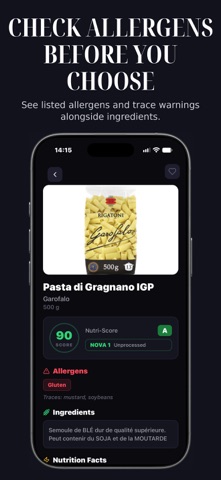
Scan IQ turns a product barcode into a clear score, the full ingredient list and the nutrition facts, all on one screen. Use it in the supermarket, at home or in the cleaning aisle.
FOOD
- Score from 0 to 100 so you can compare products quickly
- Nutri-Score and NOVA processing category (from unprocessed to ultra-processed)
- Ingredients in plain view
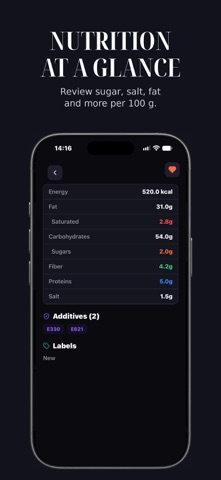
- Nutrition per 100 g: energy, fat, saturates, carbohydrates, sugars, fibre, protein and salt
- Listed allergens and trace warnings next to the ingredients
- Additives (E-numbers) shown for each product
HOUSEHOLD PRODUCTS TOO
- Scan cleaning and household products to see their chemicals and composition
- Get a score for what's inside, not just what's on the front
SAVE AND COMPARE
- Save products to favourites
- See alternatives for the product you scanned
- Scan history so you can find a product again
SOURCES
Scan IQ shows the scientific and regulatory sources behind its assessments (EFSA, FDA, WHO/IARC, ECHA, ANSES) in the app's About & Sources page. Product data comes from Open Food Facts and other public databases. Scores are generated by an algorithm and are not medical advice.
FREE AND PRO
Every new user gets 3 free scans. Unlimited scans, full ingredient and allergen breakdowns and saved scan history require Scan IQ Pro, an auto-renewing subscription (monthly, or yearly with a 3-day free trial). Payment is charged to your Apple ID. The subscription renews automatically unless cancelled at least 24 hours before the end of the current period. Manage or cancel it in your App Store account settings.
Privacy Policy: https://themikanaohub.com/privacy-policy
Terms of Use (EULA): https://www.apple.com/legal/internet-services/itunes/dev/stdeula/