



AppBrain's verdict
Established- Rating on App Store
- 5.00
- 1 ratings
- Last updated
- October 31, 2020
- Size
- 82.0 MB
It doesn't have enough ratings yet to judge what users think. Its best ranking is #54 in Top Paid, Utilities in Canada.
User feedback
Ratings and reviews on the App StoreComments on Scan Note Write for iOS
We don't have enough comments to show example comments. Please check back later.
Store listing
By Glindemann, Sennoun, Langer GbR, from the App StoreDescription by Glindemann, Sennoun, Langer GbR Written by the developer, not by AppBrain. Click to read.
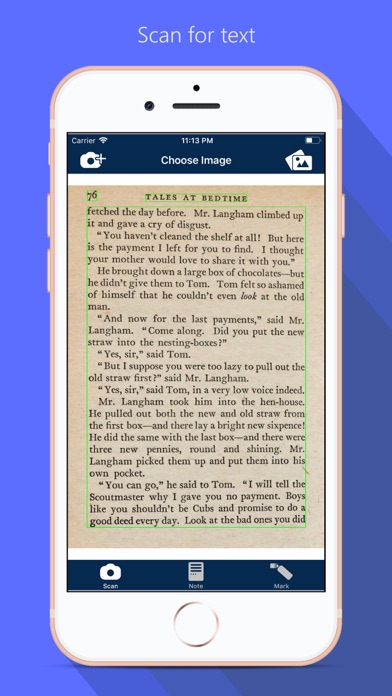
Attention: Optical Character Recognition (OCR) is a complicated task, but we are working on improving our technology steadily. We ask for understanding that special cases, crazy fonts, different languages, weak light conditions, etc. will be supported step by step via prospective updates. If there are unsatisfying results which our dev-team should focus at, feel encouraged to send us the targeted photo and/or a short explanation of your topic via mail at: contact@flooki.de
[ How to use ]
- open a new or an existing note from your local savings
- take a photo via camera or library
- extract the text
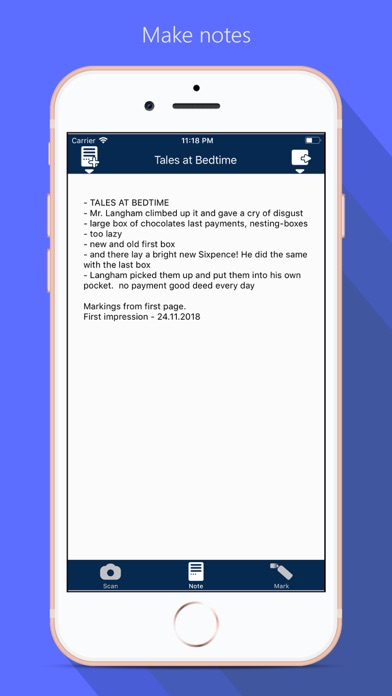
- mark informations from the extracted text you want to keep (yellow marks)
- when one headword is complete, tap button to move it to your personal note (yellow marks become grey)
- on your personal note, you will find the gathered informations in a headword format like "- ..."
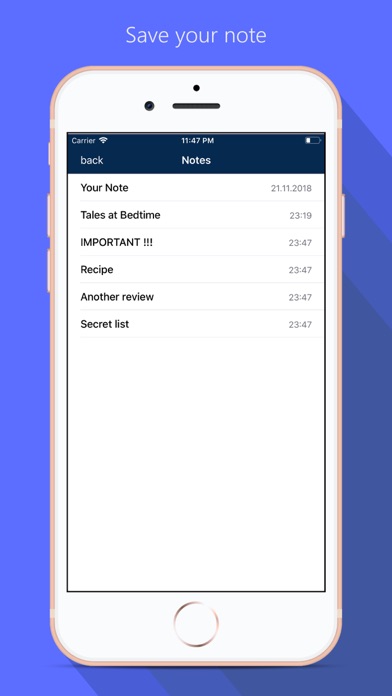
- these headwords can be edited, saved and shared
Important: Pictures are only saved temporarily. But the extracted text and note sheet can be saved locally.
[ Setup OCR language ]
The app notices your prefered operating system language and scans for this. To change the language to scan for you have to change your operating system language in your device settings.
[ Best results ]
- supported languages before iOS14: english, french, german
- new supported languages since iOS14: chinese, portuguese, spanish, italian
- latin alphabet in general is supported, but the best results are achieved with the languages described above
- standard fonts
- horizontal text orientation
- consistent light conditions
- dark font on lighter background
- best results on common book pages
Safety and technology
Found in the app by AppBrain- Price
- $1.99
- App size
- 82.0 MB
- Content rating
- Everyone
Technologies used by Scan Note Write
Releases
Updates seen on the App Store- Version
- 2.2
- Launched
- February 2018
No changelog data
Alternatives
Similar apps and more from Glindemann, Sennoun, Langer GbRAlternatives to Scan Note Write


More from Glindemann, Sennoun, Langer GbR


Rankings
App Store top charts- Highest rank
- #54
- Chart
- Top Paid
- Utilities
- Country
- Canada
App Store Rankings for Scan Note Write
Top rankings
| Rank | Country | Category | List |
|---|---|---|---|
| 54 | Canada | Utilities | Top Paid |
Ranking history in Canada
About the app and developer
About Scan Note Write
Scan Note Write is an utilities app developed by Glindemann, Sennoun, Langer GbR.
What is the rating of Scan Note Write?
Scan Note Write is rated 5.00 out of 5 stars, based on one rating ratings.
Is Scan Note Write free?
Scan Note Write costs $1.99. The app size is 81.96 MB. The latest version available is 2.2. The last update was on October 31, 2020.
What are the requirements for Scan Note Write?
The app has a content rating of Everyone. The app has been available on the App Store since February 2018.
Scan Note Write is made and published by Glindemann, Sennoun, Langer GbR. AppBrain is an independent app data site and isn't affiliated with Glindemann, Sennoun, Langer GbR. The app name, icon, screenshots and description belong to Glindemann, Sennoun, Langer GbR and are shown as published on the App Store.
Developer information for Glindemann, Sennoun, Langer GbR
Glindemann, Sennoun, Langer GbR
Address:
Frequently asked questions about Scan Note Write
Is Scan Note Write free?
No. Scan Note Write costs $1.99 on the App Store.
Is Scan Note Write still available?
Yes. Scan Note Write is on the App Store, and the last update we saw was on October 31, 2020.
How large is Scan Note Write?
Scan Note Write is 81.96 MB.
Is Scan Note Write suitable for children?
App Store rates the content of Scan Note Write as suitable for everyone.
How do people rate Scan Note Write?
Scan Note Write has one rating of 5.00 stars on the App Store.
Who made Scan Note Write?
Scan Note Write was developed by Glindemann, Sennoun, Langer GbR. It is listed in the utilities category on the App Store.
What are the best alternatives to Scan Note Write?
People looking at Scan Note Write also look at these utilities apps: ForgetNot 3 - AI Checklists, ScanPlus PRO - OCR&PDF Scanner, File Transfer Secure Drop, Quick QR Scan & Generator, Reminder Book - Anniv Birthday.