

Scan to Markdown
Scan to Markdown is made and published by JIRI CHOMAT. AppBrain is an independent app data site and isn't affiliated with JIRI CHOMAT. The app name, icon, screenshots and description belong to JIRI CHOMAT and are shown as published on the App Store.
AppBrain's verdict
- Last updated
- July 21, 2026
Rankings
App Store top chartsApp Store Rankings for Scan to Markdown
Competitors
Similar apps and more from JIRI CHOMATAlternatives to Scan to Markdown


More from JIRI CHOMAT


Releases
Updates seen on the App Store- Version
- 1.0
- Launched
- July 2026
No changelog data
User feedback
Ratings and reviews on the App StoreComments on Scan to Markdown for iOS
We don't have enough comments to show example comments. Please check back later.
Technology
Found in the app by AppBrain- Price
- Free
- App size
- 2.18 MB
- Content rating
- Everyone
Technologies used by Scan to Markdown
About the app and developer
About Scan to Markdown
Scan to Markdown is a productivity app developed by JIRI CHOMAT.
User Ratings
The app has no ratings yet.
App Information
Scan to Markdown is freely available from the App Store. The app size is 2.18 MB. The latest version available is 1.0. The last update was on July 21, 2026.
Technical Requirements
The app has a content rating of Everyone. The app has been available on the App Store since July 2026.
Developer information for JIRI CHOMAT
Address:
Frequently asked questions about Scan to Markdown
Is Scan to Markdown free?
Yes. Scan to Markdown is free on the App Store.
Is Scan to Markdown still available?
Yes. Scan to Markdown is on the App Store, and the last update we saw was on July 21, 2026.
How large is Scan to Markdown?
Scan to Markdown is 2.18 MB.
Is Scan to Markdown suitable for children?
App Store rates the content of Scan to Markdown as suitable for everyone.
Who made Scan to Markdown?
Scan to Markdown was developed by JIRI CHOMAT. It is listed in the productivity category on the App Store.
What are the best alternatives to Scan to Markdown?
People looking at Scan to Markdown also look at these productivity apps: KanGoBan, Second Brain - Voice Notes, iCategory: Home Inventory List, Text2File, brevva notes.
Store listing
By JIRI CHOMAT, from the App Store


Description by JIRI CHOMAT Written by the developer, not by AppBrain. Click to read.
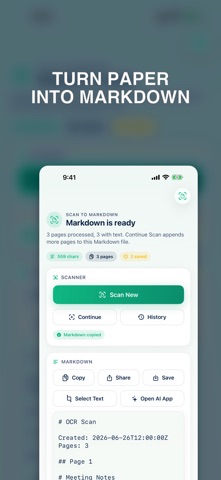
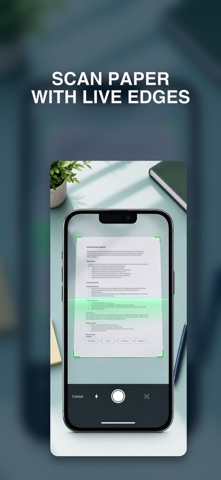
Use the document scanner to capture pages, then review the generated Markdown, copy it, share it, save it, or select only the lines you need. Historic scans are saved on device so you can reopen previous runs after relaunching the app.
For AI workflows, the app includes an explicit Open AI App action. When you tap it, Scan to Markdown copies the generated Markdown to the clipboard and opens ChatGPT or Claude using the installed app or web fallback. The OCR text is not sent to an AI app unless you choose that action.
Features:
- Document scanning with page continuation
- On-device OCR to Markdown
- Copy, share, and export Markdown
- Saved history of previous scans
- Line-based text selection tools
- Optional ChatGPT and Claude handoff