

Scan to PDF Scanner App:GoScan
Scan to PDF Scanner App:GoScan is made and published by Web Success. AppBrain is an independent app data site and isn't affiliated with Web Success. The app name, icon, screenshots and description belong to Web Success and are shown as published on the App Store.
AppBrain's verdict
- Last updated
- October 7, 2026
- Size
- 13.5 MB
User feedback
Ratings and reviews on the App StoreComments on Scan to PDF Scanner App:GoScan for iOS
We don't have enough comments to show example comments. Please check back later.
Store listing
By Web Success, from the App Store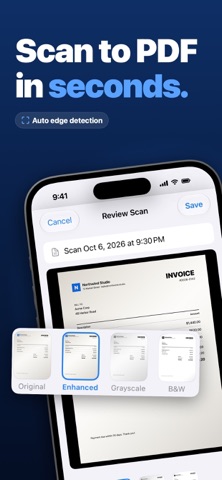


Description by Web Success Written by the developer, not by AppBrain. Click to read.
Start with a 3-day free trial. Everything is included.
SCAN & CONVERT
• Smart camera scanner with automatic edge detection and perspective correction
• Multi-page PDFs — combine as many pages as you like
• Convert photos, pictures and JPGs into PDFs, or import existing PDFs
• ID card mode: front and back of an ID, passport or licence on one tidy page
• Re-crop edges anytime with a zoom loupe; Original, Enhanced, Grayscale and Black & White filters
• Export pages as JPG or share the PDF anywhere
SIGN DOCUMENTS
• Draw your signature once, save it, and place it on any page — drag and resize
• Reuse a saved signature on the next document in two taps
• No printing, no scanning back
EXTRACT TEXT (OCR)
• On-device text recognition in your language — nothing leaves your iPhone
• Scans become searchable, selectable PDFs; find any document by the words inside it
ORGANIZE & PROTECT
• A tidy library with full-text search, filters (All · Recent · Signed) and multi-select
• Reorder, rotate, add or delete pages
• Protect a PDF with a password, lock the app with Face ID
PRIVATE BY DESIGN
• No account, no cloud — your documents stay on your device
• Light and dark appearance, 7 languages, iPhone and iPad, VoiceOver support
SUBSCRIPTION
GoScan Pro is available as a weekly plan with a 3-day free trial or a yearly plan. Payment is charged to your Apple Account at confirmation of purchase, after the free trial ends. Subscriptions renew automatically unless cancelled at least 24 hours before the end of the current period. Manage or cancel anytime in your App Store account settings.
Privacy Policy: https://pdftoscan.website/privacy.html
Terms of Use: https://pdftoscan.website/terms.html
Safety and technology
Found in the app by AppBrain- Price
- Free
- App size
- 13.5 MB
- Content rating
- Everyone
Technologies used by Scan to PDF Scanner App:GoScan
Releases
Updates seen on the App Store- Version
- 1.2
- Launched
- June 2026
No changelog data
Alternatives
Similar apps and more from Web SuccessMore from Web Success


Rankings
App Store top chartsApp Store Rankings for Scan to PDF Scanner App:GoScan
About the app and developer
About Scan to PDF Scanner App:GoScan
Scan to PDF Scanner App:GoScan is a business app developed by Web Success.
User Ratings
The app has no ratings yet.
App Information
Scan to PDF Scanner App:GoScan is freely available from the App Store. The app size is 13.54 MB. The latest version available is 1.2. The last update was on October 7, 2026.
Technical Requirements
The app has a content rating of Everyone. The app has been available on the App Store since June 2026.
Developer information for Web Success
Address: