

Scan to PDF: Sign & Redact
Scan to PDF: Sign & Redact is made and published by lapnito.cz s.r.o. AppBrain is an independent app data site and isn't affiliated with lapnito.cz s.r.o. The app name, icon, screenshots and description belong to lapnito.cz s.r.o. and are shown as published on the App Store.
AppBrain's verdict
- Last updated
- July 7, 2026
- Size
- 92.7 MB
User feedback
Ratings and reviews on the App StoreComments on Scan to PDF: Sign & Redact for iOS
We don't have enough comments to show example comments. Please check back later.
Store listing
By lapnito.cz s.r.o., from the App Store


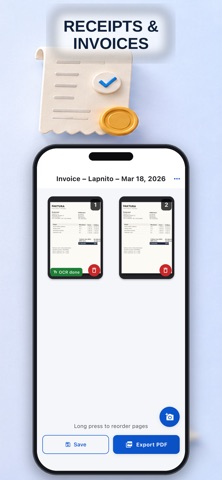

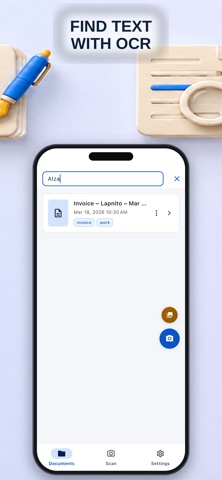
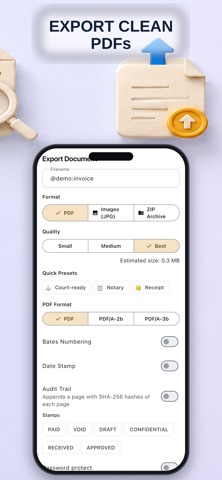

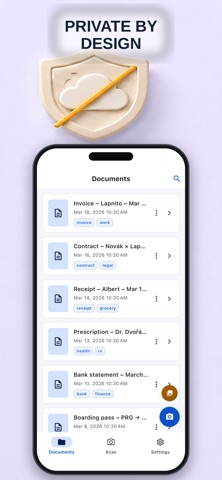
Description by lapnito.cz s.r.o. Written by the developer, not by AppBrain. Click to read.
No ads. No watermark. No subscription needed. No account. Apple's privacy label on this page says it plainly: Data Not Collected.
REDACT PDF PROPERLY
True blackout baked into the exported PDF — not a removable layer. Black out account numbers on statements, salaries on pay stubs, personal details on ID copies before you share them.
FILL AND SIGN WITHOUT PRINTING
Sign contracts, leases and school forms with your finger, place the signature precisely, export and send. No printer, no Docusign account.
A PROPER SCANNER UNDERNEATH
• Auto edge detection + perspective fix, manual corner handles
• Batch scanning; add, delete, reorder pages
• Filters and brightness/contrast for faded receipts
• OCR text recognition and automatic naming
• Compact or high-quality PDF export; share or save to Files
• Face ID-locked local library
PRIVATE AND OFFLINE BY DESIGN
Your documents never leave your phone. No cloud, no upload, no tracking, no sign-up — and no watermark on anything, ever.
WHAT PEOPLE USE IT FOR
• Receipts and invoices for expenses and taxes
• Bank statements redacted for landlords and agents
• Contracts and consent forms — scan, sign and send in one go
• ID copies with everything hidden except what's needed
• Letters, warranties, prescriptions, school paperwork
A scanner without ads, without subscription traps, and without an opinion about your documents.
Safety and technology
Found in the app by AppBrain- Price
- Free
- App size
- 92.7 MB
- Content rating
- Everyone
Technologies used by Scan to PDF: Sign & Redact
Releases
Updates seen on the App Store- Version
- 2.0
- Launched
- February 2026
No changelog data
Alternatives
Similar apps and more from lapnito.cz s.r.o.Alternatives to Scan to PDF: Sign & Redact





More from lapnito.cz s.r.o.


Rankings
App Store top chartsApp Store Rankings for Scan to PDF: Sign & Redact
About the app and developer
About Scan to PDF: Sign & Redact
Scan to PDF: Sign & Redact is a productivity app developed by lapnito.cz s.r.o.
User Ratings
The app has no ratings yet.
App Information
Scan to PDF: Sign & Redact is freely available from the App Store. The app size is 92.67 MB. The latest version available is 2.0. The last update was on July 7, 2026.
Technical Requirements
The app has a content rating of Everyone. The app has been available on the App Store since February 2026.
Developer information for lapnito.cz s.r.o.
Address:
Frequently asked questions about Scan to PDF: Sign & Redact
Is Scan to PDF: Sign & Redact free?
Yes. Scan to PDF: Sign & Redact is free on the App Store.
Is Scan to PDF: Sign & Redact still available?
Yes. Scan to PDF: Sign & Redact is on the App Store, and the last update we saw was on July 7, 2026.
How large is Scan to PDF: Sign & Redact?
Scan to PDF: Sign & Redact is 92.67 MB.
Is Scan to PDF: Sign & Redact suitable for children?
App Store rates the content of Scan to PDF: Sign & Redact as suitable for everyone.
Who made Scan to PDF: Sign & Redact?
Scan to PDF: Sign & Redact was developed by lapnito.cz s.r.o. It is listed in the productivity category on the App Store.
What are the best alternatives to Scan to PDF: Sign & Redact?
People looking at Scan to PDF: Sign & Redact also look at these productivity apps: Goal & Habit Tracker: Compound, QRamen - QR Code Maker & Scan, Scan to PDF : PDF Scanner App, ScanPro: PDF Scanner & QR Code, ScaN -WiFi Security Check-.