

ScanBoost PDF is made and published by Simone Renzi. AppBrain is an independent app data site and isn't affiliated with Simone Renzi. The app name, icon, screenshots and description belong to Simone Renzi and are shown as published on the App Store.
AppBrain's verdict
- Last updated
- August 4, 2026
Rankings
App Store top chartsApp Store Rankings for ScanBoost PDF
Competitors
Similar apps and more from Simone RenziAlternatives to ScanBoost PDF


More from Simone Renzi


Releases
Updates seen on the App Store- Version
- 2.3
- Launched
- April 2026
No changelog data
User feedback
Ratings and reviews on the App StoreComments on ScanBoost PDF for iOS
We don't have enough comments to show example comments. Please check back later.
Technology
Found in the app by AppBrain- Price
- Free
- App size
- 3.95 MB
- Content rating
- Everyone
Technologies used by ScanBoost PDF
About the app and developer
About ScanBoost PDF
ScanBoost PDF is an utilities app developed by Simone Renzi.
User Ratings
The app has no ratings yet.
App Information
ScanBoost PDF is freely available from the App Store. The app size is 3.95 MB. The latest version available is 2.3. The last update was on August 4, 2026.
Technical Requirements
The app has a content rating of Everyone. The app has been available on the App Store since April 2026.
Developer information for Simone Renzi
Address:
Store listing
By Simone Renzi, from the App Store




Description by Simone Renzi Written by the developer, not by AppBrain. Click to read.
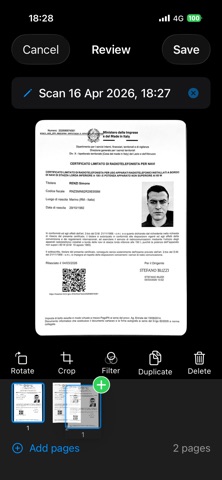
Automatic document edge detection powered by Apple's Machine Learning technology
Automatic capture when the document is stable
Manual capture with flash support
Automatic perspective correction
FILTERS AND OPTIMIZATION
Color filter with contrast enhancement
Grayscale for clean documents
High-contrast Black & White
Auto Enhancement with Core Image smart filters
PROFESSIONAL PDF EXPORT
Generate multi-page PDFs
Total quality control with a continuous slider from 5% to 100%
Real-time file size estimation
Share via AirDrop, email, messages, or any app
Save directly to the Files app
DOCUMENT MANAGEMENT
Organize your documents with custom names
Quickly search through your documents
Reorder, duplicate, or delete individual pages
Automatic drafts for works in progress
AUTOMATIC CROPPING AND ROTATION
Edges are automatically detected and cropped
Manual edge adjustment to customize the result
Rotate by 90°, 180°, or 270°
iCLOUD BACKUP
Optional iCloud backup for your documents
Automatic restore on a new device
Can be enabled or disabled from settings
PRIVACY AND SECURITY
100% on-device processing: no data is sent to external servers
No third-party tracking SDKs
No registration or account required
Your documents stay on your device
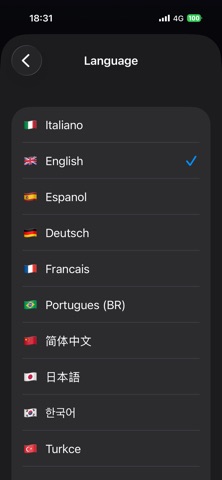
15 LANGUAGES
Italian, English, Spanish, German, French, Portuguese, Chinese, Japanese, Korean, Turkish, Arabic, Dutch, Polish, Russian, Hindi.