Download Android Apps and Games
AppBrain
  • Apps
  • Apps being viewed right now Trending apps today Most popular apps All-time most downloaded apps Top rated apps iPhone and iPad apps
  • Intelligence ▾
    Intelligence overview → Track any Android app or your whole market
    Track & analyze
    Keyword Tracker & OptimizerTrack & improve Play rankings App Performance ReportOne-off PDF for any app StatisticsFree Android & Play market stats
    Promote your app
    Featured Apps App Links
  • Intelligence
  • Pricing
  • Dashboard
  • Sign up
  • Log in
Last updated on: 2026-09-24
App Store Apps > Productivity > ScanDoc: PDF Scanner
ScanDoc: PDF Scanner icon

ScanDoc: PDF Scanner

1.0
Ferran Espuna
0.00
0 reviews
Free

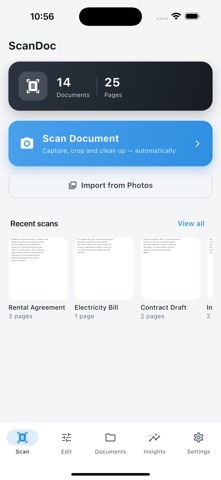
ScanDoc: PDF Scanner Screenshot 1 of 5
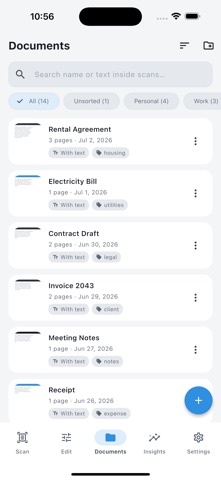
ScanDoc: PDF Scanner Screenshot 2 of 5
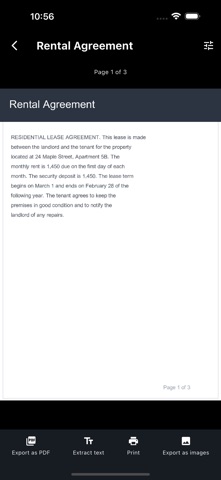
ScanDoc: PDF Scanner Screenshot 3 of 5
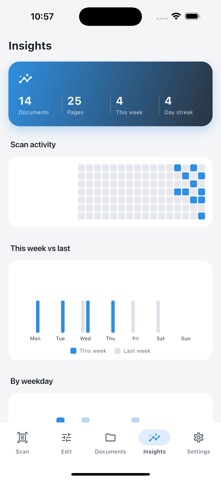
ScanDoc: PDF Scanner Screenshot 4 of 5
ScanDoc: PDF Scanner Screenshot 5 of 5
Download from the App Store

About ScanDoc: PDF Scanner

ScanDoc: PDF Scanner is a productivity app developed by Ferran Espuna.

What is the rating of ScanDoc: PDF Scanner?

ScanDoc: PDF Scanner has no ratings yet.

Is ScanDoc: PDF Scanner free?

ScanDoc: PDF Scanner is free to download. The download size is 70.00 MB. The latest version available is 1.0. The last update was on August 7, 2026.

What are the requirements for ScanDoc: PDF Scanner?

The app has a content rating of Everyone. The app has been available on the App Store since August 2026.

Description
ScanDoc turns your iPhone into a fast, private document scanner that creates clean, professional PDFs in seconds. Scan documents to PDF offline, with no uploads, no account and absolutely no watermark on your files. Every page is processed entirely on your device, so your private papers never leave your phone.

Whether you need to scan a contract, a receipt, a tax form, a school handout, an ID card or an old paper photo, ScanDoc detects the page edges automatically, straightens the perspective and produces a crisp, sharp scan you can share anywhere. Stop emailing blurry photos of documents and keep every page sharp, straight and easy to read. ScanDoc is a free document scanner with OCR that is simple, powerful and built to respect your privacy.

SMART SCANNING & EDGE DETECTION
- Automatic edge detection finds the document and crops it for you in real time
- Perspective correction straightens angled or skewed photos into a flat, even page
- Capture many pages in a row and combine them into one organized multi-page PDF
- Manual crop, rotate and re-capture tools give you full control over every scan

PROFESSIONAL SCAN FILTERS
- Crisp black & white mode makes text documents look clean and print-ready
- Grayscale mode creates light, ink-friendly copies that are perfect for archiving
- Color enhance brings out detail in photos, receipts, drawings and graphics
- Fine-tune brightness and contrast to rescue faded, dark or low-light originals

ON-DEVICE OCR TEXT RECOGNITION
- Recognize printed text inside your scans with fast on-device OCR
- Search for any word across all of your scanned documents in an instant
- Copy and extract text from a scan to paste into notes, messages or email
- Everything runs offline, with no cloud processing and no data leaving your phone

ORGANIZE, SIGN & MANAGE
- Reorder, add, insert or delete pages inside any document with a single tap
- Sort scans into folders and label them with tags for fast, easy retrieval
- Add a handwritten signature to sign agreements and forms right on the spot
- Rename, duplicate and share any PDF straight to email, chat or your cloud drive

PRIVATE & OFFLINE BY DESIGN
- 100% on-device scanning: nothing is ever uploaded to a remote server
- No account and no sign-up: every feature is available from the first launch
- No watermark, ever, on the PDFs you create, export and share
- Lock sensitive documents behind Face ID or Touch ID biometric protection

PERFECT FOR
- Students scanning lecture notes, handouts and textbook pages into searchable PDFs
- Freelancers and small business owners digitizing invoices, receipts and contracts
- Travelers saving passports, tickets, bookings and reservations for offline access
- Home offices archiving bills, warranties, tax forms and important paperwork
- Real estate, legal and finance pros who need clean scans with a signature
- Anyone who wants a free PDF scanner with no watermark and complete privacy

YOUR DOCUMENTS STAY YOURS
- ScanDoc is a private document scanner with OCR built entirely around your data
- There are no hidden cloud uploads and no tracking of what you scan
- Your scans live only on your device and in the backups you choose to make
- Export clean, high-quality PDFs that are ready for email, print or signing

Download ScanDoc today and turn every photo into a clean, searchable, professional PDF. It is the simple, private way to scan documents to PDF and keep them perfectly organized on your phone.
Show more Show less

More data about ScanDoc: PDF Scanner

Price Free to download
Rating No ratings
Ranking Not ranked
Version 1.0
App download size 70.0 MB
Suitable for Everyone

Alternative downloads for the ScanDoc: PDF Scanner app

21 Grams Box icon 21 Grams Box
Bookup OE
0.0
Free
Document scan&scanner app icon Document scan&scanner app
皓博 杨
0.0
Free
Educampo icon Educampo
Sebrae MG
0.0
Free
There : Notes, Photos, AI icon There : Notes, Photos, AI
there.do
0.0
Free
PDF Converter For Adobe PDF. icon PDF Converter For Adobe PDF.
Basit Naeem
5.0
Free
2 ratings
KeyWise: AI Keyboard Assistant icon KeyWise: AI Keyboard Assistant
Jaroslav Janda
5.0
Free
3 ratings
KAI KeyboardAI icon KAI KeyboardAI
Akshat Giri LLC
4.3
Free
16 ratings
PDF Scanner - Sign & OCR icon PDF Scanner - Sign & OCR
Zarifjon Ergashev
4.5
Free
2 ratings

More from Ferran Espuna

Vegan Recipes Pro icon Vegan Recipes Pro
Ferran Espuna
4.5
Free
10 ratings
Battery Health Tool icon Battery Health Tool
Ferran Espuna
2.0
Free
4 ratings
Decisions Roulette Pro icon Decisions Roulette Pro
Ferran Espuna
5.0
Free
4 ratings
Pizza Recipes Pro icon Pizza Recipes Pro
Ferran Espuna
5.0
Free
3 ratings
Wifi Speed Test Pro icon Wifi Speed Test Pro
Ferran Espuna
3.0
Free
2 ratings
Pay Roulette Pro icon Pay Roulette Pro
Ferran Espuna
5.0
Free
1 ratings
Contacts To Pdf Pro icon Contacts To Pdf Pro
Ferran Espuna
1.0
Free
1 ratings
Battery Life Max icon Battery Life Max
Ferran Espuna
1.0
Free
1 ratings

Changelog of ScanDoc: PDF Scanner

No changelog data

Developer information for Ferran Espuna

Ferran Espuna

Address:

Share ScanDoc: PDF Scanner

Comments on ScanDoc: PDF Scanner for iOS

We don't have enough comments to show example comments. Please check back later.

App Store Rankings for ScanDoc: PDF Scanner

This app is not ranked

Technologies used by ScanDoc: PDF Scanner

Today's trending apps Popular Productivity Apps Top new apps Apps other people are watching Apps on sale
21 Grams Box icon 21 Grams Box
Document scan&scanner app icon Document scan&scanner app
Educampo icon Educampo
There : Notes, Photos, AI icon There : Notes, Photos, AI
PDF Converter For Adobe PDF. icon PDF Converter For Adobe PDF.
KeyWise: AI Keyboard Assistant icon KeyWise: AI Keyboard Assistant
KAI KeyboardAI icon KAI KeyboardAI
PDF Scanner - Sign & OCR icon PDF Scanner - Sign & OCR
Overview Reviews Alternatives Rankings Technology
AppBrain Intelligence premium content

Subscribe now to get full and unlimited access to AppBrain Intelligence. You'll have access to:

  • App Intelligence dashboard (performance timeline, competitor comparison, country rankings, insight cards)
  • Detailed ranking data per app
  • Full timeline per developer
  • Device market shares data per country
  • Unlimited keyword tracking
1 Month

$75/mo
(billed every month)

SAVE 0%
Subscribe
3 Months

$65/mo
($195 billed every 3 months)

SAVE 13%
Subscribe
1 Year

$57.50/mo
($690 billed every year)

SAVE 23%
Subscribe
Each subscription will automatically renew 3 days before the expiration date for the same time period. Subscriptions can be cancelled at any time before the renewal.

AppBrain is a directory focused on discovering great apps and games. We give statistics, rankings and search options that Google Play and the App Store don't have. All trademarks are owned by their respective owners. AppBrain doesn't offer APKs or binaries, and always lets users install the official version from Google Play or the App Store.

More apps

  • Top Android apps being viewed
  • Akal ELD for CMV
  • Small Business Loan: Tradofina
  • WhatsLog: online last seen stats

App statistics

  • Android statistics
  • Google Play Developer stats
  • Trending Android Apps
  • Trending iOS apps
  • Top popular Apps
  • Buy the best Android phone

About AppBrain

  • Contact
  • Privacy
  • Documentation
  • DMCA takedowns
  • Articles
  • Blog
  • Android App Marketing: Learn how to better market your Android app
© 2010-2026 - AppBrain