

ScanEx: Scan to PDF & Scanner
ScanEx: Scan to PDF & Scanner is made and published by Kandemir ANDAC. AppBrain is an independent app data site and isn't affiliated with Kandemir ANDAC. The app name, icon, screenshots and description belong to Kandemir ANDAC and are shown as published on the App Store.
AppBrain's verdict
- Last updated
- June 11, 2026
Rankings
App Store top chartsApp Store Rankings for ScanEx: Scan to PDF & Scanner
Competitors
Similar apps and more from Kandemir ANDACAlso available on Google Play

Releases
Updates seen on the App Store- Version
- 1.0.7
- Launched
- May 2026
No changelog data
User feedback
Ratings and reviews on the App StoreComments on ScanEx: Scan to PDF & Scanner for iOS
We don't have enough comments to show example comments. Please check back later.
Technology
Found in the app by AppBrain- Price
- Free
- App size
- 46.6 MB
- Content rating
- Everyone
Technologies used by ScanEx: Scan to PDF & Scanner
About the app and developer
About ScanEx: Scan to PDF & Scanner
ScanEx: Scan to PDF & Scanner is a productivity app developed by Kandemir ANDAC.
What is the rating of ScanEx: Scan to PDF & Scanner?
ScanEx: Scan to PDF & Scanner has no ratings yet.
Is ScanEx: Scan to PDF & Scanner free?
ScanEx: Scan to PDF & Scanner is free. The app size is 46.60 MB. The latest version available is 1.0.7. The last update was on June 11, 2026.
What are the requirements for ScanEx: Scan to PDF & Scanner?
The app has a content rating of Everyone. The app has been available on the App Store since May 2026.
Developer information for Kandemir ANDAC
Address:
Store listing
By Kandemir ANDAC, from the App Store



Description by Kandemir ANDAC Written by the developer, not by AppBrain. Click to read.
The most complete scan to PDF app. Turn any photo to PDF instantly with your camera scanner. ScanEx combines document scanning, OCR text recognition, contract analysis, invoice scanning, PDF tools and digital signatures in one powerful app.
SCAN TO PDF — CAMERA SCANNER
The best camera scanner for converting photos and documents to PDF. Point, scan, done.
• Photo to PDF in seconds — camera scanner with automatic edge detection
• Image to PDF — import from gallery or files
• Multi-page PDF creation with color, grayscale and black & white filters
• Free scanner: up to 50 scans/month
ID SCANNER — PASSPORT SCANNER
Scan ID cards, driver's licenses and passports instantly. Front and back scanning with clean PDF output.
• ID scanner for any card type
• Passport scanner with automatic data detection
• Driver's license scan with layout options
OCR — TEXT RECOGNITION
Extract text from any scanned document or image with high accuracy OCR.
• Camera scanner to text — convert scanned documents to editable text
• Multi-language text recognition
• Copy, share or save extracted text instantly
CONTRACT ANALYSIS
Upload contracts and get instant risk analysis. Critical clauses, obligations and penalties highlighted automatically.
• Multi-page contract support up to 100 pages
• Color-coded risk levels
• Integrated signing workflow
RECEIPT SCANNER & INVOICE SCANNER
Scan receipts and invoices, extract all financial data automatically. Export to Excel with one tap.
• Receipt scanner with VAT and tax detection
• Invoice to Excel export
• Multi-invoice batch processing
PDF TOOLS — MERGE PDF, COMPRESS PDF & MORE
Complete PDF toolkit: merge PDF, compress PDF, split, rotate pages and manage documents.
• Merge PDF files with one tap
• Compress PDF to reduce file size
• Split, rotate and reorder pages
• Built-in PDF viewer
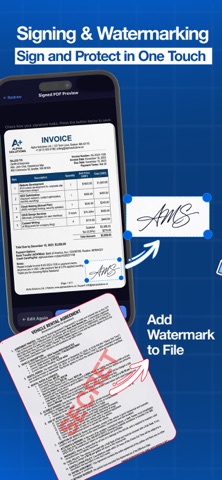
SIGN PDF — ELECTRONIC SIGNATURE
Sign PDF documents with your finger. Add text or image watermarks to protect your files.
• PDF signature with drag-and-drop positioning
• Electronic signature for contracts and agreements
• Watermark with 9-position placement grid
DOCUMENT SUMMARY
Summarize long PDFs in seconds. Ideal for academic papers, reports and legal documents.
• Smart document summary by type
• Key points clearly structured
DOCUMENT TRANSLATION
Translate scanned documents into 7 languages: Turkish, English, German, French, Spanish, Portuguese and Russian.
DOCUMENT ARCHIVE
Organize all your documents in folders and categories. Private folder with biometric protection.
PREMIUM — UNLIMITED ACCESS
• Unlimited scan to PDF, camera scanner and OCR
• Unlimited receipt scanner, invoice scanner and contract analysis
• Merge PDF, compress PDF and sign PDF without limits
• No ads
Weekly, monthly, annual or lifetime payment options.
Privacy Policy: https://scanex.online/privacy-en.html
Terms of Use: https://scanex.online/terms-en.html
Support: https://scanex.online/support.html