AppBrain
AppBrain
  • Apps
  • Apps being viewed right now Trending apps today Most popular apps All-time most installed apps Top rated apps iPhone and iPad apps
  • Intelligence ▾
    Intelligence overview → Track any Android app or your whole market
    Track & analyze
    Keyword Tracker & OptimizerTrack & improve Play rankings App Performance ReportOne-off PDF for any app StatisticsFree Android & Play market stats
    Promote your app
    Featured Apps App Links
  • Intelligence
  • Pricing
  • Dashboard
  • Sign up
  • Log in
App Store Apps > Utilities > ScanFlow: PDF Scan & Edit
ScanFlow: PDF Scan & Edit icon

ScanFlow: PDF Scan & Edit

by Jordan Farrell · Utilities · Free
On the App Store since September 2026 · Data updated 2026-10-26

ScanFlow: PDF Scan & Edit is made and published by Jordan Farrell. AppBrain is an independent app data site and isn't affiliated with Jordan Farrell. The app name, icon, screenshots and description belong to Jordan Farrell and are shown as published on the App Store.

AppBrain's verdict

Last updated
September 27, 2026
Size
58.8 MB
Official page on the App Store

User feedback

Ratings and reviews on the App Store

Comments on ScanFlow: PDF Scan & Edit for iOS

We don't have enough comments to show example comments. Please check back later.

Store listing

By Jordan Farrell, from the App Store
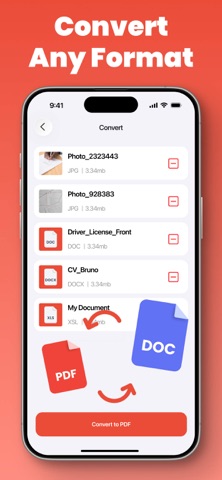
ScanFlow: PDF Scan & Edit Screenshot 1 of 5
ScanFlow: PDF Scan & Edit Screenshot 2 of 5
ScanFlow: PDF Scan & Edit Screenshot 3 of 5
ScanFlow: PDF Scan & Edit Screenshot 4 of 5
ScanFlow: PDF Scan & Edit Screenshot 5 of 5
Screenshots by Jordan Farrell, from the the App Store listing
Description by Jordan Farrell Written by the developer, not by AppBrain. Click to read.
ScanFlow: PDF Scan & Edit is a powerful document scanner that uses advanced AI to capture, enhance, and convert your paper documents into high-quality PDFs, DOC, DOCX, TXT, JPG, and PNG files. With smart preview, you can instantly see and edit scanned content, while intuitive file management lets you organize documents into folders and merge multiple PDFs into one. The app offers lossless compression to reduce file size without sacrificing quality and includes AI-powered enhancement to automatically improve scan clarity, brightness, and contrast. The free version allows you to edit up to 3 files, scan and export 3 documents, merge 3 files, and apply basic compression. Upgrade to Premium for unlimited scanning and PDF creation, unlimited export, full access to all editing tools, unlimited merging, advanced compression, and complete conversion capabilities. Whether you need to digitize receipts, contracts, notes, or photos, ScanFlow provides a professional suite of tools right in your pocket. Its AI enhancement ensures even low-light or blurry scans become crisp and readable. Simple to use yet packed with features, ScanFlow is ideal for students, professionals, and anyone who works with documents daily.
This application contains auto-renewable subscriptions and In-App Purchases: Weekly - $4.99, Monthly - $12.99, Yearly - $39.99, One‑Time Purchase-$59.99
Terms of Use Link: https://www.apple.com/legal/internet-services/itunes/dev/stdeula/
Privacy Policy Link: https://docs.google.com/document/d/1yc8K4li_lApaQeF816mQNW0G_kYNNByZuae1DFqw9Ak/edit
Official page on the App Store

Safety and technology

Found in the app by AppBrain
Price
Free
App size
58.8 MB
Content rating
Everyone

Technologies used by ScanFlow: PDF Scan & Edit

Releases

Updates seen on the App Store
Version
1.0
Launched
September 2026

No changelog data

Alternatives

Similar apps and more from Jordan Farrell

More from Jordan Farrell

SyncBuddies icon SyncBuddies
Jordan Farrell
0.0
Free
HRV Pulse icon HRV Pulse
Jordan Farrell
0.0
Free
Evolution PlanMaker icon Evolution PlanMaker
Jordan Farrell
0.0
Free

Rankings

App Store top charts

App Store Rankings for ScanFlow: PDF Scan & Edit

This app is not ranked

About the app and developer

About ScanFlow: PDF Scan & Edit

ScanFlow: PDF Scan & Edit is an utilities app developed by Jordan Farrell.

What is the rating of ScanFlow: PDF Scan & Edit?

ScanFlow: PDF Scan & Edit has no ratings yet.

Is ScanFlow: PDF Scan & Edit free?

ScanFlow: PDF Scan & Edit is free. The app size is 58.83 MB. The latest version available is 1.0. The last update was on September 27, 2026.

What are the requirements for ScanFlow: PDF Scan & Edit?

The app has a content rating of Everyone. The app has been available on the App Store since September 2026.

Developer information for Jordan Farrell

Jordan Farrell

Address:

Share ScanFlow: PDF Scan & Edit

Apps other people are watching Price drops on Google Play Popular Utilities Apps Today's trending apps Top new apps
More hot apps 🔥
Overview Reviews Rankings Technology
AppBrain Intelligence premium content

Subscribe now to get full and unlimited access to AppBrain Intelligence. You'll have access to:

  • App Intelligence dashboard (performance timeline, competitor comparison, country rankings, insight cards)
  • Detailed ranking data per app
  • Full timeline per developer
  • Device market shares data per country
  • Unlimited keyword tracking
1 Month

$75/mo
(billed every month)

SAVE 0%
Subscribe
3 Months

$65/mo
($195 billed every 3 months)

SAVE 13%
Subscribe
1 Year

$57.50/mo
($690 billed every year)

SAVE 23%
Subscribe
Each subscription will automatically renew 3 days before the expiration date for the same time period. Subscriptions can be cancelled at any time before the renewal.

AppBrain is an app data site, we track rankings, ratings, installs for all apps and games on Google Play and the App Store. AppBrain doesn't host app files or APKs, all install links go directly to the official store. All trademarks are owned by their respective owners.

More apps

  • Top Android apps being viewed
  • Crypto.com Exchange
  • Joshi ji - Open World Car Game
  • Remote for Polaroid TV

App statistics

  • Android statistics
  • Google Play Developer stats
  • Trending Android Apps
  • Trending iOS apps
  • Top popular Apps
  • Buy the best Android phone
  • Buy & sell app businesses

About AppBrain

  • Contact
  • Privacy
  • Documentation
  • DMCA takedowns
  • Blog
  • Android App Marketing: Learn how to better market your Android app
© 2010-2026 - AppBrain