AppBrain
AppBrain
  • Apps
  • Apps being viewed right now Trending apps today Most popular apps All-time most installed apps Top rated apps iPhone and iPad apps
  • Intelligence ▾
    Intelligence overview → Track any Android app or your whole market
    Track & analyze
    Keyword Tracker & OptimizerTrack & improve Play rankings App Performance ReportOne-off PDF for any app StatisticsFree Android & Play market stats
    Promote your app
    Featured Apps App Links
  • Intelligence
  • Pricing
  • Dashboard
  • Sign up
  • Log in
App Store Apps > Business > ScanGo - PDF Document Scanner
ScanGo - PDF Document Scanner icon

ScanGo - PDF Document Scanner

by Beesoft Apps · Business · Free
On the App Store since May 2024 · Data updated 2026-10-13
App Store

ScanGo - PDF Document Scanner is made and published by Beesoft Apps. AppBrain is an independent app data site and isn't affiliated with Beesoft Apps. The app name, icon, screenshots and description belong to Beesoft Apps and are shown as published on the App Store.

AppBrain's verdict

Loved by users
Rating on App Store
4.80
172 ratings
Last updated
November 29, 2025
Size
29.7 MB

Users love it: 4.8 stars from 172 ratings.

User feedback

Ratings and reviews on the App Store

Comments on ScanGo - PDF Document Scanner for iOS

We don't have enough comments to show example comments. Please check back later.

Store listing

By Beesoft Apps, from the App Store
ScanGo - PDF Document Scanner Screenshot 1 of 7
ScanGo - PDF Document Scanner Screenshot 2 of 7
ScanGo - PDF Document Scanner Screenshot 3 of 7
ScanGo - PDF Document Scanner Screenshot 4 of 7
ScanGo - PDF Document Scanner Screenshot 5 of 7
ScanGo - PDF Document Scanner Screenshot 6 of 7
ScanGo - PDF Document Scanner Screenshot 7 of 7
Screenshots by Beesoft Apps, from the the App Store listing
Description by Beesoft Apps Written by the developer, not by AppBrain. Click to read.
WHAT IS ScanGo?
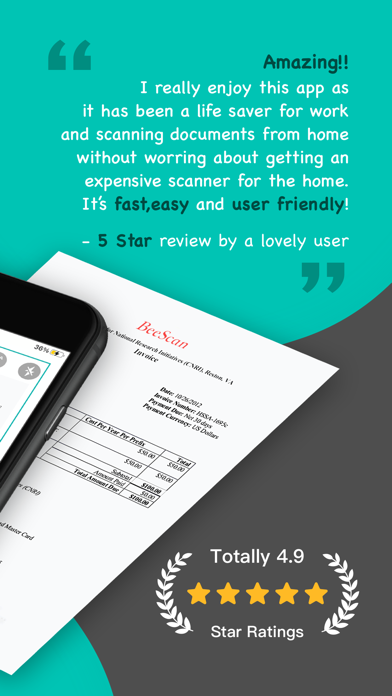
ScanGo is a little, simple, flexible, easy-to-use app with kinds of features satisfying different situations in your iPhone. It allows you to scan documents, certificates, credit cards, invoices, receipts, tickets and any paper with high quality image & PDF output. Also, you can extract text by OCR function from any scans just by one tap.
It is also a camera scanner with concise, efficient user interface whose main tone is black & white with teal & chrome yellow embellished throughout the app.

HOW TO SCAN DOCS?
- Scan everything by one click, of course you can choose to scan from Photos or Camera.
- Edit docs after scanning immediately, including add, rotate, adjust, reorder and delete pages.
- Rotate, Crop and Adjust filter to get high quality scans.
- Provided five filter modes to enhance your scans - Original, B&W 1, B&W 2, Color, Grayscale. What’s more, each filter can be adjusted for its own Brightness, Contrast, Saturation and Sharpness.

HOW TO MANAGE DOCS?
- The Recents module on home page shows your recently added docs, which helps to find them faster.
- Add folders and sub-folders to manage scanned docs.
- Rename folders and documents to make them more distinguishable.
- Important and urgent documents can be Starred for faster access.
- Search function helps to find the doc you need from a dizzying array.
- Every folder, doc and page can be shared with email, Dropbox, Google Drive, Evernote etc. or Wifi directly.
- Save scans as JPEG to Photos.
- Move/Copy/Delete docs and pages.
- Print scans directly within app once you connect to a Printer.
- Fax scans directly if you have Fax Pro app installed.

AFRAID OF DATA LOSS?
ScanGo supports syncing data with iCloud.

MAKE THE APP MORE EFFICIENT
CONVENIENT - Turn on the camera immediately whenever you open the app.
HANDY - Save scans to Photos automatically.
EASY - Auto edge detection and enhancement.
SIMPLE - Share docs and folders in default PDF size.
SECURE - Protect your documents with passcode.

MORE QUESTIONS?
If you have any problems with ScanGo, please email us at scango@beesoft.io, we’ll help to figure it out asap.
Official page on the App Store

Safety and technology

Found in the app by AppBrain
Price
Free
App size
29.7 MB
Content rating
Everyone

Technologies used by ScanGo - PDF Document Scanner

Releases

Updates seen on the App Store
Version
1.1.3
Launched
May 2024

No changelog data

Alternatives

Similar apps and more from Beesoft Apps

Alternatives to ScanGo - PDF Document Scanner

HyperScan-scanning from mobile icon HyperScan-scanning from mobile
Hyperlink
4.6
Free
10 ratings
PDF Maker: Image to pdf icon PDF Maker: Image to pdf
Nirav Parmar
3.5
Free
11 ratings
PDF Converter - Edit & Scan icon PDF Converter - Edit & Scan
Parth Talpara
3.7
Free
25 ratings
Protocol O: Document Scanner icon Protocol O: Document Scanner
Oksana Nikita
1.0
$8.99
1 ratings
PrivScanner: PPT Slides to PDF icon PrivScanner: PPT Slides to PDF
楚云 徐
5.0
Free
1 ratings
HEIC to JPG ™ icon HEIC to JPG ™
Andy Sutanto
4.4
Free
42 ratings
Doc Scanner: PDF Converter icon Doc Scanner: PDF Converter
Nishan Singh
4.6
Free
17 ratings
Background Remover - BG Editor icon Background Remover - BG Editor
Asad Ahsan
4.5
Free
28 ratings

More from Beesoft Apps

Shared Family Calendar: FamCal icon Shared Family Calendar: FamCal
Beesoft Apps
4.9
Free
27.9K ratings
Checkbook - Account Tracker icon Checkbook - Account Tracker
Beesoft Apps
4.3
Free
14.3K ratings
Planner Pro - Daily Planner icon Planner Pro - Daily Planner
Beesoft Apps
4.5
Free
13.3K ratings
Pocket Schedule Planner icon Pocket Schedule Planner
Beesoft Apps
4.5
Free
8.3K ratings
Period Tracker: Monthly Cycles icon Period Tracker: Monthly Cycles
Beesoft Apps
4.0
Free
3.8K ratings
Pocket Expense 6 icon Pocket Expense 6
Beesoft Apps
3.9
Free
2.0K ratings
Hours Keeper: Time Tracker icon Hours Keeper: Time Tracker
Beesoft Apps
4.1
Free
1.4K ratings
Nova Fax: Send fax from iPhone icon Nova Fax: Send fax from iPhone
Beesoft Apps
4.7
$19.99
1.0K ratings

Rankings

App Store top charts

App Store Rankings for ScanGo - PDF Document Scanner

This app is not ranked

About the app and developer

About ScanGo - PDF Document Scanner

ScanGo - PDF Document Scanner is a business app developed by Beesoft Apps.

What is the rating of ScanGo - PDF Document Scanner?

ScanGo - PDF Document Scanner is rated 4.80 out of 5 stars, based on 170 ratings.

Is ScanGo - PDF Document Scanner free?

ScanGo - PDF Document Scanner is free. The app size is 29.66 MB. The latest version available is 1.1.3. The last update was on November 29, 2025.

What are the requirements for ScanGo - PDF Document Scanner?

The app has a content rating of Everyone. The app has been available on the App Store since May 2024.

Developer information for Beesoft Apps

Beesoft Apps

Address:

Share ScanGo - PDF Document Scanner

Today's trending apps Popular Business Apps Top new apps Apps other people are watching Price drops on Google Play
HyperScan-scanning from mobile icon HyperScan-scanning from mobile
PDF Maker: Image to pdf icon PDF Maker: Image to pdf
PDF Converter - Edit & Scan icon PDF Converter - Edit & Scan
Protocol O: Document Scanner icon Protocol O: Document Scanner
PrivScanner: PPT Slides to PDF icon PrivScanner: PPT Slides to PDF
HEIC to JPG ™ icon HEIC to JPG ™
Doc Scanner: PDF Converter icon Doc Scanner: PDF Converter
Background Remover - BG Editor icon Background Remover - BG Editor
Overview Alternatives Reviews Rankings Technology
AppBrain Intelligence premium content

Subscribe now to get full and unlimited access to AppBrain Intelligence. You'll have access to:

  • App Intelligence dashboard (performance timeline, competitor comparison, country rankings, insight cards)
  • Detailed ranking data per app
  • Full timeline per developer
  • Device market shares data per country
  • Unlimited keyword tracking
1 Month

$75/mo
(billed every month)

SAVE 0%
Subscribe
3 Months

$65/mo
($195 billed every 3 months)

SAVE 13%
Subscribe
1 Year

$57.50/mo
($690 billed every year)

SAVE 23%
Subscribe
Each subscription will automatically renew 3 days before the expiration date for the same time period. Subscriptions can be cancelled at any time before the renewal.

AppBrain is an app data site, we track rankings, ratings, installs for all apps and games on Google Play and the App Store. AppBrain doesn't host app files or APKs, all install links go directly to the official store. All trademarks are owned by their respective owners. As an Amazon Associate AppBrain earns from qualifying purchases.

More apps

  • Top Android apps being viewed
  • MapGenie: BG3 Map for Android
  • Kickoff Tactics: Football CCG
  • Expense Tracker: Manage Money

App statistics

  • Android statistics
  • Google Play Developer stats
  • Trending Android Apps
  • Trending iOS apps
  • Top popular Apps
  • Buy the best Android phone
  • Buy & sell app businesses

About AppBrain

  • Contact
  • Privacy
  • Documentation
  • DMCA takedowns
  • Articles
  • Blog
  • The AppBrain advertising system
© 2010-2026 - AppBrain