

Scanlio: PDF Scanner & OCR
Scanlio: PDF Scanner & OCR is made and published by HUGO ANATOLE PAUL MORICEAU. AppBrain is an independent app data site and isn't affiliated with HUGO ANATOLE PAUL MORICEAU. The app name, icon, screenshots and description belong to HUGO ANATOLE PAUL MORICEAU and are shown as published on the App Store.
AppBrain's verdict
- Last updated
- September 16, 2026
Rankings
App Store top chartsApp Store Rankings for Scanlio: PDF Scanner & OCR
Competitors
Similar apps and more from HUGO ANATOLE PAUL MORICEAUAlternatives to Scanlio: PDF Scanner & OCR


More from HUGO ANATOLE PAUL MORICEAU


Releases
Updates seen on the App Store- Version
- 1.0.20
- Launched
- June 2026
No changelog data
User feedback
Ratings and reviews on the App StoreComments on Scanlio: PDF Scanner & OCR for iOS
We don't have enough comments to show example comments. Please check back later.
Technology
Found in the app by AppBrain- Price
- Free
- App size
- 23.2 MB
- Content rating
- Everyone
Technologies used by Scanlio: PDF Scanner & OCR
About the app and developer
About Scanlio: PDF Scanner & OCR
Scanlio: PDF Scanner & OCR is a business app developed by HUGO ANATOLE PAUL MORICEAU.
User Ratings
The app has no ratings yet.
App Information
Scanlio: PDF Scanner & OCR is freely available from the App Store. The app size is 23.24 MB. The latest version available is 1.0.20. The last update was on September 16, 2026.
Technical Requirements
The app has a content rating of Everyone. The app has been available on the App Store since June 2026.
Developer information for HUGO ANATOLE PAUL MORICEAU
Address:
Store listing
By HUGO ANATOLE PAUL MORICEAU, from the App Store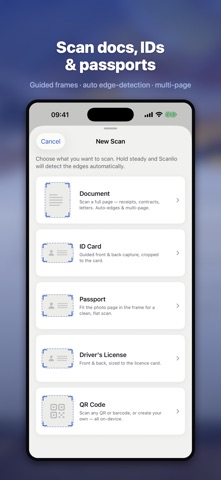




Description by HUGO ANATOLE PAUL MORICEAU Written by the developer, not by AppBrain. Click to read.
SCAN ANYTHING, INSTANTLY
• Automatic edge detection — just line it up and Scanlio does the rest
• Smooth multi-page scanning, even in low light
• Import existing PDFs or images from Files or Photos
• Crisp, high-contrast output that looks like a real scan, not a photo
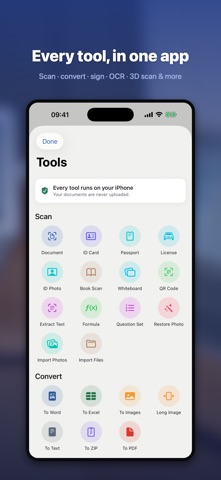
POWERFUL OCR (TEXT RECOGNITION)
• Accurately pull text out of any scan with multilingual OCR
• Make your PDFs searchable, selectable, and copyable
• Perfect for archiving contracts, invoices, receipts, and letters
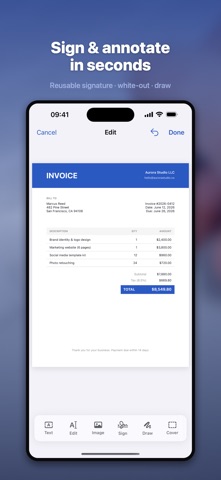
A REAL PDF EDITOR
• Add text boxes you can move, resize, and recolor
• Sign documents with a reusable signature you draw once
• White-out to cover and replace existing text
• Draw, highlight, and annotate freehand
• Merge several PDFs, split a file, or extract just the pages you need
ID, PASSPORT & LICENSE SCANNING
• A dedicated guide frame sizes the camera box to ID cards, passports, and driver's licenses
• Front-and-back capture, auto-cropped to the frame
• Stored securely on your device and lockable with Face ID or a PIN
CONVERT TO ANY FORMAT
• PDF to Word, PDF to Images, PDF to plain Text
• Built for real professional workflows and office tools
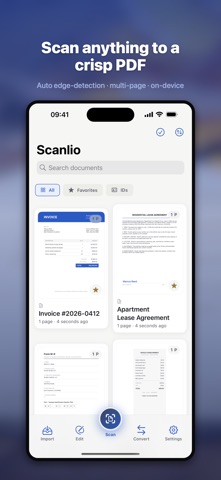
ORGANIZED DOCUMENT LIBRARY
• Sort by name, date, or pages; rename and find anything instantly
• Full-text search across your scans
• Share in one tap via Mail, AirDrop, WhatsApp, or any app
PRIVATE BY DESIGN
Scanlio works entirely offline. Your documents stay on your iPhone or iPad — never on our servers. Privacy isn't a setting here, it's the architecture.
SCANLIO PRO
Go unlimited with Pro: unlimited OCR, the full PDF editor, e-signatures, format conversions, unlimited exports, and zero ads. Try it free, upgrade when you're convinced.
Download Scanlio and carry a complete scanner, PDF editor, and document signer in your pocket.
— SUBSCRIPTION —
Scanlio Pro is an auto-renewable subscription, available Weekly, Monthly or Yearly. Payment is charged to your Apple ID at confirmation of purchase. Your subscription renews automatically unless cancelled at least 24 hours before the end of the current period; manage or cancel in your App Store account settings. Any unused free-trial period is forfeited when you buy a subscription.
Terms of Use (EULA): https://www.apple.com/legal/internet-services/itunes/dev/stdeula/
Privacy Policy: https://lastoneparis.github.io/scanlio/privacy.html