



AppBrain's verdict
- Last updated
- October 6, 2026
- Size
- 36.2 MB
User feedback
Ratings and reviews on the App StoreComments on Scanly: PDF Scanner & Editor for iOS
We don't have enough comments to show example comments. Please check back later.
Store listing
By Nguyen Nhu Vuong, from the App StoreDescription by Nguyen Nhu Vuong Written by the developer, not by AppBrain. Click to read.
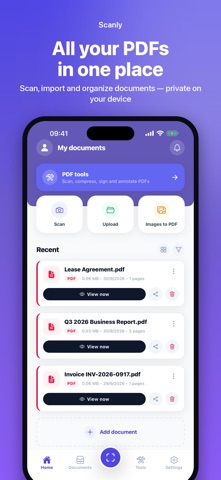
SCAN DOCUMENTS TO PDF
• Scan receipts, contracts, notes and book pages with your camera
• Capture several pages in a row and save them as one PDF
• Combine photos from your library into a single PDF
COMPRESS PDF
• Reduce PDF file size in seconds for email and upload limits
• Choose Low, Medium or High compression to balance size and quality
• See exactly how many MB you saved
SIGN & EDIT PDF
• Draw your signature and place it on any page
• Highlight important passages
• Type text directly onto pages — fill in forms and add notes
• Draw freely with your finger or Apple Pencil
READ & ORGANIZE
• Smooth PDF reader with quick page navigation
• Organize documents into folders
• Open PDFs shared from Mail, Files, Safari and chat apps
PRIVATE BY DESIGN
Files are processed on your device — they are not uploaded to our servers for scanning, compression, signing or editing.
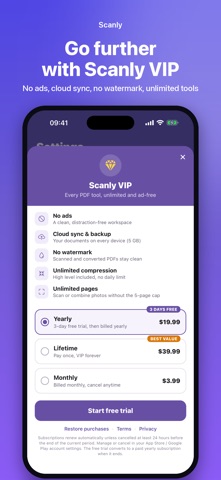
SCANLY VIP
• No ads
• Cloud sync & backup across devices
• No watermark on scanned PDFs
• Unlimited compression, including High
• Unlimited scan pages
Free version: up to 3 compressions per day and 5 pages per scan, with ads.
VIP is available as a monthly subscription, a yearly subscription (with a 3-day free trial) or a one-time lifetime purchase. Payment is charged to your Apple ID account at confirmation of purchase. Subscriptions renew automatically unless cancelled at least 24 hours before the end of the current period; your account is charged for renewal within 24 hours before the period ends. You can manage and cancel subscriptions in your App Store account settings. Any unused portion of a free trial is forfeited when you purchase a subscription.
Terms of Use (EULA): https://www.apple.com/legal/internet-services/itunes/dev/stdeula/
Privacy Policy: https://2sbrain.net/scanly/privacy.html
Safety and technology
Found in the app by AppBrain- Price
- Free
- App size
- 36.2 MB
- Content rating
- Everyone
Technologies used by Scanly: PDF Scanner & Editor
Releases
Updates seen on the App Store- Version
- 1.0.5
- Launched
- June 2026
No changelog data
Alternatives
Similar apps and more from Nguyen Nhu VuongAlternatives to Scanly: PDF Scanner & Editor


More from Nguyen Nhu Vuong


Rankings
App Store top chartsApp Store Rankings for Scanly: PDF Scanner & Editor
About the app and developer
About Scanly: PDF Scanner & Editor
Scanly: PDF Scanner & Editor is a productivity app developed by Nguyen Nhu Vuong.
User Ratings
The app has no ratings yet.
App Information
Scanly: PDF Scanner & Editor is freely available from the App Store. The app size is 36.19 MB. The latest version available is 1.0.5. The last update was on October 6, 2026.
Technical Requirements
The app has a content rating of Everyone. The app has been available on the App Store since June 2026.
Scanly: PDF Scanner & Editor is made and published by Nguyen Nhu Vuong. AppBrain is an independent app data site and isn't affiliated with Nguyen Nhu Vuong. The app name, icon, screenshots and description belong to Nguyen Nhu Vuong and are shown as published on the App Store.
Developer information for Nguyen Nhu Vuong
Address: