


AppBrain's verdict
- Last updated
- April 28, 2026
- Size
- 49.8 MB
User feedback
Ratings and reviews on the App StoreComments on Scanner AI: PDF Scan & Docs for iOS
We don't have enough comments to show example comments. Please check back later.
Store listing
By Sagar Sheladiya, from the App StoreDescription by Sagar Sheladiya Written by the developer, not by AppBrain. Click to read.
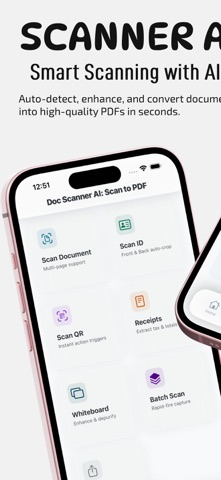
Whether you need to scan receipts, contracts, notes, ID cards, or business documents, Doc Scanner AI delivers fast, high-quality results with professional accuracy.
Scan anytime, anywhere. No internet required.
KEY FEATURES
Fast Document Scanning
Capture high-quality scans using your device camera. Automatically detect edges, crop, and enhance documents for sharp, clear results.
AI-Powered OCR Text Recognition
Extract text from scanned documents instantly. Copy, edit, and export text into multiple formats for easy use across apps.
PDF Scanner and Editor
Create, edit, merge, split, and compress PDF files. Organize pages, reorder content, and optimize files for sharing or storage.
Advanced Image Enhancement
Improve scan quality with smart filters including black and white, grayscale, and color enhancement. Adjust brightness, contrast, and sharpness.
Digital Signature
Sign documents directly on your device. Save and reuse signatures for contracts, forms, and agreements.
QR Code Scanner and Generator
Scan QR codes quickly or create your own for URLs, contacts, and more.
ID Card and Passport Scanner
Scan identity documents with precision. Automatically format and export as clean, professional PDFs.
Business Card Scanner
Capture and extract contact details from business cards. Save information directly to your device.
Secure Document Storage
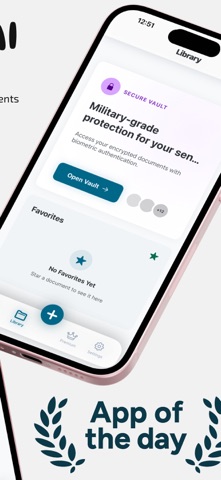
Protect your files with passcode or biometric lock. All documents are stored locally for maximum privacy.
Folder Organization
Create folders, organize documents, and manage files with ease. Keep everything structured and accessible.
Smart Search
Find documents instantly using file names or OCR text search.
AirPrint and Sharing
Print documents directly or share via email, messaging apps, or cloud services in PDF or image format.
Offline Access
Scan and manage documents without an internet connection. Your data stays private and secure.
SMART USE CASES
Scan receipts and invoices for expense tracking
Digitize notes, books, and study materials
Sign and send contracts instantly
Store and manage ID documents securely
Convert photos into professional PDFs
PREMIUM FEATURES
Upgrade to Doc Scanner AI Premium to unlock:
Unlimited OCR text recognition
Advanced PDF editing tools
Cloud backup and sync
Document search and indexing
AI enhancement tools
Ad-free experience
Subscriptions are available on a monthly or yearly basis.
WHY CHOOSE Scanner AI: PDF Scan & Docs
Fast and accurate scanning
Professional-quality PDF output
Powerful editing and organization tools
Secure and private document storage
Designed for everyday productivity
Download Scanner AI: PDF Scan & Docs today and simplify the way you scan, manage, and share documents.
Privacy Policy: https://sites.google.com/view/doc-scanner-ai-scan-to-pdf
Terms of Use (Apple Standard EULA): https://www.apple.com/legal/internet-services/itunes/dev/stdeula
Safety and technology
Found in the app by AppBrain- Price
- Free
- App size
- 49.8 MB
- Content rating
- Everyone
Technologies used by Scanner AI: PDF Scan & Docs
Releases
Updates seen on the App Store- Version
- 1.0.2
- Launched
- April 2026
No changelog data
Alternatives
Similar apps and more from Sagar SheladiyaAlternatives to Scanner AI: PDF Scan & Docs




More from Sagar Sheladiya


Rankings
App Store top chartsApp Store Rankings for Scanner AI: PDF Scan & Docs
About the app and developer
About Scanner AI: PDF Scan & Docs
Scanner AI: PDF Scan & Docs is a productivity app developed by Sagar Sheladiya.
User Ratings
The app has no ratings yet.
App Information
Scanner AI: PDF Scan & Docs is freely available from the App Store. The app size is 49.76 MB. The latest version available is 1.0.2. The last update was on April 28, 2026.
Technical Requirements
The app has a content rating of Everyone. The app has been available on the App Store since April 2026.
Scanner AI: PDF Scan & Docs is made and published by Sagar Sheladiya. AppBrain is an independent app data site and isn't affiliated with Sagar Sheladiya. The app name, icon, screenshots and description belong to Sagar Sheladiya and are shown as published on the App Store.
Developer information for Sagar Sheladiya
Address:
Frequently asked questions about Scanner AI: PDF Scan & Docs
Is Scanner AI: PDF Scan & Docs free?
Yes. Scanner AI: PDF Scan & Docs is free on the App Store.
Is Scanner AI: PDF Scan & Docs still available?
Yes. Scanner AI: PDF Scan & Docs is on the App Store, and the last update we saw was on April 28, 2026.
How large is Scanner AI: PDF Scan & Docs?
Scanner AI: PDF Scan & Docs is 49.76 MB.
Is Scanner AI: PDF Scan & Docs suitable for children?
App Store rates the content of Scanner AI: PDF Scan & Docs as suitable for everyone.
Who made Scanner AI: PDF Scan & Docs?
Scanner AI: PDF Scan & Docs was developed by Sagar Sheladiya. It is listed in the productivity category on the App Store.
What are the best alternatives to Scanner AI: PDF Scan & Docs?
People looking at Scanner AI: PDF Scan & Docs also look at these productivity apps: Scan.nerai, AI Email Assistant: Writer, Jumbo Connect, Unzip: ZIP RAR 7Z Extractor, AI Note Taker & Voice Notes.