

Scanner Max: Scan Docs to PDF
Scanner Max: Scan Docs to PDF is made and published by Anton Savelev. AppBrain is an independent app data site and isn't affiliated with Anton Savelev. The app name, icon, screenshots and description belong to Anton Savelev and are shown as published on the App Store.
AppBrain's verdict
- Last updated
- September 21, 2026
- Size
- 54.6 MB
User feedback
Ratings and reviews on the App StoreComments on Scanner Max: Scan Docs to PDF for iOS
We don't have enough comments to show example comments. Please check back later.
Store listing
By Anton Savelev, from the App Store


Description by Anton Savelev Written by the developer, not by AppBrain. Click to read.
Instant scanning
Point your camera and watch the magic: automatic edge detection, smart enhancement, high-resolution output in just a few taps. Perfect for:
• business documents, contracts, invoices, letters
• handwritten notes, sketches, quick memos
• receipts, rent payments, tickets, any printed paper
Powerful document converter
Turn your scans (or imported PDFs) into the formats you need:
• editable files — DOCX, PPTX, XLSX
• images — PNG, JPG
• plain text — TXT
Ready for Word, PowerPoint, spreadsheets or simple sharing.
Auto-crop & perspective correction
No need for perfect alignment. The app automatically crops and straightens every page — clean, professional results every time.
OCR — text recognition
• Extract editable text from your scans. Search, copy or edit content easily.
• Works great with printed documents, forms, books and many handwritten notes.
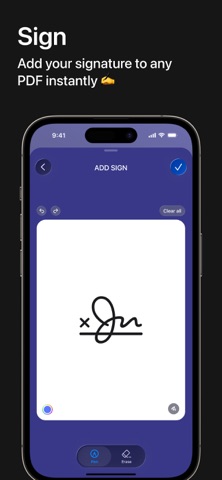
Sign documents in seconds
Create your signature(s) once — then add them to any page with one tap. Fast e-signing right on your device.
Multi-page documents
Scan as many pages as you need and combine them into one smooth PDF. Add, reorder, delete pages effortlessly.
Custom settings
Choose resolution, color mode, default format and other options to match your workflow perfectly.
Secure & convenient sharing
• Send scans via email, messengers or cloud.
• PDF, JPEG, PNG formats
• password protection available
• save to Photos, Dropbox, Google Drive or any app
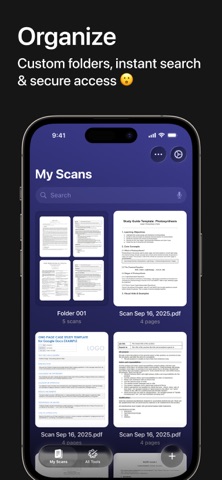
Smart organization
Create folders, rename files, find documents instantly. Everything stays neatly sorted.
Who uses Scanner Max?
Remote workers, students, accountants, real estate agents, lawyers, managers — anyone who deals with paper daily. Digitize contracts, tax forms, tickets, receipts, notes, homework and export in PDF, JPG or PNG.
Scanner Max Subscription:
• Unlock full features with a subscription
• Free trial included for new users
• Payment charged after confirmation
• Auto-renews unless cancelled
• Cancel anytime in your App Store account settings
Privacy Policy: https://scannerpdfapp.framer.website/privacy
Terms of Use: https://scannerpdfapp.framer.website/terms
We value your opinion!
Leave a review or write to us at scannerpdfapp@gmail.com. Your feedback helps make Scanner Max even better.
Safety and technology
Found in the app by AppBrain- Price
- Free
- App size
- 54.6 MB
- Content rating
- Everyone
Technologies used by Scanner Max: Scan Docs to PDF
Releases
Updates seen on the App Store- Version
- 1.0.1
- Launched
- July 2026
No changelog data
Alternatives
Similar apps and more from Anton SavelevAlternatives to Scanner Max: Scan Docs to PDF


Rankings
App Store top chartsApp Store Rankings for Scanner Max: Scan Docs to PDF
About the app and developer
About Scanner Max: Scan Docs to PDF
Scanner Max: Scan Docs to PDF is an utilities app developed by Anton Savelev.
What is the rating of Scanner Max: Scan Docs to PDF?
Scanner Max: Scan Docs to PDF has no ratings yet.
Is Scanner Max: Scan Docs to PDF free?
Scanner Max: Scan Docs to PDF is free. The app size is 54.60 MB. The latest version available is 1.0.1. The last update was on September 21, 2026.
What are the requirements for Scanner Max: Scan Docs to PDF?
The app has a content rating of Everyone. The app has been available on the App Store since July 2026.
Developer information for Anton Savelev
Address:
Frequently asked questions about Scanner Max: Scan Docs to PDF
Is Scanner Max: Scan Docs to PDF free?
Yes. Scanner Max: Scan Docs to PDF is free on the App Store.
Is Scanner Max: Scan Docs to PDF still available?
Yes. Scanner Max: Scan Docs to PDF is on the App Store, and the last update we saw was on September 21, 2026.
How large is Scanner Max: Scan Docs to PDF?
Scanner Max: Scan Docs to PDF is 54.60 MB.
Is Scanner Max: Scan Docs to PDF suitable for children?
App Store rates the content of Scanner Max: Scan Docs to PDF as suitable for everyone.
Who made Scanner Max: Scan Docs to PDF?
Scanner Max: Scan Docs to PDF was developed by Anton Savelev. It is listed in the utilities category on the App Store.
What are the best alternatives to Scanner Max: Scan Docs to PDF?
People looking at Scanner Max: Scan Docs to PDF also look at these utilities apps: Video to MP3: Convert to Audio, Smart Cleaner・Storage Clean Up, PDF Converter ‧, MOES, Nepal Telecom.