AppBrain
AppBrain
  • Apps
  • Apps being viewed right now Trending apps today Most popular apps All-time most installed apps Top rated apps iPhone and iPad apps
  • Intelligence ▾
    Intelligence overview → Track any Android app or your whole market
    Track & analyze
    Keyword Tracker & OptimizerTrack & improve Play rankings App Performance ReportOne-off PDF for any app StatisticsFree Android & Play market stats
    Promote your app
    Featured Apps App Links
  • Intelligence
  • Pricing
  • Dashboard
  • Sign up
  • Log in
App Store Apps > Productivity > Scanner: PDF & Document Scan
Scanner: PDF & Document Scan icon

Scanner: PDF & Document Scan

1.0.2
YOU SEUNGMIN
0.00
0 reviews
Free

Scanner: PDF & Document Scan Screenshot 1 of 6
Scanner: PDF & Document Scan Screenshot 2 of 6
Scanner: PDF & Document Scan Screenshot 3 of 6
Scanner: PDF & Document Scan Screenshot 4 of 6
Scanner: PDF & Document Scan Screenshot 5 of 6
Scanner: PDF & Document Scan Screenshot 6 of 6
Screenshots by YOU SEUNGMIN, from the the App Store listing
View on the App Store Also on Google Play

About Scanner: PDF & Document Scan

Scanner: PDF & Document Scan is a productivity app developed by YOU SEUNGMIN.

User Ratings

The app has no ratings yet.

App Information

Scanner: PDF & Document Scan is freely available from the App Store. The app size is 82.75 MB. The latest version available is 1.0.2. The last update was on November 6, 2026.

Technical Requirements

The app has a content rating of Everyone. The app has been available on the App Store since October 2026.

Scanner: PDF & Document Scan is made and published by YOU SEUNGMIN. AppBrain is an independent app data site and isn't affiliated with YOU SEUNGMIN. The app name, icon, screenshots and description belong to YOU SEUNGMIN and are shown as published on the App Store.

Description by YOU SEUNGMIN (from the App Store)
Scanner turns paper into clean PDFs with your phone camera. Point it at a page, and Scanner finds the edges, straightens the page and takes the picture when you hold still.

SCAN
• Live edge detection outlines the page as you aim.
• Automatic capture when the page is found and the phone is steady, or tap to scan yourself.
• One page at a time, or many pages in a row.
• Flash and light for dim rooms.
• Import photos of documents you already took.

NEVER LOSE A PAGE
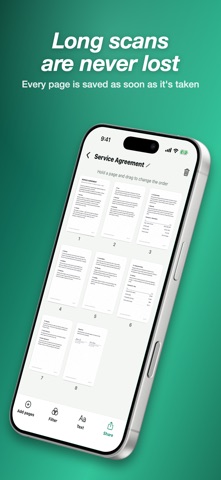
Each page is saved the moment it is taken. If a call comes in or the app closes during a long scan, the pages you took are still there.

CLEAN PAGES
• Tilted photos come out square with perspective correction.
• The Clean filter removes shadows and whitens the paper.
• Gray and black-and-white filters for crisp text.
• Drag the corners to adjust a page, rotate it, or apply a filter to every page at once.

EXPORT AS PDF, JPG OR TEXT
• PDFs with searchable, copyable text.
• Small, medium or original file size.
• Page size: same as the scan, A4 or Letter.
• Text recognition reads the words on your pages so you can copy or share them.
• Share to mail, messages and other apps, or save to Files.

ORGANIZE
• Drag pages to reorder them, delete pages or add more.
• Rename documents and search by name or by the text inside.

PRIVATE
Scanning, cleaning and text recognition all happen on your phone. Nothing is uploaded, and no account is needed.

FREE WITH ADS, OR PREMIUM
Scanner is free with ads, and there are no ads on the camera screen. Scanner Premium removes all ads. Choose a monthly subscription or a one-time lifetime purchase.

Privacy Policy: https://dsm0829.github.io/scanner-privacy/
Terms of Use: https://www.apple.com/legal/internet-services/itunes/dev/stdeula/
Show more Show less

More data about Scanner: PDF & Document Scan

Price Free
Rating No ratings
Ranking Not ranked
Version 1.0.2
App size 82.7 MB
Suitable for Everyone

Also available on Google Play

Scanner: PDF & Document Scan icon Scanner: PDF & Document Scan
VISM STUDIO
0.0
Free
1+

Alternatives to Scanner: PDF & Document Scan

ScanQ: PDF Scanner & Converter icon ScanQ: PDF Scanner & Converter
EMRE KESKIN
0.0
Free
Honest Scanner icon Honest Scanner
STOCKGORILLA LLC
5.0
Free
2 ratings
一鍵去手寫 icon 一鍵去手寫
Hsien Chi Hou
0.0
Free
PureScan Doc Scanner icon PureScan Doc Scanner
Chien Yu Wang
0.0
Free
Unscribble Handwriting to Text icon Unscribble Handwriting to Text
Gold Bits LLC
0.0
Free
PDFLove: PDF Scanner & OCR icon PDFLove: PDF Scanner & OCR
Arjun Jain
0.0
Free
PDF to Text OCR: Scan & Copy icon PDF to Text OCR: Scan & Copy
Mustafa Utku Coskun
0.0
Free
Paperix - PDF Secure and Local icon Paperix - PDF Secure and Local
Abhijit Bansal
5.0
Free
5 ratings

More from YOU SEUNGMIN

Docx: Open & Edit Documents icon Docx: Open & Edit Documents
YOU SEUNGMIN
0.0
Free
PDFX: Editor, Reader & Signer icon PDFX: Editor, Reader & Signer
YOU SEUNGMIN
0.0
Free
Ear Training: Chords & Scales icon Ear Training: Chords & Scales
YOU SEUNGMIN
0.0
Free
DiceRoll: 3D Dice Roller RPG icon DiceRoll: 3D Dice Roller RPG
YOU SEUNGMIN
0.0
Free
Tuner: Guitar, Ukulele & Bass icon Tuner: Guitar, Ukulele & Bass
YOU SEUNGMIN
0.0
Free
Universal: TV Remote Control icon Universal: TV Remote Control
YOU SEUNGMIN
0.0
Free
Spreadsheet: XLSX & CSV Editor icon Spreadsheet: XLSX & CSV Editor
YOU SEUNGMIN
0.0
Free
Codex Bible: KJV Offline Study icon Codex Bible: KJV Offline Study
YOU SEUNGMIN
0.0
Free

Changelog of Scanner: PDF & Document Scan

No changelog data

Developer information for YOU SEUNGMIN

YOU SEUNGMIN

Address:

Share Scanner: PDF & Document Scan

Comments on Scanner: PDF & Document Scan for iOS

We don't have enough comments to show example comments. Please check back later.

App Store Rankings for Scanner: PDF & Document Scan

This app is not ranked

Technologies used by Scanner: PDF & Document Scan

Frequently asked questions about Scanner: PDF & Document Scan

Is Scanner: PDF & Document Scan free?

Yes. Scanner: PDF & Document Scan is free on the App Store.

Is Scanner: PDF & Document Scan still available?

Yes. Scanner: PDF & Document Scan is on the App Store, and the last update we saw was on November 6, 2026.

How large is Scanner: PDF & Document Scan?

Scanner: PDF & Document Scan is 82.75 MB.

Is Scanner: PDF & Document Scan suitable for children?

App Store rates the content of Scanner: PDF & Document Scan as suitable for everyone.

Who made Scanner: PDF & Document Scan?

Scanner: PDF & Document Scan was developed by YOU SEUNGMIN. It is listed in the productivity category on the App Store.

What are the best alternatives to Scanner: PDF & Document Scan?

People looking at Scanner: PDF & Document Scan also look at these productivity apps: ScanQ: PDF Scanner & Converter, Honest Scanner, 一鍵去手寫, PureScan Doc Scanner, Unscribble Handwriting to Text.

Price drops on Google Play Today's trending apps Popular Productivity Apps Apps other people are watching Top new apps
ScanQ: PDF Scanner & Converter icon ScanQ: PDF Scanner & Converter
Honest Scanner icon Honest Scanner
一鍵去手寫 icon 一鍵去手寫
PureScan Doc Scanner icon PureScan Doc Scanner
Unscribble Handwriting to Text icon Unscribble Handwriting to Text
PDFLove: PDF Scanner & OCR icon PDFLove: PDF Scanner & OCR
PDF to Text OCR: Scan & Copy icon PDF to Text OCR: Scan & Copy
Paperix - PDF Secure and Local icon Paperix - PDF Secure and Local
AppBrain Intelligence premium content

Subscribe now to get full and unlimited access to AppBrain Intelligence. You'll have access to:

  • App Intelligence dashboard (performance timeline, competitor comparison, country rankings, insight cards)
  • Detailed ranking data per app
  • Full timeline per developer
  • Device market shares data per country
  • Unlimited keyword tracking
1 Month

$75/mo
(billed every month)

SAVE 0%
Subscribe
3 Months

$65/mo
($195 billed every 3 months)

SAVE 13%
Subscribe
1 Year

$57.50/mo
($690 billed every year)

SAVE 23%
Subscribe
Each subscription will automatically renew 3 days before the expiration date for the same time period. Subscriptions can be cancelled at any time before the renewal.

AppBrain is an app data site, we track rankings, ratings, installs for all apps and games on Google Play and the App Store. AppBrain doesn't host app files or APKs, all install links go directly to the official store. All trademarks are owned by their respective owners.

More apps

  • Top Android apps being viewed
  • CherryShort: Short Dramas
  • REACTOR: Amp Intelligence Android App
  • Lao Keyboard

App statistics

  • Android statistics
  • Google Play Developer stats
  • Trending Android Apps
  • Trending iOS apps
  • Top popular Apps
  • Buy the best Android phone
  • Buy & sell app businesses

About AppBrain

  • Contact
  • Privacy
  • Documentation
  • DMCA takedowns
  • Blog
  • Free App-Ads.Txt Validation
© 2010-2026 - AppBrain