

Scanner: Scan Documents to PDF
Scanner: Scan Documents to PDF is made and published by Cricket Live Line. AppBrain is an independent app data site and isn't affiliated with Cricket Live Line. The app name, icon, screenshots and description belong to Cricket Live Line and are shown as published on the App Store.
AppBrain's verdict
- Last updated
- October 26, 2026
Rankings
App Store top chartsApp Store Rankings for Scanner: Scan Documents to PDF
Competitors
Similar apps and more from Cricket Live LineMore from Cricket Live Line


Also available on Google Play

Releases
Updates seen on the App Store- Version
- 2.1.0
- Launched
- June 2026
No changelog data
User feedback
Ratings and reviews on the App StoreComments on Scanner: Scan Documents to PDF for iOS
We don't have enough comments to show example comments. Please check back later.
Technology
Found in the app by AppBrain- Price
- Free
- App size
- 30.0 MB
- Content rating
- Everyone
Technologies used by Scanner: Scan Documents to PDF
About the app and developer
About Scanner: Scan Documents to PDF
Scanner: Scan Documents to PDF is a productivity app developed by Cricket Live Line.
What is the rating of Scanner: Scan Documents to PDF?
Scanner: Scan Documents to PDF has no ratings yet.
Is Scanner: Scan Documents to PDF free?
Scanner: Scan Documents to PDF is free. The app size is 29.96 MB. The latest version available is 2.1.0. The last update was on October 26, 2026.
What are the requirements for Scanner: Scan Documents to PDF?
The app has a content rating of Everyone. The app has been available on the App Store since June 2026.
Developer information for Cricket Live Line
Address:
Store listing
By Cricket Live Line, from the App Store




Description by Cricket Live Line Written by the developer, not by AppBrain. Click to read.
SCAN AND CLEAN
• Scan documents, receipts, ID cards, books and whiteboards with automatic edge detection.
• Review every page before saving: crop, rotate, retake, and apply filters for sharp black-and-white or colour pages.
• Text recognition (OCR) makes scanned pages searchable and lets you copy the text.
A COMPLETE PDF STUDIO
• Merge PDFs and images into one document, in the order you choose.
• Organize pages: reorder, rotate, delete, split and extract pages.
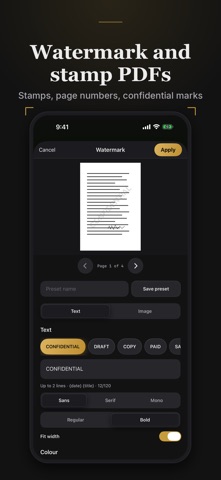
• Add watermarks, stamps and page numbers.
• Sign and fill documents, annotate and highlight.
• Compress PDFs, add or remove a password, and convert PDFs to images.
• Open PDFs and photos from Files, Mail and other apps.
PRIVATE BY DESIGN
• Scanning, editing and text recognition run on your iPhone.
• No account is needed to use the app.
• Scanning, editing and exporting work offline.
• Documents stay on your device until you choose to share them.
What Scanner Premium adds
• Ask PDF: ask questions about a document and get summaries.
• Translate: translate the recognised text of a document.
• Redaction: remove sensitive text from a page, not just cover it.
• Count & area: count objects and measure rooms and surfaces.
Scanner Premium is an auto-renewing subscription, with a one-time option where offered. Payment is charged to your Apple Account at confirmation of purchase. The subscription renews unless cancelled at least 24 hours before the end of the current period. Manage or cancel it in Settings › Apple Account › Subscriptions.
Terms of Use (EULA): https://arioapps.com/terms
Privacy Policy: https://arioapps.com/privacy