

ScannerBest - PDF Scanner App
ScannerBest - PDF Scanner App is made and published by 伟 高. AppBrain is an independent app data site and isn't affiliated with 伟 高. The app name, icon, screenshots and description belong to 伟 高 and are shown as published on the App Store.
AppBrain's verdict
- Last updated
- June 29, 2026
- Size
- 159.5 MB
User feedback
Ratings and reviews on the App StoreComments on ScannerBest - PDF Scanner App for iOS
We don't have enough comments to show example comments. Please check back later.
Store listing
By 伟 高, from the App Store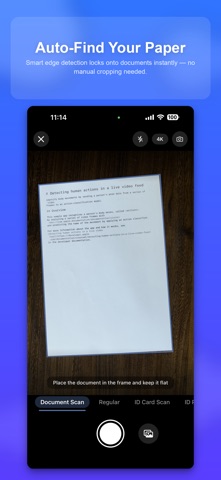


Description by 伟 高 Written by the developer, not by AppBrain. Click to read.
-----WHO IT'S FOR & USE CASES-----
Whether you work in an office, study at school, teach, freelance, or need to prepare ID and application materials, ScannerBest turns paper around you into clean PDFs or images.
● Work & business: contracts, agreements, quotes, meeting notes; invoices and receipts for reimbursement; whiteboards and handouts archived for sharing
● Students: class notes, boards, and slides; homework, tests, and lab reports; study guides and textbook pages organized for review
● Teachers: tests, marked papers, and notices scanned; whiteboard photos saved for records and parents
● IDs & applications: ID card, passport, household register, driver license, bank card templates; standard ID photos; visa, banking, and registration documents
● Freelancers: client contracts, quotes, delivery notes; project files and receipts sorted in folders
● Daily life: lease contracts, insurance papers, manuals and warranties; handwritten notes and book pages; important files backed up on device with tags
-----KEY FEATURES-----
【DOCUMENT SCANNING】
Shoot paper documents with automatic edge detection, perspective correction, and cropping.
Capture multiple pages in one session and apply filters such as AI Smart Enhance, Flatten, Remove Shadow, Push White, Text Enhance, and B&W Document.
Choose page sizes (e.g. A4), then reorder, rotate, flip, and adjust layout in the editor.
【IMPORT & CONVERT】
Import photos from your library or bring in PDF files for further editing.
Convert PDF pages into image drafts.
【ID & CARD SCANNING】
Templates for ID cards, passports, bank cards, driver licenses, vehicle licenses, household register pages, and more—with guided front/back or spread capture.
ID photo mode supports common standard sizes.
【EDIT & EXPORT】
Manage multi-page drafts and add text watermarks (tiled watermark is a premium feature).
Export as PDF, multiple images, or one long image; save to Photos or print PDF.
Lock drafts with a password and export password-protected PDFs (premium).
Merge drafts and build photo collages (premium).
【FILE LIBRARY】
Drafts stay on your device. Organize with folders, tags, and favorites; sort, filter, and batch move, delete, or export.
-----PREMIUM SUBSCRIPTION (IN-APP PURCHASE)-----
ScannerBest VIP is an auto-renewable subscription that unlocks card/ID export, tiled watermark, document encryption, draft merge, collage, and PDF export without the app watermark. Core scanning and editing are free; ID photo exports include a limited monthly quota on the free plan.
Plans and pricing:
· Quarterly: $3.99/quarter (7-day free trial for new subscribers)
· Annual: $9.99/year
Payment is charged to your iTunes Account. Subscription renews automatically unless auto-renew is turned off at least 24 hours before the end of the current period. Manage or cancel in Account Settings. Any unused free trial ends when you purchase a paid subscription.
Terms of Use: https://tuneify999.com/user_scannerbest.html
Privacy Policy: https://tuneify999.com/privacy_scannerbest.html
Subscription Terms: https://tuneify999.com/subsubscription_scannerbest.html
----TIPS FOR BETTER SCANS----
· Use good lighting and hold steady
· Fill the frame and keep the page flat
We welcome your feedback in the app.
Safety and technology
Found in the app by AppBrain- Price
- Free
- App size
- 159.5 MB
- Content rating
- Everyone
Technologies used by ScannerBest - PDF Scanner App
Releases
Updates seen on the App Store- Version
- 1.0.1
- Launched
- June 2026
No changelog data
Alternatives
Similar apps and more from 伟 高More from 伟 高


Rankings
App Store top chartsApp Store Rankings for ScannerBest - PDF Scanner App
About the app and developer
About ScannerBest - PDF Scanner App
ScannerBest - PDF Scanner App is a productivity app developed by 伟 高.
User Ratings
The app has no ratings yet.
App Information
ScannerBest - PDF Scanner App is freely available from the App Store. The app size is 159.55 MB. The latest version available is 1.0.1. The last update was on June 29, 2026.
Technical Requirements
The app has a content rating of Everyone. The app has been available on the App Store since June 2026.
Developer information for 伟 高
Address:
Frequently asked questions about ScannerBest - PDF Scanner App
Is ScannerBest - PDF Scanner App free?
Yes. ScannerBest - PDF Scanner App is free on the App Store.
Is ScannerBest - PDF Scanner App still available?
Yes. ScannerBest - PDF Scanner App is on the App Store, and the last update we saw was on June 29, 2026.
How large is ScannerBest - PDF Scanner App?
ScannerBest - PDF Scanner App is 159.55 MB.
Is ScannerBest - PDF Scanner App suitable for children?
App Store rates the content of ScannerBest - PDF Scanner App as suitable for everyone.
Who made ScannerBest - PDF Scanner App?
ScannerBest - PDF Scanner App was developed by 伟 高. It is listed in the productivity category on the App Store.