

Scanote is made and published by Natsuki Hibi. AppBrain is an independent app data site and isn't affiliated with Natsuki Hibi. The app name, icon, screenshots and description belong to Natsuki Hibi and are shown as published on the App Store.
AppBrain's verdict
- Last updated
- September 5, 2026
Rankings
App Store top chartsApp Store Rankings for Scanote
Releases
Updates seen on the App Store- Version
- 1.0.1
- Launched
- May 2026
No changelog data
User feedback
Ratings and reviews on the App StoreComments on Scanote for iOS
We don't have enough comments to show example comments. Please check back later.
Technology
Found in the app by AppBrain- Price
- Free
- App size
- 1.67 MB
- Content rating
- Everyone
Technologies used by Scanote
About the app and developer
About Scanote
Scanote is a productivity app developed by Natsuki Hibi.
User Ratings
The app has no ratings yet.
App Information
Scanote is freely available from the App Store. The app size is 1.67 MB. The latest version available is 1.0.1. The last update was on September 5, 2026.
Technical Requirements
The app has a content rating of Everyone. The app has been available on the App Store since May 2026.
Developer information for Natsuki Hibi
Address:
Store listing
By Natsuki Hibi, from the App Store

Description by Natsuki Hibi Written by the developer, not by AppBrain. Click to read.
Snap a photo of any document, handwritten note, or printed page — Scanote recognizes the text and saves it in a form you can read, copy, and organize later.
◆ Who It's For
- You need to scan multi-page documents and keep the text organized for later
- You want to snap a handout or meeting note and copy the text right away
- You want to paste recognized text directly into other apps or LLMs
- You want OCR that works entirely on-device — no data sent to any server
◆ Key Features
■ Scan Multiple Pages at Once
Capture multiple pages in a single session (up to 30 pages) and read them all together. Reorder pages freely after scanning, and copy the full text across all pages at once.
■ Copy and Share with Ease
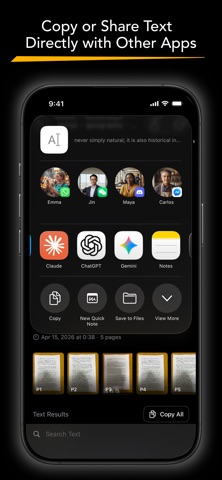
Copy the full recognized text, or copy page by page. Paste directly into any app, or share via the system share sheet.
■ History and Albums to Stay Organized
Every scan is saved to your history automatically. Use albums to group scans by project, class, or topic — so what you need is always easy to find.
■ Fully On-Device. No Internet. No Account.
OCR processing and storage happen entirely on your device. Works in airplane mode. No Wi-Fi, no cloud uploads, no sign-in required.
■ High-Accuracy OCR in 30 Languages
Supports Japanese, English, Chinese (Simplified & Traditional), Cantonese, Korean, French, German, Spanish, Arabic, and 20 more — all processed on your device. No internet connection required, and your text never leaves your phone.
Your notes. Your documents. As text, right where you need it.