

Scanpaper: PDF Scanner & OCR
Scanpaper: PDF Scanner & OCR is made and published by Artmvstd SIA. AppBrain is an independent app data site and isn't affiliated with Artmvstd SIA. The app name, icon, screenshots and description belong to Artmvstd SIA and are shown as published on the App Store.
AppBrain's verdict
- Rating on App Store
- 5.00
- 14 ratings
- Last updated
- October 24, 2026
It doesn't have enough ratings yet to judge what users think.
Rankings
App Store top chartsApp Store Rankings for Scanpaper: PDF Scanner & OCR
Competitors
Similar apps and more from Artmvstd SIA





Releases
Updates seen on the App Store- Version
- 1.1.0
- Launched
- August 2025
No changelog data
User feedback
Ratings and reviews on the App StoreComments on Scanpaper: PDF Scanner & OCR for iOS
We don't have enough comments to show example comments. Please check back later.
Technology
Found in the app by AppBrain- Price
- Free
- App size
- 51.9 MB
- Content rating
- Everyone
Technologies used by Scanpaper: PDF Scanner & OCR
About the app and developer
About Scanpaper: PDF Scanner & OCR
Scanpaper: PDF Scanner & OCR is an utilities app developed by Artmvstd SIA.
User Ratings
Scanpaper: PDF Scanner & OCR is rated 5.00 out of 5 stars. The rating is based on 14 ratings.
App Information
Scanpaper: PDF Scanner & OCR is freely available from the App Store. The app size is 51.91 MB. The latest version available is 1.1.0. The last update was on October 24, 2026.
Technical Requirements
The app has a content rating of Everyone. The app has been available on the App Store since August 2025.
Developer information for Artmvstd SIA
Address:
Frequently asked questions about Scanpaper: PDF Scanner & OCR
Is Scanpaper: PDF Scanner & OCR free?
Yes. Scanpaper: PDF Scanner & OCR is free on the App Store.
Is Scanpaper: PDF Scanner & OCR still available?
Yes. Scanpaper: PDF Scanner & OCR is on the App Store, and the last update we saw was on October 24, 2026.
How large is Scanpaper: PDF Scanner & OCR?
Scanpaper: PDF Scanner & OCR is 51.91 MB.
Is Scanpaper: PDF Scanner & OCR suitable for children?
App Store rates the content of Scanpaper: PDF Scanner & OCR as suitable for everyone.
How do people rate Scanpaper: PDF Scanner & OCR?
Scanpaper: PDF Scanner & OCR scores 5.00 out of 5 stars, from 14 ratings on the App Store.
Who made Scanpaper: PDF Scanner & OCR?
Scanpaper: PDF Scanner & OCR was developed by Artmvstd SIA. It is listed in the utilities category on the App Store.
What are the best alternatives to Scanpaper: PDF Scanner & OCR?
People looking at Scanpaper: PDF Scanner & OCR also look at these utilities apps: Cleanup Storage: Cleaner Phone, PDF Converter - Editor Viewer, AI Note Summarize, 万能遥控器 - 通用遥控手机助手, MP3 & MP4 Converter.
Store listing
By Artmvstd SIA, from the App Store


Description by Artmvstd SIA Written by the developer, not by AppBrain. Click to read.
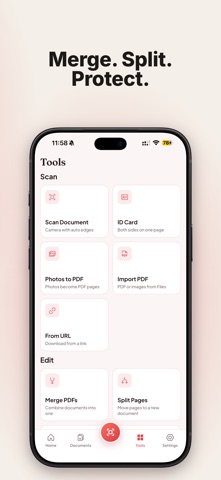
SCAN ANYTHING TO PDF
• Live edge detection and auto capture
• Multi-page scans in one go, pages reordered by drag
• Filters for documents, receipts, photos and books
• ID card and passport modes: both sides on one page
• Import photos, files or a link and turn them into PDF
FIND THE WORDS INSIDE YOUR SCANS
• Text recognition (OCR) runs on your phone
• Search your library by name or by the text on the page
• Copy or export the recognised text
SIGN AND SEND
• Draw your signature once, place it on any page
• Add text, initials, stamps and markup
• Share as PDF, images or plain text, print, or save to Files
ORGANISE AND PROTECT
• Folders, search and sorting
• Merge PDFs, split pages, compress for email
• Password-protect a PDF and lock the app with Face ID or a PIN
PRIVATE BY DESIGN
No account. No cloud. Your scans never leave your phone unless you share them.
WHO IT'S FOR
Students submitting assignments, freelancers sending signed contracts, travellers keeping passport copies, anyone who wants paperwork out of the drawer and into their pocket.
Scanpaper Pro unlocks unlimited documents with no footer, High scan quality, text recognition and search, ID card, passport and book modes, PDF passwords, compression, watermarks and page numbers, app lock with Face ID, and unlimited signatures and stamps. Merge, split, folders, markup and sharing are free. A free trial is available.
If you opt to purchase a subscription, the fee is charged to your Apple ID account. Subscriptions renew automatically unless cancelled at least 24 hours before the end of the current period. Manage or cancel in your App Store account settings. Any unused portion of a free trial is forfeited when you purchase a subscription.
Terms of Use: https://artmvstd.com/terms/
Privacy Policy: https://artmvstd.com/privacy/