

ScanPin: QR Code Scanner
ScanPin: QR Code Scanner is made and published by Hakan Cevik. AppBrain is an independent app data site and isn't affiliated with Hakan Cevik. The app name, icon, screenshots and description belong to Hakan Cevik and are shown as published on the App Store.
AppBrain's verdict
- Last updated
- August 22, 2026
- Size
- 15.1 MB
User feedback
Ratings and reviews on the App StoreComments on ScanPin: QR Code Scanner for iOS
We don't have enough comments to show example comments. Please check back later.
Store listing
By Hakan Cevik, from the App Store

Description by Hakan Cevik Written by the developer, not by AppBrain. Click to read.
Most QR scanners treat every scan like a disposable action: scan, open, forget. ScanPin is different. Preview what you scanned, save it to a searchable QR history, organize it with notes and tags, and find it again later without rescanning.
Whether it’s a restaurant menu, hotel Wi‑Fi QR code, event ticket, boarding pass link, contact card, document, coupon, or a place you want to remember, ScanPin turns random scans into a useful personal library.
SCAN QR CODES FAST
Open ScanPin and scan supported QR codes with your camera. ScanPin recognizes common QR content types so you can move from scan to save in seconds.
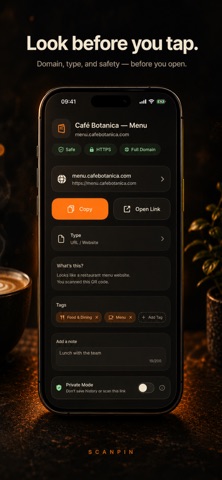
PREVIEW BEFORE YOU OPEN
Before opening supported links, ScanPin can show:
• Destination domain
• Detected content type
• Basic local caution signals
• Full link when available
These signals give you more context before you tap. ScanPin is not a malware scanner and does not guarantee that a destination is safe.
SAVE QR CODES FOR LATER
Stop losing useful QR codes after a single scan. Save items with:
• Custom title
• Notes
• Tags
• Favorites
• Detected QR type
• Optional location
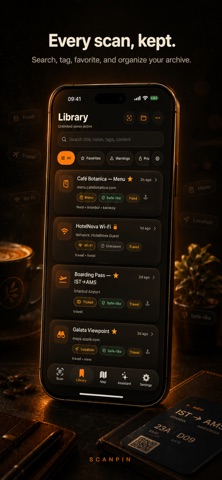
Your saved scans become a searchable QR library you can return to whenever you need them.
BUILD A REAL QR HISTORY
Use your QR history to:
• Search saved QR codes
• Filter and organize your library
• Favorite frequently used items
• Reopen links without scanning again
• Keep related scans together
• Find important codes days or weeks later
Free users can save up to 10 items.
MADE FOR EVERYDAY QR USE
RESTAURANT MENUS
Save a menu QR code from a café or restaurant so you can reopen it later without scanning the table again.
WI‑FI QR CODES
Keep hotel, guest, café, office, or travel Wi‑Fi QR codes in your library for easier access later.
TICKETS & TRAVEL
Save ticket links, boarding-pass links, venue QR codes, travel check-ins, museum guides, and other useful travel-related scans.
DOCUMENTS & LINKS
Keep product manuals, document links, forms, coupons, contact cards, event pages, and useful web links organized in one place.
PLACES WORTH REMEMBERING
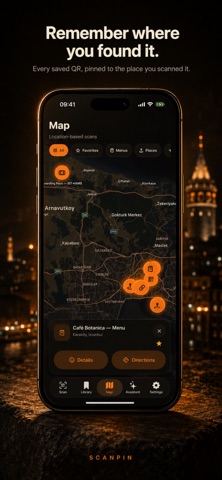
Optionally save location with a scan so you can remember where you found it.
PRIVATE BY DESIGN
Saved ScanPin content is stored locally on your device. No ScanPin account is required to build your library. Preview and caution signals are processed locally before you choose to open supported links. Pro users can also lock private saved items with Face ID.
SCANPIN PRO
Upgrade when you want to go beyond the free 10-save limit. ScanPin Pro includes:
• Unlimited saved QR codes
• Scan QR codes from photos
• Collections for trips, work, projects, and personal groups
• Map view for saved scan locations
• Home Screen widgets for quick access
• Face ID lock for private items
• Export and import your library
LOCAL INSIGHTS
ScanPin Pro includes a local insights assistant designed to help you understand and revisit saved content using information from your ScanPin library.
HOME SCREEN ACCESS
Use widgets to surface recent or favorite saved items so important QR codes are easier to reopen from your Home Screen.
MAP YOUR SAVED PLACES
When location is enabled for saved scans, Pro users can browse those memories on a map and return to useful places more easily.
COLLECTIONS THAT MATCH REAL LIFE
Organize saved QR codes into collections for trips, work, events, restaurants, and personal projects.
EXPORT & IMPORT
Pro users can export and import their ScanPin library.
WHY SCANPIN?
Because useful QR codes should not disappear the moment you close a browser tab.
ScanPin combines QR scanning with the features generic readers often leave behind: QR history, saving, search, organization, preview, notes, tags, favorites, optional location, and private local storage.
Scan once. Save what matters. Find it later.
Privacy Policy: https://cevik10.github.io/privacy.html
Terms of Use: https://cevik10.github.io/terms.html
Safety and technology
Found in the app by AppBrain- Price
- Free
- App size
- 15.1 MB
- Content rating
- Everyone
Technologies used by ScanPin: QR Code Scanner
Releases
Updates seen on the App Store- Version
- 1.0
- Launched
- August 2026
No changelog data
Alternatives
Similar apps and more from Hakan CevikAlternatives to ScanPin: QR Code Scanner


More from Hakan Cevik


Rankings
App Store top chartsApp Store Rankings for ScanPin: QR Code Scanner
About the app and developer
About ScanPin: QR Code Scanner
ScanPin: QR Code Scanner is an utilities app developed by Hakan Cevik.
User Ratings
The app has no ratings yet.
App Information
ScanPin: QR Code Scanner is freely available from the App Store. The app size is 15.08 MB. The latest version available is 1.0. The last update was on August 22, 2026.
Technical Requirements
The app has a content rating of Everyone. The app has been available on the App Store since August 2026.
Developer information for Hakan Cevik
Address: