

Scanter: PDF Scanner & Docs
Scanter: PDF Scanner & Docs is made and published by VISORYA YAZILIM VE TEKNOLOJI ANONIM SIRKETI. AppBrain is an independent app data site and isn't affiliated with VISORYA YAZILIM VE TEKNOLOJI ANONIM SIRKETI. The app name, icon, screenshots and description belong to VISORYA YAZILIM VE TEKNOLOJI ANONIM SIRKETI and are shown as published on the App Store.
AppBrain's verdict
- Last updated
- October 15, 2026
Rankings
App Store top chartsApp Store Rankings for Scanter: PDF Scanner & Docs
Competitors
Similar apps and more from VISORYA YAZILIM VE TEKNOLOJI ANONIM SIRKETIAlternatives to Scanter: PDF Scanner & Docs


Also available on Google Play

Releases
Updates seen on the App Store- Version
- 1.1.4
- Launched
- June 2026
No changelog data
User feedback
Ratings and reviews on the App StoreComments on Scanter: PDF Scanner & Docs for iOS
We don't have enough comments to show example comments. Please check back later.
Technology
Found in the app by AppBrain- Price
- Free
- App size
- 89.2 MB
- Content rating
- Everyone
Technologies used by Scanter: PDF Scanner & Docs
About the app and developer
About Scanter: PDF Scanner & Docs
Scanter: PDF Scanner & Docs is a productivity app developed by VISORYA YAZILIM VE TEKNOLOJI ANONIM SIRKETI.
User Ratings
The app has no ratings yet.
App Information
Scanter: PDF Scanner & Docs is freely available from the App Store. The app size is 89.21 MB. The latest version available is 1.1.4. The last update was on October 15, 2026.
Technical Requirements
The app has a content rating of Everyone. The app has been available on the App Store since June 2026.
Developer information for VISORYA YAZILIM VE TEKNOLOJI ANONIM SIRKETI
Store listing
By VISORYA YAZILIM VE TEKNOLOJI ANONIM SIRKETI, from the App Store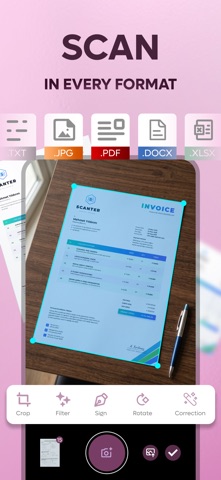



Description by VISORYA YAZILIM VE TEKNOLOJI ANONIM SIRKETI Written by the developer, not by AppBrain. Click to read.
WHAT YOU CAN DO
• Scan documents with automatic edge detection and perspective correction
• Scan several pages in a row
• Color, grayscale and black & white filters
• Export to PDF or images
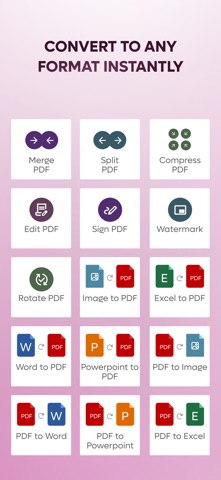
• Merge, split, compress, rotate and watermark PDFs
• Crop, edit and sign your pages
• Convert Word, Excel, PowerPoint and images to PDF, and PDF to Word, PowerPoint and images
• Ask AI: type a question and get an answer
• Share by email, Messages, WhatsApp, Drive, Dropbox and more, or print directly
YOUR DATA
Scanning, merging, splitting, compressing, signing and editing happen on your device. File conversion and cloud storage upload your file over an encrypted connection to Scanter's servers in Türkiye; converted files are deleted automatically within hours. Ask AI sends only the text of your question to Google's Gemini service. The free version shows ads, and you can manage your ad and privacy choices in the app. We do not sell your data.
AVAILABLE IN 28 LANGUAGES
SCANTER PRO SUBSCRIPTION
Scanter Pro is an auto-renewing subscription that removes ads and daily limits and includes cloud storage. Payment is charged to your store account at purchase confirmation. The subscription renews automatically unless it is cancelled at least 24 hours before the end of the current period, and you can manage or cancel it in your store account settings. Prices vary by country or region and are shown in the app before purchase.
Terms of Use (EULA): https://scanterapp.com/terms-tr.html
Privacy Policy: https://scanterapp.com/privacy.html