




AppBrain's verdict
- Rating on App Store
- 3.00
- 2 ratings
- Last updated
- November 10, 2026
- Size
- 8.86 MB
It doesn't have enough ratings yet to judge what users think.
User feedback
Ratings and reviews on the App StoreComments on ScanTo Pro: Offline PDF & OCR for iOS
We don't have enough comments to show example comments. Please check back later.
Store listing
By Guan Feng Lai, from the App StoreDescription by Guan Feng Lai Written by the developer, not by AppBrain. Click to read.
Scan contracts, receipts and IDs into crisp PDFs — then find any of them later by typing one word from inside the document.
On-device text recognition (OCR) reads every scan and auto-sorts it into Receipts, IDs, Cards and Contracts, so you never hunt by file name again.
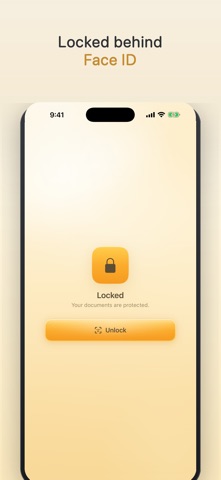
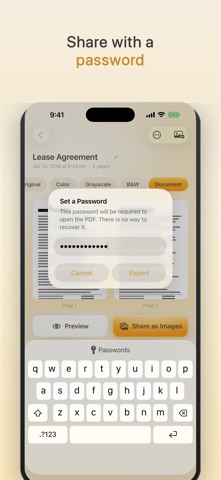
It all works offline: nothing is uploaded, no account, same in airplane mode. Lock the app with Face ID and export password-protected PDFs.
SEARCH INSIDE YOUR DOCUMENTS — OFFLINE
• On-device text recognition (OCR) reads every scan automatically.
• Search for a word and find the document that contains it — not just by its name.
• Scans are auto-sorted into Receipts, IDs, Cards, Contracts and more — all offline.
• View and copy the recognized text, or export it as a .txt file. It never leaves your device.
LOCKED & ENCRYPTED
• Lock the app with Face ID or your passcode.
• Export password-protected, encrypted PDFs to share sensitive documents safely.
PRIVATE BY DESIGN
• No cloud. Your scans never touch a server.
• No account. No sign-up, no login, no profile.
• No tracking. Zero analytics, zero ads, zero third-party SDKs.
• No network. It works exactly the same in airplane mode.
FREE TO START — UNLOCK ONCE
Download free — scanning, photo import and on-device text search are unlimited for everyone. Your first 3 PDF exports are on us (free exports carry a watermark). A single one-time purchase unlocks unlimited PDF exports, removes the watermark for good and opens every advanced export — OCR text export, password-encrypted PDFs and the ID-card layout. No subscription, no ads, no trial that quietly starts charging.
EVERYTHING YOU NEED
• Fast multi-page scanning with automatic edge detection and perspective correction.
• Five looks: Original, Color, Grayscale, B&W, and Document enhance.
• Reorder, rotate, delete, and add pages anytime.
• Smart auto-naming from the document's contents.
• ID Card mode: front and back on a single page.
• Export PDFs sized to the image, A4, or US Letter — ready to print.
• Save to Files, or share to Mail, AirDrop, or Messages.
• Scan hands-free with Siri, Spotlight, Shortcuts, or the Action Button.
• A calm, premium interface, designed down to the last detail.
• Now available in 44 languages — auto-detected, or switch any time.
Built for lawyers, accountants, freelancers, founders, students — anyone who scans something they'd rather not hand to someone else's server.
Your documents stay on this device. That's the whole idea.
Optimized for iPhone Duo.
Safety and technology
Found in the app by AppBrain- Price
- Free
- App size
- 8.86 MB
- Content rating
- Everyone
Technologies used by ScanTo Pro: Offline PDF & OCR
Releases
Updates seen on the App Store- Version
- 1.2.12
- Launched
- June 2026
No changelog data
Alternatives
Similar apps and more from Guan Feng Lai


Rankings
App Store top chartsApp Store Rankings for ScanTo Pro: Offline PDF & OCR
About the app and developer
About ScanTo Pro: Offline PDF & OCR
ScanTo Pro: Offline PDF & OCR is a productivity app developed by Guan Feng Lai.
What is the rating of ScanTo Pro: Offline PDF & OCR?
ScanTo Pro: Offline PDF & OCR is rated 3.00 out of 5 stars, based on 2 ratings.
Is ScanTo Pro: Offline PDF & OCR free?
ScanTo Pro: Offline PDF & OCR is free. The app size is 8.86 MB. The latest version available is 1.2.12. The last update was on November 10, 2026.
What are the requirements for ScanTo Pro: Offline PDF & OCR?
The app has a content rating of Everyone. The app has been available on the App Store since June 2026.
ScanTo Pro: Offline PDF & OCR is made and published by Guan Feng Lai. AppBrain is an independent app data site and isn't affiliated with Guan Feng Lai. The app name, icon, screenshots and description belong to Guan Feng Lai and are shown as published on the App Store.
Developer information for Guan Feng Lai
Address:
Frequently asked questions about ScanTo Pro: Offline PDF & OCR
Is ScanTo Pro: Offline PDF & OCR free?
Yes. ScanTo Pro: Offline PDF & OCR is free on the App Store.
Is ScanTo Pro: Offline PDF & OCR still available?
Yes. ScanTo Pro: Offline PDF & OCR is on the App Store, and the last update we saw was on November 10, 2026.
How large is ScanTo Pro: Offline PDF & OCR?
ScanTo Pro: Offline PDF & OCR is 8.86 MB.
Is ScanTo Pro: Offline PDF & OCR suitable for children?
App Store rates the content of ScanTo Pro: Offline PDF & OCR as suitable for everyone.
How do people rate ScanTo Pro: Offline PDF & OCR?
ScanTo Pro: Offline PDF & OCR scores 3.00 out of 5 stars, from 2 ratings on the App Store.
Who made ScanTo Pro: Offline PDF & OCR?
ScanTo Pro: Offline PDF & OCR was developed by Guan Feng Lai. It is listed in the productivity category on the App Store.
What are the best alternatives to ScanTo Pro: Offline PDF & OCR?
People looking at ScanTo Pro: Offline PDF & OCR also look at these productivity apps: Save My Receipt, AI Crypto Portfolio: Koin PRO, Ear Recorder, Walkaway: Screen Time Blocker, FastScan2PDF.