

Scene Cards is made and published by Keith Tunney. AppBrain is an independent app data site and isn't affiliated with Keith Tunney. The app name, icon, screenshots and description belong to Keith Tunney and are shown as published on the App Store.
AppBrain's verdict
- Last updated
- October 9, 2026
Rankings
App Store top chartsApp Store Rankings for Scene Cards
Competitors
Similar apps and more from Keith TunneyAlternatives to Scene Cards


Releases
Updates seen on the App Store- Version
- 2.1.1
- Launched
- April 2026
No changelog data
User feedback
Ratings and reviews on the App StoreComments on Scene Cards for iOS
We don't have enough comments to show example comments. Please check back later.
Technology
Found in the app by AppBrain- Price
- Free
- App size
- 32.6 MB
- Content rating
- Everyone
Technologies used by Scene Cards
About the app and developer
About Scene Cards
Scene Cards is a productivity app developed by Keith Tunney.
User Ratings
The app has no ratings yet.
App Information
Scene Cards is freely available from the App Store. The app size is 32.61 MB. The latest version available is 2.1.1. The last update was on October 9, 2026.
Technical Requirements
The app has a content rating of Everyone. The app has been available on the App Store since April 2026.
Developer information for Keith Tunney
Address:
Frequently asked questions about Scene Cards
Is Scene Cards free?
Yes. Scene Cards is free on the App Store.
Is Scene Cards still available?
Yes. Scene Cards is on the App Store, and the last update we saw was on October 9, 2026.
How large is Scene Cards?
Scene Cards is 32.61 MB.
Is Scene Cards suitable for children?
App Store rates the content of Scene Cards as suitable for everyone.
Who made Scene Cards?
Scene Cards was developed by Keith Tunney. It is listed in the productivity category on the App Store.
What are the best alternatives to Scene Cards?
People looking at Scene Cards also look at these productivity apps: Crew-First, TextPad Editor, Film Beans Timesheets, Luciditi, Sixth Degree.
Store listing
By Keith Tunney, from the App Store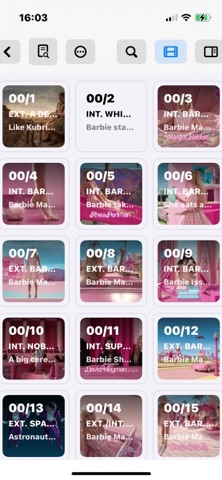
Description by Keith Tunney Written by the developer, not by AppBrain. Click to read.
Import a PDF or Final Draft script and your scenes will appear instantly as cards on a wall — ready to sort, annotate, and plan. Whether you're a writer breaking story, a director prepping a shoot, or any department you are working in, Scene Cards gives you the big picture and the fine detail at the same time.
Wall View
See your entire film at a glance. Scenes display as cards showing slug line, synopsis, and reference images. Drag to reorder, gap-close, or renumber with a tap.
Print and pin it to the wall or use on your desktop or tablet.
Script Panel
Click open the side panel and read the script pages of the scene you select (no more waiting for sides on set) characters may be colour annotated for clarity.
Inspector Panel
Dive into any scene — attach reference images, video, audio ,or folders, Each Scene Card can hold any amount of information about it's scene. Create a folder for your own department then share with others.
Edit its synopsis, move it anywhere in the grid, mark it omitted, or insert a new scene after it.
Three Modes
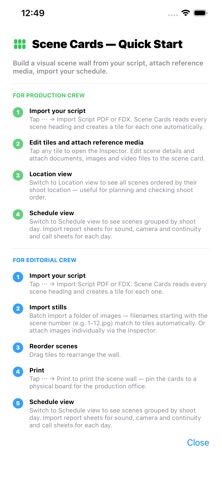
Switch between Script, Locations, and Schedule views.
Script is imported from any PDF or Final Draft
Locations all scenes organised in location order (think recces and fast access to all scene information)
Schedule import your one liner pdf and see all scene cards in shoot day order
Designed for macOS and iPhone/iPad
A single document works across all your devices. The macOS layout shows everything at once; iOS keeps it clean with sheets and popovers.
Scene Cards saves in an open document format — your data is always yours.
Terms of Use: https://www.apple.com/legal/internet-services/itunes/dev/stdeula/