

Scene vLog: Multi-lens cam
Scene vLog: Multi-lens cam is made and published by ryota kido. AppBrain is an independent app data site and isn't affiliated with ryota kido. The app name, icon, screenshots and description belong to ryota kido and are shown as published on the App Store.
AppBrain's verdict
- Last updated
- October 3, 2026
Rankings
App Store top chartsApp Store Rankings for Scene vLog: Multi-lens cam
Competitors
Similar apps and more from ryota kidoAlternatives to Scene vLog: Multi-lens cam


More from ryota kido


Releases
Updates seen on the App Store- Version
- 1.3
- Launched
- August 2026
No changelog data
User feedback
Ratings and reviews on the App StoreComments on Scene vLog: Multi-lens cam for iOS
We don't have enough comments to show example comments. Please check back later.
Technology
Found in the app by AppBrain- Price
- Free
- App size
- 5.64 MB
- Content rating
- Everyone
Technologies used by Scene vLog: Multi-lens cam
About the app and developer
About Scene vLog: Multi-lens cam
Scene vLog: Multi-lens cam is a photo & video app developed by ryota kido.
User Ratings
The app has no ratings yet.
App Information
Scene vLog: Multi-lens cam is freely available from the App Store. The app size is 5.64 MB. The latest version available is 1.3. The last update was on October 3, 2026.
Technical Requirements
The app has a content rating of Everyone. The app has been available on the App Store since August 2026.
Developer information for ryota kido
Address:
Frequently asked questions about Scene vLog: Multi-lens cam
Is Scene vLog: Multi-lens cam free?
Yes. Scene vLog: Multi-lens cam is free on the App Store.
Is Scene vLog: Multi-lens cam still available?
Yes. Scene vLog: Multi-lens cam is on the App Store, and the last update we saw was on October 3, 2026.
How large is Scene vLog: Multi-lens cam?
Scene vLog: Multi-lens cam is 5.64 MB.
Is Scene vLog: Multi-lens cam suitable for children?
App Store rates the content of Scene vLog: Multi-lens cam as suitable for everyone.
Who made Scene vLog: Multi-lens cam?
Scene vLog: Multi-lens cam was developed by ryota kido. It is listed in the photo & video category on the App Store.
What are the best alternatives to Scene vLog: Multi-lens cam?
People looking at Scene vLog: Multi-lens cam also look at these photo & video apps: Influencer Camera: Vlog Maker, MomentCamera - Food & Pets, SplitLens Dual Camera, MixCam: Dual Camera Recorder, Double Lens: Dual Camera.
Store listing
By ryota kido, from the App Store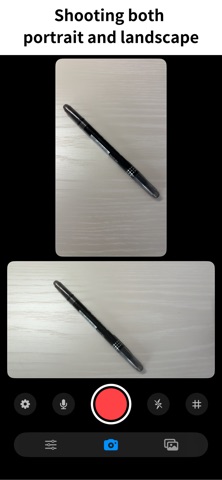
Description by ryota kido Written by the developer, not by AppBrain. Click to read.
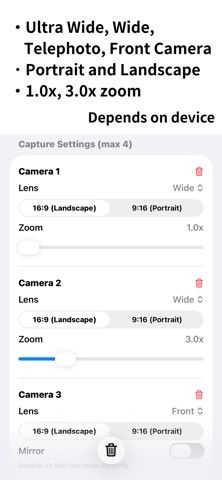
Ultra Wide, Wide, Telephoto, Front Camera
Portrait and Landscape
1.0x, 3.0x zoom
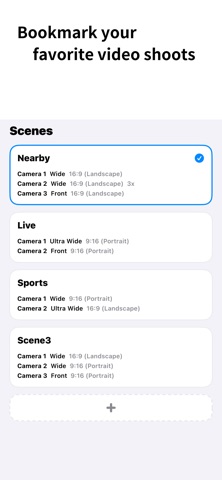
Mix and match freely, and save your own shooting setups as scenes.
* Available lenses depend on your device.
For example:
Sports Mode: Telephoto + Ultra Wide
Concert Mode: Ultra Wide + Front Camera
Lecture Mode: Ultra Wide + Wide
On location, just pick a scene and hit record. No retakes. No switching cameras. One take, every angle.
Capture Settings
Quality: 720p / 1080p / 4K
Frame Rate: 30 / 60 FPS
File Format: MOV / MP4
Stabilization: Off / Standard / Cinematic
Microphone Selection / Flash / Grid Overlay
Save to: Device / external SSD
Free version
• All recording features above are free to use
• Each recording can be up to 10 minutes long
• Videos under 3 minutes are saved with no watermark
• Videos 3 minutes or longer are saved with a watermark — you can remove it from up to 10 videos for free
Pro (requires in-app purchase: monthly plan or one-time lifetime purchase)
• No watermark on any video, including previously recorded ones
• No recording time limit
Available as a monthly plan or a one-time lifetime purchase.
Launch Campaign
If you first download Scene vLog by September 15, 2026, all Pro features above are included for free, permanently — no purchase required. Downloads after that date require the Pro in-app purchase for those features.
Terms of Use (EULA)
By downloading or using this app, you agree to Apple’s standard Terms of Use (EULA):
https://www.apple.com/legal/internet-services/itunes/dev/stdeula/