SceneView Demo — SDK samples is made and published by
Thomas Gorisse.
AppBrain is an independent app data site and isn't affiliated with Thomas Gorisse.
The app name, icon, screenshots and description belong to Thomas Gorisse and are shown as
published on the App Store.
About SceneView Demo — SDK samples
SceneView Demo — SDK samples is an utilities app developed by Thomas Gorisse.
User Ratings
The app has no ratings yet.
App Information
SceneView Demo — SDK samples is freely available from the App Store. The app size is 254.11 MB. The latest version available is 4.52.0. The last update was on October 6, 2026.
Technical Requirements
The app has a content rating of Everyone. The app has been available on the App Store since April 2026.
Description by Thomas Gorisse(from the App Store)
See what the SceneView SDK can do, on your own iPhone or iPad, before you write a line of code.
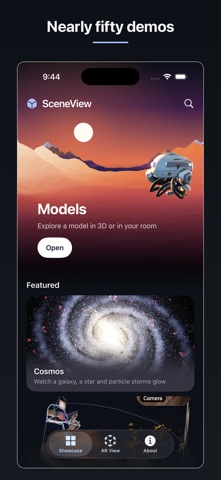
SceneView is an open-source 3D and augmented reality SDK for SwiftUI, built on RealityKit. This app is its demo: nearly 50 screens, each one a working sample of a feature you can put in your own app. Every screen links to the source code that draws it, and most of them are only a few lines long.
START HERE
- Cosmos — a galaxy, a star with a ringed planet, and particle storms that glow in real time. Tap the planet and the camera flies there. - Rerun AR Replay — watch a real AR session rebuild itself in 3D.
WHAT THE SAMPLES SHOW
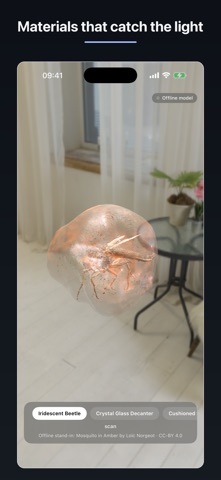
- 3D models — load USDZ and Reality files, play their animations, and orbit, pinch and zoom the camera. - Augmented reality — place a model on a table, hang it on a wall, track images and faces, or place it instantly without waiting for a plane. - Real-world blending — real furniture and passing people stay in front of virtual objects, and the light around you lights the model. - Lighting and materials — swap HDR environments and watch reflections and shadows change in real time. - Scene mesh, depth, physics, geometry, spatial audio and more. - Your own files — open a USDZ, Reality, STL, OBJ, PLY or 3MF file and see how the SDK renders it.
FOR DEVELOPERS
A 3D model on screen is one view, and AR placement is one call. Find the screen that looks like what you want to build, open its code, and copy it into your project. The SDK, the samples and this app are free and open source.
github.com/sceneview/sceneview
PRIVACY
No account, no ads, no cross-app tracking. Your models and the camera feed stay on your device — the camera is used only for AR, and nothing it sees is stored or uploaded. The app sends usage statistics and crash reports (Firebase), never linked to your identity, to decide what to improve next — you can turn them off in Settings. Beyond that, the one feature that reaches the network is the online model gallery, and only while you are searching it.
Open source under the Apache License 2.0. https://github.com/sceneview/sceneview
Each subscription will automatically renew 3 days before the expiration date for
the same time period. Subscriptions can be cancelled at any time before the renewal.