

SCIPIA ROBOCON is made and published by JIN KYU PARK. AppBrain is an independent app data site and isn't affiliated with JIN KYU PARK. The app name, icon, screenshots and description belong to JIN KYU PARK and are shown as published on the App Store.
AppBrain's verdict
- Last updated
- February 24, 2026
Rankings
App Store top chartsApp Store Rankings for SCIPIA ROBOCON
Competitors
Similar apps and more from JIN KYU PARKAlternatives to SCIPIA ROBOCON





Releases
Updates seen on the App Store- Version
- 2.0
- Launched
- June 2023
No changelog data
User feedback
Ratings and reviews on the App StoreComments on SCIPIA ROBOCON for iOS
We don't have enough comments to show example comments. Please check back later.
Technology
Found in the app by AppBrain- Price
- Free
- App size
- 1.08 MB
- Content rating
- Everyone
Technologies used by SCIPIA ROBOCON
About the app and developer
About SCIPIA ROBOCON
SCIPIA ROBOCON is an education app developed by JIN KYU PARK.
User Ratings
The app has no ratings yet.
App Information
SCIPIA ROBOCON is freely available from the App Store. The app size is 1.08 MB. The latest version available is 2.0. The last update was on February 24, 2026.
Technical Requirements
The app has a content rating of Everyone. The app has been available on the App Store since June 2023.
Developer information for JIN KYU PARK
Address:
Frequently asked questions about SCIPIA ROBOCON
Is SCIPIA ROBOCON free?
Yes. SCIPIA ROBOCON is free on the App Store.
Is SCIPIA ROBOCON still available?
Yes. SCIPIA ROBOCON is on the App Store, and the last update we saw was on February 24, 2026.
How large is SCIPIA ROBOCON?
SCIPIA ROBOCON is 1.08 MB.
Is SCIPIA ROBOCON suitable for children?
App Store rates the content of SCIPIA ROBOCON as suitable for everyone.
Who made SCIPIA ROBOCON?
SCIPIA ROBOCON was developed by JIN KYU PARK. It is listed in the education category on the App Store.
What are the best alternatives to SCIPIA ROBOCON?
People looking at SCIPIA ROBOCON also look at these education apps: ForBLE, RoboCat app, EyesBot VR, HSYCO, Dash IoT.
Store listing
By JIN KYU PARK, from the App Store

Description by JIN KYU PARK Written by the developer, not by AppBrain. Click to read.
Features:
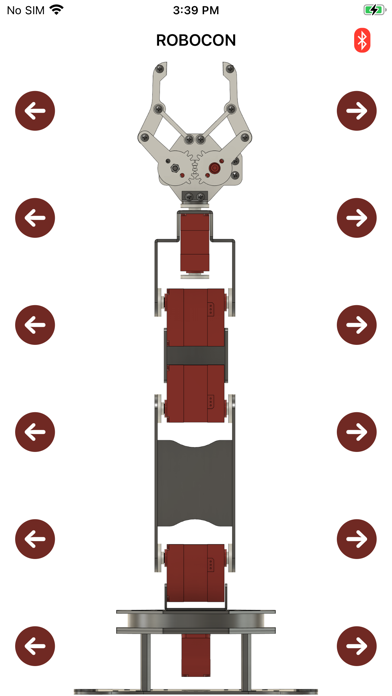
- Button Mode: Control each joint with directional arrows and robot arm diagram
- Slider Mode: Fine-tune all 6 servo channels with real-time PWM sliders (500-2500)
- Pose Management: Save current positions as poses, rename, reorder, and delete
- Sequence Playback: Select multiple poses and play them in sequence with adjustable delay
- Teach Download: Send saved poses to robot's EEPROM for standalone playback
- Teach Upload: Load teach data from robot back to the app
- File Export/Import: Back up and restore poses as JSON files
- Real-time Monitoring: Live servo position feedback via status polling
- External Event Trigger: Enable hardware trigger for automatic sequence playback
- Auto-reconnect: Automatically reconnect to the last paired Bluetooth device
How to use:
1. Power on the robot arm
2. Open the app and tap the Bluetooth icon to scan
3. Select your BLE module to connect
4. Control joints using Button or Slider mode
5. Save poses and create motion sequences
Compatible with Scipia 6-DOF robot arm kit with Arduino Uno controller.