

Scorelio: Sheet Music Player
Scorelio: Sheet Music Player is made and published by Ishinomaru. AppBrain is an independent app data site and isn't affiliated with Ishinomaru. The app name, icon, screenshots and description belong to Ishinomaru and are shown as published on the App Store.
AppBrain's verdict
- Last updated
- November 2, 2026
- Size
- 49.9 MB
User feedback
Ratings and reviews on the App StoreComments on Scorelio: Sheet Music Player for iOS
We don't have enough comments to show example comments. Please check back later.
Store listing
By Ishinomaru, from the App Store


Description by Ishinomaru Written by the developer, not by AppBrain. Click to read.
No score at hand? Try the bundled sample — a four-part choir piece — right away.
■ Supported file formats
- MusicXML (.xml / .musicxml / .mxl)
- Standard MIDI File (.mid / .midi)
- MuseScore (.mscz / .mscx)
- Finale (.musx / .mus)
■ Reading
- Orchestral playback with a cursor that follows the music in real time
- Tap anywhere on the score to play from there; jump to any measure or section
- Turn pages or hold the playback position centred or left of centre; pinch-to-zoom, double-tap to fit, full-screen paper layout, single-line horizontal scroll
- Solfège syllables (movable do) under the notes, taken from the key signature and following changes of key
- Write on the score: text notes and a freehand pen. What you write stays on the same notes when you change the staff size or the layout, and the score file itself is never changed
■ Practising part by part
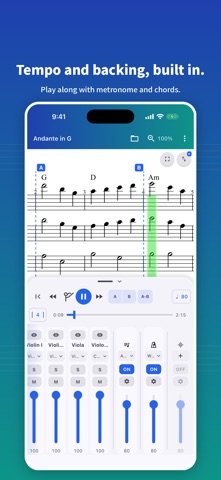
- Per-part mute, solo, volume and instrument (sound)
- Hide the other staves and read only your own line (hidden parts keep playing)
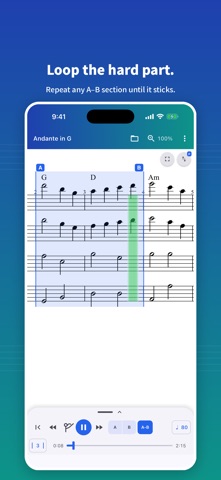
- A-B repeat with beat-snapped markers, and a tempo that can rise each lap
- Tempo from 50 to 300 BPM, with a one-bar count-in
- Metronome with selectable click sounds, on every beat or on the offbeats
- Chord track: automatic backing that follows the chord symbols in the score, with selectable voicings
- Audio track: your own backing or reference recording in sync with the score — it follows even when you change the tempo
- Settings and annotations are remembered per score and come back when you reopen it
- Recent scores on the home screen, control from an external keyboard or a page-turner pedal, and screen reader support (VoiceOver)
■ Ways to practice
- Solo your own part to learn it, then mute it and play along with the rest
- Loop the two bars that keep going wrong, slowly at first, faster each lap
- Read your own staff large while the rest of the ensemble keeps playing
- Play through against a backing track, the metronome or the chord backing
- Sight-read something new with the solfège syllables to hear how the notes relate
■ Scorelio Pro (one-time purchase)
A single purchase unlocks everything below and restores on your other devices with the same account:
- Remove ads
- An additional sound font, plus your own sound fonts (.sf2 / .sf3)
- Export scores and performances (MusicXML, also compressed .mxl / MIDI / PDF / audio .m4a / video .mp4)
- Transpose by semitone
- Play in full-page view, with the current bar marked and pages turning on their own
- Notation and reference pitch: show transposing parts as written or as they sound, and tune to A=442 or another reference
■ Privacy-friendly by design
- The contents and names of the scores you open are processed only on your device and never uploaded
- Viewing, playback and Pro features such as transpose and export work without an internet connection — you only need a connection to purchase or restore Pro
- No name, email, or account sign-in required
- An advertising ID is collected for ad delivery, and anonymous usage and crash data for quality improvement (see the privacy policy)
■ Languages
English / German / Japanese / Simplified Chinese / Traditional Chinese / Korean / Vietnamese / French / Portuguese (Brazil)
Whether you sing in a choir, play in a wind ensemble, rehearse in a band, or prepare for your next lesson, Scorelio fits in your pocket.
Safety and technology
Found in the app by AppBrain- Price
- Free
- App size
- 49.9 MB
- Content rating
- Everyone
Technologies used by Scorelio: Sheet Music Player
Releases
Updates seen on the App Store- Version
- 1.17.1
- Launched
- May 2026
No changelog data
Alternatives
Similar apps and more from Ishinomaru


Rankings
App Store top chartsApp Store Rankings for Scorelio: Sheet Music Player
About the app and developer
About Scorelio: Sheet Music Player
Scorelio: Sheet Music Player is a music app developed by Ishinomaru.
What is the rating of Scorelio: Sheet Music Player?
Scorelio: Sheet Music Player has no ratings yet.
Is Scorelio: Sheet Music Player free?
Scorelio: Sheet Music Player is free. The app size is 49.94 MB. The latest version available is 1.17.1. The last update was on November 2, 2026.
What are the requirements for Scorelio: Sheet Music Player?
The app has a content rating of Everyone. The app has been available on the App Store since May 2026.
Developer information for Ishinomaru
Address: