AppBrain
AppBrain
  • Apps
  • Apps being viewed right now Trending apps today Most popular apps All-time most installed apps Top rated apps iPhone and iPad apps
  • Intelligence ▾
    Intelligence overview → Track any Android app or your whole market
    Track & analyze
    Keyword Tracker & OptimizerTrack & improve Play rankings App Performance ReportOne-off PDF for any app StatisticsFree Android & Play market stats
    Promote your app
    Featured Apps App Links
  • Intelligence
  • Pricing
  • Dashboard
  • Sign up
  • Log in
App Store Apps > Productivity > Scrappy — Digitial Scrapbook
App profile & analytics · Productivity · Data updated 2026-10-20
Scrappy — Digitial Scrapbook icon

Scrappy — Digitial Scrapbook

by Steve Harris · Free · Version 1.2.1
Availability On the App Store since March 2026 ↗
Rating on App Store
5.00/5
4 ratings
Rating
5.00
4 reviews
Best rank
–
not in the top lists
Last updated
September 30, 2026
1.2.1
AppBrain's verdict

It doesn't have enough ratings yet to judge what users think.

Scrappy — Digitial Scrapbook is made and published by Steve Harris. AppBrain is an independent app data site and isn't affiliated with Steve Harris. The app name, icon, screenshots and description belong to Steve Harris and are shown as published on the App Store.

About Scrappy — Digitial Scrapbook

Scrappy — Digitial Scrapbook is a productivity app developed by Steve Harris.

User Ratings

Scrappy — Digitial Scrapbook is rated 5.00 out of 5 stars. The rating is based on 4 ratings.

App Information

Scrappy — Digitial Scrapbook is freely available from the App Store. The app size is 22.99 MB. The latest version available is 1.2.1. The last update was on September 30, 2026.

Technical Requirements

The app has a content rating of High Maturity. The app has been available on the App Store since March 2026.

Description by Steve Harris (from the App Store)
Scrappy is a digital scrapbook for ideas, research, and fun. Use Scrappy to save text, links and images—and find them again.

Scrappy shows everything as large thumbnails that open to fill the view, where you can swipe through items individually.

Scrappy’s sidebar shows favorites, recent items, and categories for things like notes, images, and web links to help you find what you need, along with its excellent search features.

You can also create your own lists, including smart lists, with customizable icons and colors, and items can have searchable, and optionally color-coded tags too.

In addition to notes, web links and images, Scrappy can play movie and audio files, has built-in support for previewing PDFs and text files, and can show other files with Quick Look.

* GETTING STUFF IN

- Scrappy’s Share extension can save web links, images, files and text from within other apps
- If you’ve already copied something, use New from Clipboard to create a new item from the home screen or within the app itself
- You can also take photos or videos with the camera, and add photos and videos from your Photos library

* NOTES

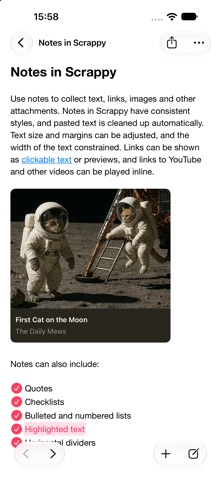
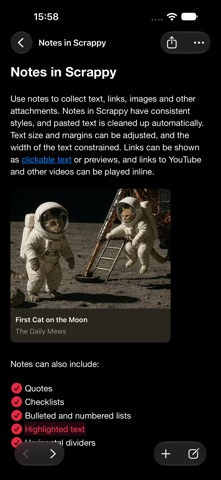
Use notes to collect text, links, images and other attachments.

- Notes have consistent styles, and pasted text is cleaned up automatically
- Links can be shown as clickable text or previews
- Links to YouTube and other videos can be played inline
- Include quotes, checklists, bulleted and numbered lists, highlighted text, horizontal dividers, and links to other items
- Lock notes to protect sensitive information with a password that only you know

* WEB LINKS

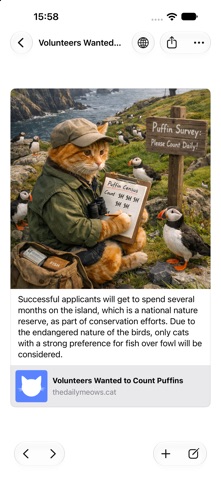
When you save a web link to Scrappy, what’s shown adapts to the content:

- Articles resemble reader mode in web browsers with a featured image and cleaned-up text
- Other links, such as social media posts, will appear as cards with a summary and image
- YouTube and other links to videos can be played

Scrappy also supports links with highlights, showing only that text, and when you view the original page the highlighted text will be scrolled into view.

When viewing web links, Scrappy lets you:

- Remove portions of text from articles
- Edit information about the links
- Save the original page for offline viewing too, if required

* SEARCH

Once you’ve got things into Scrappy, you’ll want to find them again. Scrappy finds items by their name, date, kind, URL, tags and content, including text in scanned PDFs and images.

Scrappy finds images by the text and prominent features they contain, and what they represent, such as screenshots, illustrations and receipts.

Search suggestions appear as you type, and you can combine these to drill down to what you need. Found text is highlighted as you swipe through results.

Scrappy also lets you create Smart Lists to match items against a set of rules.

* GETTING STUFF OUT

Finally, it’s no good putting things in an app if you can’t get them back out again. All the items you add to Scrappy can be dragged to other apps or saved as files, and you can export any list or the entire library as files and folders in standard formats that any good app can understand.

* SUBSCRIPTIONS

Use of Scrappy requires a paid subscription that you can purchase in the app.

Payment will be charged to your account following any free trial offered unless cancelled in Account Settings at least 24-hours before the end of the trial period. The subscription will automatically renew unless auto-renew is turned off at least 24-hours before the end of the current period.

Subscriptions may be managed and auto-renewal may be turned off by going to Account Settings after purchase.

If you start a free trial and cancel before it ends, you cannot reactivate the free trial.

When your subscription ends, you will lose access to any functionality provided by the subscription.

Terms of Use:
https://reinventedsoftware.com/scrappy/terms.html
Show more Show less

Screenshots

Scrappy — Digitial Scrapbook Screenshot 1 of 10
Scrappy — Digitial Scrapbook Screenshot 2 of 10
Scrappy — Digitial Scrapbook Screenshot 3 of 10
Scrappy — Digitial Scrapbook Screenshot 4 of 10
Scrappy — Digitial Scrapbook Screenshot 5 of 10
Scrappy — Digitial Scrapbook Screenshot 6 of 10
Scrappy — Digitial Scrapbook Screenshot 7 of 10
Scrappy — Digitial Scrapbook Screenshot 8 of 10
Scrappy — Digitial Scrapbook Screenshot 9 of 10
Scrappy — Digitial Scrapbook Screenshot 10 of 10
Screenshots by Steve Harris, from the the App Store listing
Official page on the App Store

Alternatives to Scrappy — Digitial Scrapbook

DEVONthink To Go 4 icon DEVONthink To Go 4
DEVONtechnologies, LLC
4.7
Free
249 ratings
OmniOutliner 6 icon OmniOutliner 6
The Omni Group
4.8
Free
16 ratings
NewTwos: Quick Notes & Lists icon NewTwos: Quick Notes & Lists
Twos Technologies Incorporated
4.1
Free
32 ratings
Quick Notes - Supasend icon Quick Notes - Supasend
Pradeep Burugu
4.7
Free
32 ratings
Monologue: Smart Dictation icon Monologue: Smart Dictation
Every Media Inc
4.8
Free
298 ratings
Tot Pocket icon Tot Pocket
The Iconfactory
4.4
Free
237 ratings
Defter Notes icon Defter Notes
Deft Works ApS
4.4
Free
75 ratings
Supernotes – Notes & Journal icon Supernotes – Notes & Journal
Supernotes
4.8
Free
127 ratings

More from Steve Harris

Keep It Mobile icon Keep It Mobile
Steve Harris
4.5
Free
642 ratings
Feeder 4 icon Feeder 4
Steve Harris
0.0
$49.99
Keep It icon Keep It
Steve Harris
0.0
Free

Changelog of Scrappy — Digitial Scrapbook

No changelog data

Developer information for Steve Harris

Steve Harris

Address:

Share Scrappy — Digitial Scrapbook

Comments on Scrappy — Digitial Scrapbook for iOS

We don't have enough comments to show example comments. Please check back later.

App Store Rankings for Scrappy — Digitial Scrapbook

This app is not ranked

Technologies used by Scrappy — Digitial Scrapbook

Frequently asked questions about Scrappy — Digitial Scrapbook

Is Scrappy — Digitial Scrapbook free?

Yes. Scrappy — Digitial Scrapbook is free on the App Store.

Is Scrappy — Digitial Scrapbook still available?

Yes. Scrappy — Digitial Scrapbook is on the App Store, and the last update we saw was on September 30, 2026.

How large is Scrappy — Digitial Scrapbook?

Scrappy — Digitial Scrapbook is 22.99 MB.

Is Scrappy — Digitial Scrapbook suitable for children?

App Store gives Scrappy — Digitial Scrapbook a high maturity rating. It is meant for adults.

How do people rate Scrappy — Digitial Scrapbook?

Scrappy — Digitial Scrapbook scores 5.00 out of 5 stars, from 4 ratings on the App Store.

Who made Scrappy — Digitial Scrapbook?

Scrappy — Digitial Scrapbook was developed by Steve Harris. It is listed in the productivity category on the App Store.

What are the best alternatives to Scrappy — Digitial Scrapbook?

People looking at Scrappy — Digitial Scrapbook also look at these productivity apps: DEVONthink To Go 4, OmniOutliner 6, NewTwos: Quick Notes & Lists, Quick Notes - Supasend, Monologue: Smart Dictation.

Apps other people are watching Today's trending apps Popular Productivity Apps Price drops on Google Play Top new apps
DEVONthink To Go 4 icon DEVONthink To Go 4
OmniOutliner 6 icon OmniOutliner 6
NewTwos: Quick Notes & Lists icon NewTwos: Quick Notes & Lists
Quick Notes - Supasend icon Quick Notes - Supasend
Monologue: Smart Dictation icon Monologue: Smart Dictation
Tot Pocket icon Tot Pocket
Defter Notes icon Defter Notes
Supernotes – Notes & Journal icon Supernotes – Notes & Journal
Overview Alternatives Reviews Rankings Technology
AppBrain Intelligence premium content

Subscribe now to get full and unlimited access to AppBrain Intelligence. You'll have access to:

  • App Intelligence dashboard (performance timeline, competitor comparison, country rankings, insight cards)
  • Detailed ranking data per app
  • Full timeline per developer
  • Device market shares data per country
  • Unlimited keyword tracking
1 Month

$75/mo
(billed every month)

SAVE 0%
Subscribe
3 Months

$65/mo
($195 billed every 3 months)

SAVE 13%
Subscribe
1 Year

$57.50/mo
($690 billed every year)

SAVE 23%
Subscribe
Each subscription will automatically renew 3 days before the expiration date for the same time period. Subscriptions can be cancelled at any time before the renewal.

AppBrain is an app data site, we track rankings, ratings, installs for all apps and games on Google Play and the App Store. AppBrain doesn't host app files or APKs, all install links go directly to the official store. All trademarks are owned by their respective owners. As an Amazon Associate AppBrain earns from qualifying purchases.

More apps

  • Top Android apps being viewed
  • FSIBL FirstCash
  • Connect By Tribal
  • View MagicOS 8.0 - icon pack

App statistics

  • Android statistics
  • Google Play Developer stats
  • Trending Android Apps
  • Trending iOS apps
  • Top popular Apps
  • Buy the best Android phone
  • Buy & sell app businesses

About AppBrain

  • Contact
  • Privacy
  • Documentation
  • DMCA takedowns
  • Articles
  • Blog
  • The AppBrain advertising system
© 2010-2026 - AppBrain