

Screen Cast: Screen Mirroring
Screen Cast: Screen Mirroring is made and published by Keyur Kyada. AppBrain is an independent app data site and isn't affiliated with Keyur Kyada. The app name, icon, screenshots and description belong to Keyur Kyada and are shown as published on the App Store.
AppBrain's verdict
- Rating on App Store
- 3.33
- 3 ratings
- Last updated
- October 6, 2026
It doesn't have enough ratings yet to judge what users think.
Rankings
App Store top chartsApp Store Rankings for Screen Cast: Screen Mirroring
Competitors
Similar apps and more from Keyur KyadaMore from Keyur Kyada





Releases
Updates seen on the App Store- Version
- 1.0.2
- Launched
- January 2026
No changelog data
User feedback
Ratings and reviews on the App StoreComments on Screen Cast: Screen Mirroring for iOS
We don't have enough comments to show example comments. Please check back later.
Technology
Found in the app by AppBrain- Price
- Free
- App size
- 42.3 MB
- Content rating
- Everyone
Technologies used by Screen Cast: Screen Mirroring
About the app and developer
About Screen Cast: Screen Mirroring
Screen Cast: Screen Mirroring is an utilities app developed by Keyur Kyada.
User Ratings
Screen Cast: Screen Mirroring is rated 3.33 out of 5 stars. The rating is based on 3 ratings.
App Information
Screen Cast: Screen Mirroring is freely available from the App Store. The app size is 42.29 MB. The latest version available is 1.0.2. The last update was on October 6, 2026.
Technical Requirements
The app has a content rating of Everyone. The app has been available on the App Store since January 2026.
Developer information for Keyur Kyada
Address:
Frequently asked questions about Screen Cast: Screen Mirroring
Is Screen Cast: Screen Mirroring free?
Yes. Screen Cast: Screen Mirroring is free on the App Store.
Is Screen Cast: Screen Mirroring still available?
Yes. Screen Cast: Screen Mirroring is on the App Store, and the last update we saw was on October 6, 2026.
How large is Screen Cast: Screen Mirroring?
Screen Cast: Screen Mirroring is 42.29 MB.
Is Screen Cast: Screen Mirroring suitable for children?
App Store rates the content of Screen Cast: Screen Mirroring as suitable for everyone.
How do people rate Screen Cast: Screen Mirroring?
Screen Cast: Screen Mirroring scores 3.33 out of 5 stars, from 3 ratings on the App Store.
Who made Screen Cast: Screen Mirroring?
Screen Cast: Screen Mirroring was developed by Keyur Kyada. It is listed in the utilities category on the App Store.
Store listing
By Keyur Kyada, from the App Store
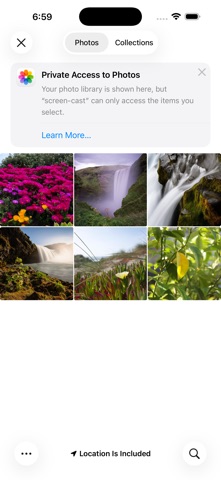

Description by Keyur Kyada Written by the developer, not by AppBrain. Click to read.
Turn your Smart phone into a powerful remote for your big screen. With Screen Mirroring for Smart TV, you can instantly mirror your mobile screen to any Smart TV or Chromecast-enabled TV — 100% free and easy to use.
Enjoy your favorite photos, videos, apps, presentations, games, and websites on a larger display without cables or complicated setup. Whether you’re watching videos, sharing memories with family, or presenting content at work, our app makes screen casting fast and seamless.
Simply connect your phone and TV to the same Wi-Fi network, tap Start Mirroring, and see everything from your phone appear on your TV in real time. No login, no hardware required.
Key Features
• Mirror your full Smart screen to Smart TV
• Cast photos, videos, and apps instantly
• High-quality, real-time screen sharing
• Works with Smart TV, Chromecast & Cast-enabled TVs
• Simple setup with one-tap connection
• Free to use with no hidden charges
Perfect For
• Watching videos and movies on a big screen
• Sharing photos and videos with friends & family
• Playing mobile games on TV
• Presentations, demos, and online meetings
• Browsing the web on your TV
Important Notes
• Both devices must be connected to the same Wi-Fi network
• Performance depends on network stability and device capability
• DRM-protected apps (like Netflix, Prime Video, etc.) may restrict mirroring due to content policies
We are constantly improving the app to deliver smoother performance and better compatibility across devices. Your feedback helps us grow and build better features for you.
Disclaimer:
This app is not affiliated with Google or any TV brand. Smart TV and Chromecast are trademarks of their respective owners.
Mirror smarter. Share bigger. Enjoy everything on your TV — for free.
Privacy Policy: https://apptivityglobal.com/privacy-policy/
Terms of Use: https://privacypolicytest12.blogspot.com