

Screen Mirroring: Air Cast TV
Screen Mirroring: Air Cast TV is made and published by Vang Hedegaard. AppBrain is an independent app data site and isn't affiliated with Vang Hedegaard. The app name, icon, screenshots and description belong to Vang Hedegaard and are shown as published on the App Store.
AppBrain's verdict
- Rating on App Store
- 4.50
- 2 ratings
- Last updated
- March 11, 2026
It doesn't have enough ratings yet to judge what users think.
Rankings
App Store top chartsApp Store Rankings for Screen Mirroring: Air Cast TV
Releases
Updates seen on the App Store- Version
- 1.0.3
- Launched
- February 2026
No changelog data
User feedback
Ratings and reviews on the App StoreComments on Screen Mirroring: Air Cast TV for iOS
We don't have enough comments to show example comments. Please check back later.
Technology
Found in the app by AppBrain- Price
- Free
- App size
- 15.3 MB
- Content rating
- Everyone
Technologies used by Screen Mirroring: Air Cast TV
About the app and developer
About Screen Mirroring: Air Cast TV
Screen Mirroring: Air Cast TV is a photo & video app developed by Vang Hedegaard.
What is the rating of Screen Mirroring: Air Cast TV?
Screen Mirroring: Air Cast TV is rated 4.50 out of 5 stars, based on 2 ratings.
Is Screen Mirroring: Air Cast TV free?
Screen Mirroring: Air Cast TV is free. The app size is 15.28 MB. The latest version available is 1.0.3. The last update was on March 11, 2026.
What are the requirements for Screen Mirroring: Air Cast TV?
The app has a content rating of Everyone. The app has been available on the App Store since February 2026.
Developer information for Vang Hedegaard
Address:
Frequently asked questions about Screen Mirroring: Air Cast TV
Is Screen Mirroring: Air Cast TV free?
Yes. Screen Mirroring: Air Cast TV is free on the App Store.
Is Screen Mirroring: Air Cast TV still available?
Yes. Screen Mirroring: Air Cast TV is on the App Store, and the last update we saw was on March 11, 2026.
How large is Screen Mirroring: Air Cast TV?
Screen Mirroring: Air Cast TV is 15.28 MB.
Is Screen Mirroring: Air Cast TV suitable for children?
App Store rates the content of Screen Mirroring: Air Cast TV as suitable for everyone.
How do people rate Screen Mirroring: Air Cast TV?
Screen Mirroring: Air Cast TV scores 4.50 out of 5 stars, from 2 ratings on the App Store.
Who made Screen Mirroring: Air Cast TV?
Screen Mirroring: Air Cast TV was developed by Vang Hedegaard. It is listed in the photo & video category on the App Store.
Store listing
By Vang Hedegaard, from the App Store
Description by Vang Hedegaard Written by the developer, not by AppBrain. Click to read.
Mirror your iPhone to a compatible Smart TV or streaming device, and easily cast your favorite media in seconds.
What you can do with Mirror Share
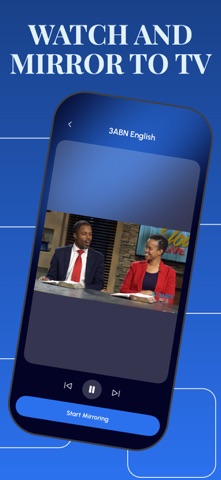
Screen Mirroring: share your screen to a TV for presentations, browsing, apps, and more.
Cast Photos & Videos: enjoy your gallery on a larger display with smooth playback.
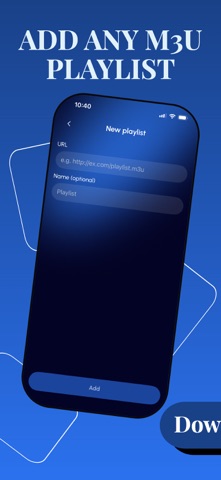
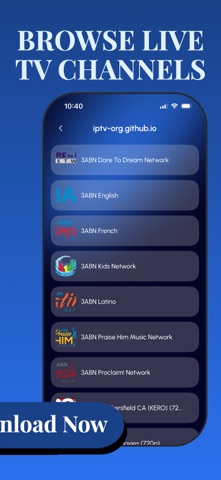
Stream IPTV (M3U): add an M3U playlist link and watch live TV channels.
Cast Documents: display files from your device for work or study.
Browser Mirroring: open websites on your phone and watch them on the TV in real time.
Simple & fast setup
Connect your phone and TV to the same Wi-Fi network.
Open Mirror Share and choose what you want to cast.
Tap to start mirroring or streaming.
Notes
Performance depends on your Wi-Fi network, TV model, and supported protocols.
Some apps may restrict mirroring due to content protection (DRM).
Subscription Information:
- Payment. Charges apply to your iTunes Account at purchase confirmation.
- Auto-Renewal. Subscriptions renew automatically unless canceled at least 24 hours before the current period ends.
- Renewal Charges. Your account will be charged for renewal within 24 hours prior to the end of the current period, based on the selected plan.
- Manage Your Subscription. Go to your Account Settings after purchase to handle auto-renewal and other preferences.
Privacy Policy - https://telegra.ph/Privacy-Policy-02-13-130
Terms Of Use -https://telegra.ph/Terms-of-use-02-13-3
Download Mirror Share and start sharing your screen to TV anytime.