

Screen Recorder - V Recording
Screen Recorder - V Recording is made and published by Mohammad Mahmudul Hasan. AppBrain is an independent app data site and isn't affiliated with Mohammad Mahmudul Hasan. The app name, icon, screenshots and description belong to Mohammad Mahmudul Hasan and are shown as published on the App Store.
AppBrain's verdict
- Rating on App Store
- 4.20
- 46 ratings
- Last updated
- September 12, 2026
- Size
- 29.7 MB
It doesn't have enough ratings yet to judge what users think.
User feedback
Ratings and reviews on the App StoreComments on Screen Recorder - V Recording for iOS
We don't have enough comments to show example comments. Please check back later.
Store listing
By Mohammad Mahmudul Hasan, from the App Store
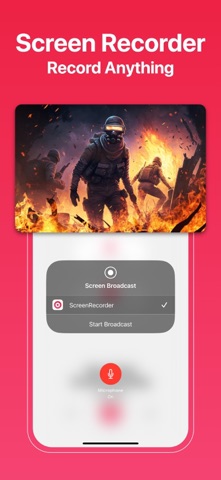
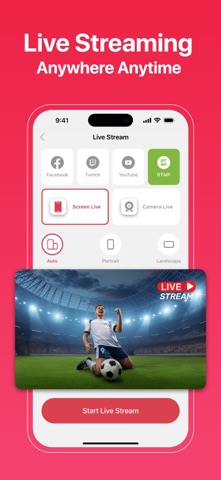


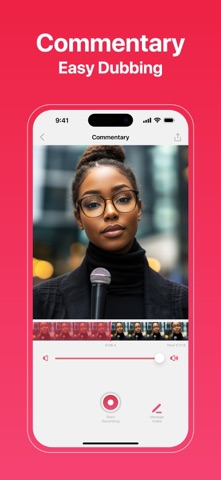


Description by Mohammad Mahmudul Hasan Written by the developer, not by AppBrain. Click to read.
With our app, you can record, edit, and share screen recordings more easily than ever before. Whether you’re a content creator, educator, gamer, or just capturing priceless moments, Screen Recorder is here to meet your needs.
Key Features:
Record Screen
Capture seamless, high-resolution screen recordings. Perfect for tutorials, lectures, gameplay, and more.
My Recordings (Drafts)
Store and manage your recordings effortlessly with Drafts. Keep them accessible and well-organized for future editing and sharing.
Face-cam
Add more than one face-cam video to your recordings. Customize the size and placement of each face-cam for an engaging and interactive experience.
Commentary
Include multiple commentary videos to enhance your recordings. Ideal for lessons, reactions, or presentations, this feature helps you provide detailed explanations and insights.
Video Crop
Focus on the most important parts by cutting out unwanted sections of your video.
Video Rotate
Adjust your video orientation effortlessly. Whether flipping or turning it upside down, ensure perfect alignment every time.
Video Trim
Remove unnecessary portions to create concise and impactful content.
Video Volume
Fine-tune audio levels for a professional-quality recording. Ensure your voice and background sounds are perfectly balanced.
Video Flip
Flip videos vertically or horizontally to achieve the desired perspective.
Dual-Cam
Stream your screen and yourself simultaneously with front- and rear-camera functionality.
Canvas
Resize the canvas to fit any platform or requirement. Create content for presentations, social media, or personal projects with ease.
User-Friendly Interface
Navigate and utilize all features effortlessly with our intuitive design.
High-Quality Output
Enjoy professional editing tools and high-resolution recordings, including HD and 4K, to ensure your videos look and sound fantastic.
Seamless Sharing
Share your video recordings directly to Facebook, Instagram, Messenger, and more.
Why Choose a Screen Recorder?
Screen Recorder is designed to be user-friendly and versatile, catering to a broad range of users. Whether you’re a professional creating presentations, a teacher crafting educational materials, a gamer sharing achievements, or a content creator producing high-quality videos, this app has everything you need.
Screen Recorder Subscription:
* Using a subscription you have access to keep backup using dropbox or google drive, unlimited recordings and more. Watermarks and advertisements will be removed automatically.
* Screen Recorder subscription is billed weekly, monthly or annually at the rate corresponding to the selected plan.
* Payment will be charged to iTunes Account at confirmation of purchase.
* Subscription automatically renews unless auto-renew is turned off at least 24-hours before the end of the current period.
* Account will be charged for renewal within 24-hours prior to the end of the current period, and identify the cost of the renewal.
* Subscriptions may be managed by the user and auto-renewal may be turned off by going to the user's Account Settings after purchase.
* Any unused portion of a free trial period, if offered, will be forfeited when the user purchases a subscription to that publication, where applicable.
- Terms & Conditions: https://app.matrixsolution.xyz/documents/Terms&Conditions.html
- Privacy Policy: https://app.matrixsolution.xyz/documents/PrivacyPolicy_ScreenRecorder.html
Got questions or feedback? Reach out to our dedicated support team at support@matrixsolution.xyz
Follow us on social media:
Facebook: @matrixsolution16
Safety and technology
Found in the app by AppBrain- Price
- Free
- App size
- 29.7 MB
- Content rating
- Everyone
Technologies used by Screen Recorder - V Recording
Releases
Updates seen on the App Store- Version
- 2.3
- Launched
- December 2024
No changelog data
Alternatives
Similar apps and more from Mohammad Mahmudul HasanMore from Mohammad Mahmudul Hasan


Rankings
App Store top chartsApp Store Rankings for Screen Recorder - V Recording
About the app and developer
About Screen Recorder - V Recording
Screen Recorder - V Recording is an utilities app developed by Mohammad Mahmudul Hasan.
User Ratings
Screen Recorder - V Recording is rated 4.20 out of 5 stars. The rating is based on 46 ratings.
App Information
Screen Recorder - V Recording is freely available from the App Store. The app size is 29.73 MB. The latest version available is 2.3. The last update was on September 12, 2026.
Technical Requirements
The app has a content rating of Everyone. The app has been available on the App Store since December 2024.
Developer information for Mohammad Mahmudul Hasan
Address:
Frequently asked questions about Screen Recorder - V Recording
Is Screen Recorder - V Recording free?
Yes. Screen Recorder - V Recording is free on the App Store.
Is Screen Recorder - V Recording still available?
Yes. Screen Recorder - V Recording is on the App Store, and the last update we saw was on September 12, 2026.
How large is Screen Recorder - V Recording?
Screen Recorder - V Recording is 29.73 MB.
Is Screen Recorder - V Recording suitable for children?
App Store rates the content of Screen Recorder - V Recording as suitable for everyone.
How do people rate Screen Recorder - V Recording?
Screen Recorder - V Recording scores 4.20 out of 5 stars, from 46 ratings on the App Store.
Who made Screen Recorder - V Recording?
Screen Recorder - V Recording was developed by Mohammad Mahmudul Hasan. It is listed in the utilities category on the App Store.