

Screen Time - AppStops
Screen Time - AppStops is made and published by Yoshiharu Yamada. AppBrain is an independent app data site and isn't affiliated with Yoshiharu Yamada. The app name, icon, screenshots and description belong to Yoshiharu Yamada and are shown as published on the App Store.
AppBrain's verdict
- Rating on App Store
- 5.00
- 3 ratings
- Last updated
- March 25, 2025
It doesn't have enough ratings yet to judge what users think.
Rankings
App Store top chartsApp Store Rankings for Screen Time - AppStops
Releases
Updates seen on the App Store- Version
- 1.3.3
- Launched
- November 2024
No changelog data
User feedback
Ratings and reviews on the App StoreComments on Screen Time - AppStops for iOS
We don't have enough comments to show example comments. Please check back later.
Technology
Found in the app by AppBrain- Price
- $4.99
- App size
- 10.6 MB
- Content rating
- Everyone
Technologies used by Screen Time - AppStops
About the app and developer
About Screen Time - AppStops
Screen Time - AppStops is a productivity app developed by Yoshiharu Yamada.
User Ratings
Screen Time - AppStops is rated 5.00 out of 5 stars. The rating is based on 3 ratings.
App Information
Screen Time - AppStops costs $4.99. The app size is 10.59 MB. The latest version available is 1.3.3. The last update was on March 25, 2025.
Technical Requirements
The app has a content rating of Everyone. The app has been available on the App Store since November 2024.
Developer information for Yoshiharu Yamada
Address:
Store listing
By Yoshiharu Yamada, from the App Store




Description by Yoshiharu Yamada Written by the developer, not by AppBrain. Click to read.
▼ Features
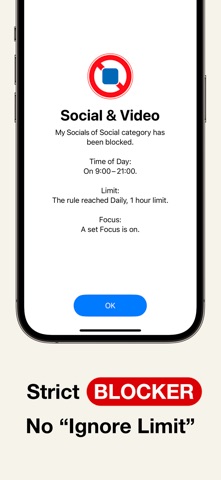
• Strict blocking screen with no “Ignore Limit” button.
• Block apps while in Focus Mode, e.g., “No entertainment apps during Work Mode.”
• Set daily or weekly app limits, e.g., “Social apps limited to 1 hour per day.”
• Usage time notifications, e.g., “20% (12 min) of today’s social app time remaining.”
• Time-based app restrictions, e.g., “No video apps from 9 AM to 5 PM.”
• Temporary app blocking with a timer, e.g., “Focus on studying for the next 90 minutes.”
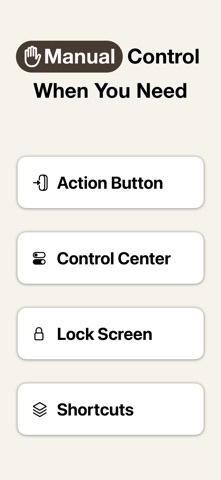
• Manually block apps via Control Center (*1), Action Button (*2), Lock Screen (*3), or Shortcuts app.
▼ User Guide
The app includes user guides with images and texts for all rules, so you can use it with confidence.
▼ If You Need to Urgently Disable App Blocking
By uninstalling the AppStops app, you can regain access to blocked apps and websites. If uninstalling does not disable the block (a rare occurrence due to OS issues), please reinstall the AppStops app and go to Settings App > Screen Time > APPS WITH SCREEN TIME ACCESS, then toggle off the switch for AppStops.
------------------------------------------------------------
*1: Control Center is available on iOS 18 or later
*2: Action Button is available only on devices with an Action Button running iOS 18 or later.
*3: Lock Screen control is available only on iPhone devices running iOS 18 or later.
※ The system screen for selecting apps and web domains may crash sometimes. While you can avoid crashes by following the steps outlined in the Help section, please be aware of this issue before making your purchase.
Terms of Use
https://yoshiharustudio.com/appstops/terms-of-use.html
Privacy Policy
https://yoshiharustudio.com/appstops/privacy-policy.html
Specified Commercial Transaction Act
https://yoshiharustudio.com/appstops/specified-commercial-transactions-act.html