

Screen Time - Break Check
Screen Time - Break Check is made and published by CodeWerm LLC. AppBrain is an independent app data site and isn't affiliated with CodeWerm LLC. The app name, icon, screenshots and description belong to CodeWerm LLC and are shown as published on the App Store.
AppBrain's verdict
- Rating on App Store
- 4.31
- 13 ratings
- Last updated
- September 7, 2026
- Size
- 32.3 MB
It doesn't have enough ratings yet to judge what users think.
User feedback
Ratings and reviews on the App StoreComments on Screen Time - Break Check for iOS
We don't have enough comments to show example comments. Please check back later.
Store listing
By CodeWerm LLC, from the App Store


Description by CodeWerm LLC Written by the developer, not by AppBrain. Click to read.
Break Check brings your screen time down without blocking a thing. You see how long you have been going, get a nudge when your time is up, and decide what happens next. No locked screens, no workarounds, no shame spiral.
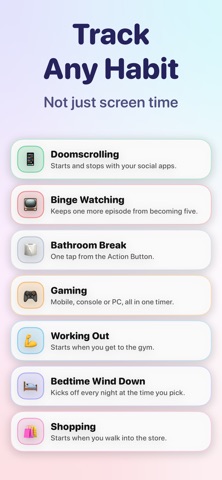
TRACK ANY HABIT, NOT JUST SCREEN TIME
Doomscrolling, binge watching, gaming, the gym, shopping, reading, a bathroom break that got away from you. If you can start it and stop it, you can put it on a timer.
SET A DAILY GOAL
Give a habit a daily limit. Stay under it and the day counts as a win. Every day you meet your goal adds to your streak.
NO HARD CUTOFFS
When your time is up you get a gentle notification and the timer keeps counting, so you always know where you stand. Need longer? Add a few minutes with one tap.
OR A REAL ALARM
For a habit that needs a firmer stop, end the session with a full alarm instead. It gets through silent mode and Focus.
NOTHING TO FORGET
Timers can start and stop on their own: when you open an app, when you arrive somewhere, or at a time you pick each night. Your social apps can run their own timer. The gym one starts when you walk in. Setup takes about a minute.
CONTROL IT FROM ANYWHERE
A running timer sits in your Dynamic Island, Notification Center and Lock Screen, so you can check it or pause it without opening anything. Start one from Control Center, your Action Button, or a Home Screen widget.
SEE WHERE YOUR TIME GOES
Watch each day add up, spot your patterns, and see how close you are to your goal. Your time is kept as real sessions rather than one daily total, so you can find the hour you did not know you were spending.
LIFE HAPPENS
Waiting at the doctor? Long train ride? Some phone time should not count. Snooze every timer at once and take a guilt free break. No streak broken, no pressure.
PRIVATE BY DESIGN
No account. Nothing to sign up for, ever. Break Check never asks for Screen Time access and never sees which apps you open, only the timers you start. Your habits sync through your own iCloud and are never collected or sold.
YOUR FIRST TIMER IS ALWAYS FREE
Not a trial. Track one habit for as long as you like, at no cost. Unlimited adds the rest: a timer for every habit, full alarm alerts, and the button that snoozes them all. Monthly, yearly, or a one-time purchase that is yours forever.
Privacy Policy: https://codewerm.com/breakcheck/privacy-policy
Terms of Use: https://www.apple.com/legal/internet-services/itunes/dev/stdeula/
Safety and technology
Found in the app by AppBrain- Price
- Free
- App size
- 32.3 MB
- Content rating
- Everyone
Technologies used by Screen Time - Break Check
Releases
Updates seen on the App Store- Version
- 2.1
- Launched
- March 2025
No changelog data
Alternatives
Similar apps and more from CodeWerm LLCAlternatives to Screen Time - Break Check


More from CodeWerm LLC


Rankings
App Store top chartsApp Store Rankings for Screen Time - Break Check
About the app and developer
About Screen Time - Break Check
Screen Time - Break Check is a productivity app developed by CodeWerm LLC.
User Ratings
Screen Time - Break Check is rated 4.31 out of 5 stars. The rating is based on 13 ratings.
App Information
Screen Time - Break Check is freely available from the App Store. The app size is 32.27 MB. The latest version available is 2.1. The last update was on September 7, 2026.
Technical Requirements
The app has a content rating of Everyone. The app has been available on the App Store since March 2025.
Developer information for CodeWerm LLC
Address:
Frequently asked questions about Screen Time - Break Check
Is Screen Time - Break Check free?
Yes. Screen Time - Break Check is free on the App Store.
Is Screen Time - Break Check still available?
Yes. Screen Time - Break Check is on the App Store, and the last update we saw was on September 7, 2026.
How large is Screen Time - Break Check?
Screen Time - Break Check is 32.27 MB.
Is Screen Time - Break Check suitable for children?
App Store rates the content of Screen Time - Break Check as suitable for everyone.
How do people rate Screen Time - Break Check?
Screen Time - Break Check scores 4.31 out of 5 stars, from 13 ratings on the App Store.
Who made Screen Time - Break Check?
Screen Time - Break Check was developed by CodeWerm LLC. It is listed in the productivity category on the App Store.
What are the best alternatives to Screen Time - Break Check?
People looking at Screen Time - Break Check also look at these productivity apps: ADHD Structure Planner: Simple, Timeblocks Planner ADHD: Align, Habit Tracker: Rovelist, New Year Resolutions: Yearvana, Duse - Habit Tracker.