

Screen Time Control: Inscreen
Screen Time Control: Inscreen is made and published by Vaibhav Negi. AppBrain is an independent app data site and isn't affiliated with Vaibhav Negi. The app name, icon, screenshots and description belong to Vaibhav Negi and are shown as published on the App Store.
AppBrain's verdict
- Rating on App Store
- 4.58
- 38 ratings
- Last updated
- February 10, 2026
- Size
- 13.1 MB
It doesn't have enough ratings yet to judge what users think.
User feedback
Ratings and reviews on the App StoreComments on Screen Time Control: Inscreen for iOS
We don't have enough comments to show example comments. Please check back later.
Store listing
By Vaibhav Negi, from the App Store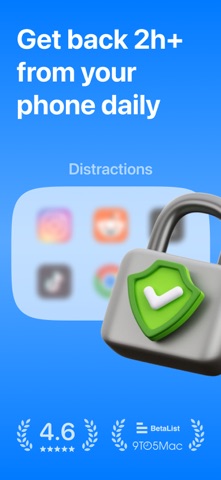



Description by Vaibhav Negi Written by the developer, not by AppBrain. Click to read.
⏵ HOW IS INSCREEN DIFFERENT?
Unlike other screen time apps that completely block access, Inscreen draws on Cognitive Behavioural Therapy (CBT) to help you recognize your screen time habits through regular prompts and inculcate healthier behaviours without restrictions.
⏵ WHY IT WORKS?
We tap into a few key psychological principles and behavioural patterns. Here’s why it works:
- Awareness = Better Choices: Regular reminders to ask whether you're on your phone intentionally, encouraging healthier choices.
- Guiding, not controlling: Instead of strict limits, scheduled subtle nudges to guide you toward mindful decisions, without the frustration of restrictions.
- Accountability: Weekly progress, actionable insights and daily notifications leading to lasting behaviour changes.
- Low barrier to entry: No drastic changes or restrictions, making it easy to integrate into daily life and gradually adjust over time.
⏵ FEATURES
- Alerts to be intentional about your screen time.
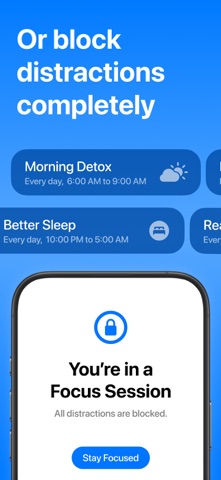
- Focus sessions to completely block distracting apps for a set routine, say, during work or winding down at night.
- Strict daily limits to keep your screen time in control.
- Notifications that help you track your daily activity.
- Secure and private. All your data stays on your device.
⏵ HOW DOES THE SETUP WORK?
1. Choose the distracting apps or categories.
2. Set a daily limit.
3. Set up focus sessions (optional).
⏵ FINANCIAL AID
We’re on a mission to solve phone addiction and distraction. We’re determined to help everyone. Our Financial Aid program offers a free 1 year subscription to individuals who are financially stretched but are in need. The link to apply is in the app.
⏵ ABOUT
Inscreen is self-funded and run by two independent developers — Preet and Vaibhav.
⏵ LINKS
Privacy Policy: https://github.com/theinscreenapp/ios/blob/main/privacy.md.
Terms: https://github.com/theinscreenapp/ios/blob/main/terms.md.
Support: https://github.com/theinscreenapp/ios/blob/main/support.md.
Safety and technology
Found in the app by AppBrain- Price
- Free
- App size
- 13.1 MB
- Content rating
- Everyone
Technologies used by Screen Time Control: Inscreen
Releases
Updates seen on the App Store- Version
- 1.6.1
- Launched
- December 2024
No changelog data
Alternatives
Similar apps and more from Vaibhav NegiAlternatives to Screen Time Control: Inscreen




More from Vaibhav Negi


Rankings
App Store top chartsApp Store Rankings for Screen Time Control: Inscreen
About the app and developer
About Screen Time Control: Inscreen
Screen Time Control: Inscreen is a productivity app developed by Vaibhav Negi.
User Ratings
Screen Time Control: Inscreen is rated 4.58 out of 5 stars. The rating is based on 38 ratings.
App Information
Screen Time Control: Inscreen is freely available from the App Store. The app size is 13.12 MB. The latest version available is 1.6.1. The last update was on February 10, 2026.
Technical Requirements
The app has a content rating of Everyone. The app has been available on the App Store since December 2024.
Developer information for Vaibhav Negi
Address: