

Screen Time Control: Mute
Screen Time Control: Mute is made and published by YUTO OKURA. AppBrain is an independent app data site and isn't affiliated with YUTO OKURA. The app name, icon, screenshots and description belong to YUTO OKURA and are shown as published on the App Store.
AppBrain's verdict
- Last updated
- September 19, 2026
- Size
- 53.0 MB
User feedback
Ratings and reviews on the App StoreComments on Screen Time Control: Mute for iOS
We don't have enough comments to show example comments. Please check back later.
Store listing
By YUTO OKURA, from the App Store



Description by YUTO OKURA Written by the developer, not by AppBrain. Click to read.
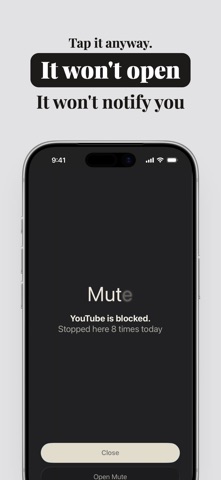
Mute makes the apps you choose unavailable during the hours you choose.
Not willpower. A wall.
THREE WAYS TO STOP
- Schedule: block apps during set hours, like 10 PM to 7 AM, or weekday mornings. Pick the days.
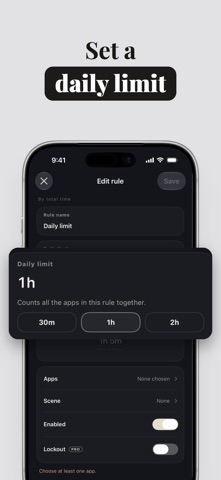
- Daily limit: "one hour a day." When you use it up, that app stays closed until midnight.
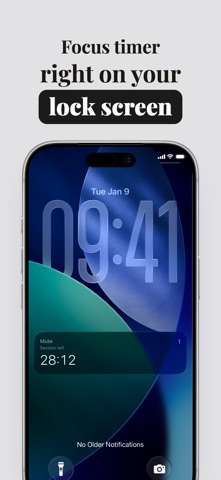
- Focus timer: 25, 50, or 90 minutes, or any length you like. Leave it open-ended with ∞. The countdown lives on your lock screen and in the Dynamic Island. Ending early takes one breath first.
BLOCKED MEANS QUIET
Mute uses Apple's Screen Time framework. While an app is blocked, it can't be opened, and its notifications stop arriving. Nothing on your lock screen pulling you back in. Websites in Safari can be blocked by domain, too.
LOCKOUT (MUTE PRO)
Turn on Lockout, and a rule or session can't be switched off, edited, or deleted until it ends. Not from inside the app, not by deleting Mute, not by changing the clock. For the moment you genuinely need out, there's one emergency pass a week.
TIME TAKEN BACK, AND YOUR STREAK
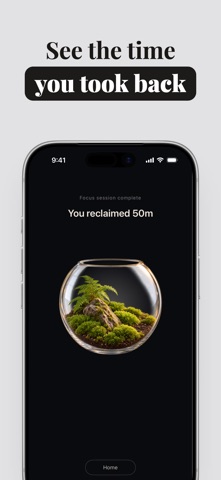
When a session ends, Mute shows the time you took back. Keep your rules running day after day and your streak grows; Mute lets you know at milestones like 3, 7, and 30 days. Home also shows how much time went to which apps today.
THE TERRARIUM
A terrarium is a small garden sealed in glass: moss, a few tiny plants, a world you can hold in one hand. Your home screen in Mute holds one. As you take back time and your streak reaches milestones, you earn new terrariums and choose which one to display. No pep talks. A quiet, growing scene.
YOUR USAGE STAYS ON YOUR PHONE
Mute never sends records of which apps you use, when, or for how long to our servers. The apps you block are stored as tokens issued by Apple, and we can't turn them back into app names. No account, no email address. Delete everything from Settings whenever you like.
IF THIS SOUNDS LIKE YOU
- An hour of scrolling before bed you didn't plan
- Opening social media between tasks without deciding to
- Losing your focus every time a notification lands
- Setting a Screen Time limit, then tapping "Ignore Limit"
FREE AND MUTE PRO
Free includes two rules and the focus timer without limits. Pro removes the rule limit and unlocks Lockout.
GOOD TO KNOW
- Requires iOS 26.5 or later and Screen Time access.
- Mute Pro is an auto-renewing subscription (annual or weekly). Prices are shown in the app. Payment is charged to your Apple ID when you confirm the purchase, and the subscription renews unless auto-renew is turned off at least 24 hours before the current period ends. Manage it in Settings → Apple ID → Subscriptions.
- Terms of Use: https://blossom-railway-09b.notion.site/Term-of-Use-3d137c58801d80788f90dddd1e760888
- Privacy Policy: https://blossom-railway-09b.notion.site/Privacy-Policy-3d137c58801d80ac910ce254e0843bf6
Safety and technology
Found in the app by AppBrain- Price
- Free
- App size
- 53.0 MB
- Content rating
- Everyone
Technologies used by Screen Time Control: Mute
Releases
Updates seen on the App Store- Version
- 1.0
- Launched
- September 2026
No changelog data
Alternatives
Similar apps and more from YUTO OKURAMore from YUTO OKURA


Rankings
App Store top chartsApp Store Rankings for Screen Time Control: Mute
About the app and developer
About Screen Time Control: Mute
Screen Time Control: Mute is a health & fitness app developed by YUTO OKURA.
What is the rating of Screen Time Control: Mute?
Screen Time Control: Mute has no ratings yet.
Is Screen Time Control: Mute free?
Screen Time Control: Mute is free. The app size is 52.97 MB. The latest version available is 1.0. The last update was on September 19, 2026.
What are the requirements for Screen Time Control: Mute?
The app has a content rating of Everyone. The app has been available on the App Store since September 2026.
Developer information for YUTO OKURA
Address: