

Screen Time Control: Pause
Screen Time Control: Pause is made and published by Carlos Velasquez. AppBrain is an independent app data site and isn't affiliated with Carlos Velasquez. The app name, icon, screenshots and description belong to Carlos Velasquez and are shown as published on the App Store.
AppBrain's verdict
- Rating on App Store
- 5.00
- 9 ratings
- Last updated
- October 8, 2026
It doesn't have enough ratings yet to judge what users think.
Rankings
App Store top chartsApp Store Rankings for Screen Time Control: Pause
Competitors
Similar apps and more from Carlos VelasquezAlternatives to Screen Time Control: Pause


Releases
Updates seen on the App Store- Version
- 1.6.2
- Launched
- June 2026
No changelog data
User feedback
Ratings and reviews on the App StoreComments on Screen Time Control: Pause for iOS
We don't have enough comments to show example comments. Please check back later.
Technology
Found in the app by AppBrain- Price
- Free
- App size
- 15.3 MB
- Content rating
- Everyone
Technologies used by Screen Time Control: Pause
About the app and developer
About Screen Time Control: Pause
Screen Time Control: Pause is a productivity app developed by Carlos Velasquez.
User Ratings
Screen Time Control: Pause is rated 5.00 out of 5 stars. The rating is based on 9 ratings.
App Information
Screen Time Control: Pause is freely available from the App Store. The app size is 15.33 MB. The latest version available is 1.6.2. The last update was on October 8, 2026.
Technical Requirements
The app has a content rating of Everyone. The app has been available on the App Store since June 2026.
Developer information for Carlos Velasquez
Address:
Frequently asked questions about Screen Time Control: Pause
Is Screen Time Control: Pause free?
Yes. Screen Time Control: Pause is free on the App Store.
Is Screen Time Control: Pause still available?
Yes. Screen Time Control: Pause is on the App Store, and the last update we saw was on October 8, 2026.
How large is Screen Time Control: Pause?
Screen Time Control: Pause is 15.33 MB.
Is Screen Time Control: Pause suitable for children?
App Store rates the content of Screen Time Control: Pause as suitable for everyone.
How do people rate Screen Time Control: Pause?
Screen Time Control: Pause scores 5.00 out of 5 stars, from 9 ratings on the App Store.
Who made Screen Time Control: Pause?
Screen Time Control: Pause was developed by Carlos Velasquez. It is listed in the productivity category on the App Store.
What are the best alternatives to Screen Time Control: Pause?
People looking at Screen Time Control: Pause also look at these productivity apps: Offscroll: Screen Time Control, Keelder: Screen Time Limit, Spinbrek: Cute App Blocker, Tempo: Screen Time Guard, conscious screen time controls.
Store listing
By Carlos Velasquez, from the App Store


Description by Carlos Velasquez Written by the developer, not by AppBrain. Click to read.
We all reach for the same apps on autopilot. Pause puts a small, calming puzzle between you and those apps, so opening one becomes a choice, not a reflex.
HOW IT WORKS
• Choose the apps you want to pause.
• When you try to open one, Pause asks you to solve a quick puzzle first.
• Solve it, and the app unlocks for 15 minutes of intentional use.
• When time's up, the pause comes back automatically.
That tiny moment of friction is enough to break the autopilot—and remind you why you picked up your phone in the first place.
NINE CALMING PUZZLES
Word Jumble, Mini Crossword, Sliding Tile, Ball Sort, Connect the Colors, Maze, Sixdoku, and more. Every unlock is a small mental reset instead of a mindless tap.
DESIGNED FOR INTENTION, NOT RESTRICTION
Pause isn't about locking yourself out—it's about adding just enough space to choose. No guilt, no lectures. Just a gentle pause.
PAUSE PREMIUM
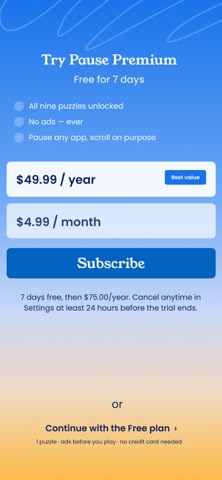
• Unlock all nine puzzles
• Remove ads
• Start with a 7-day free trial, then annual or monthly
Your privacy comes first. Pause uses Apple's Screen Time technology, and the apps you choose never leave your device.
Scroll less by accident. Scroll more on purpose.
—
SUBSCRIPTION DETAILS
Pause Premium is an auto-renewing subscription. (7-day free trial for new subscribers)
• Annual — $74.99/year
• Monthly — $9.99/month
Payment is charged to your Apple Account at confirmation of purchase. Your subscription renews automatically unless canceled at least 24 hours before the end of the current period; your account is charged for renewal within 24 hours before the period ends. Manage or cancel anytime in your Apple Account settings. Any unused portion of a free trial is forfeited when you start a subscription.
Privacy Policy URL:
Terms of Use URL: https://www.apple.com/legal/internet-services/itunes/dev/stdeula/