

Screen Time Control - Paused
Screen Time Control - Paused is made and published by Worth A Try LLC. AppBrain is an independent app data site and isn't affiliated with Worth A Try LLC. The app name, icon, screenshots and description belong to Worth A Try LLC and are shown as published on the App Store.
AppBrain's verdict
New- Rating on App Store
- 4.75
- 4 ratings
- Last updated
- October 8, 2026
- Size
- 36.3 MB
Screen Time Control - Paused came out 36 days ago. It doesn't have enough ratings yet to judge what users think.
User feedback
Ratings and reviews on the App StoreComments on Screen Time Control - Paused for iOS
We don't have enough comments to show example comments. Please check back later.
Store listing
By Worth A Try LLC, from the App Store



Description by Worth A Try LLC Written by the developer, not by AppBrain. Click to read.
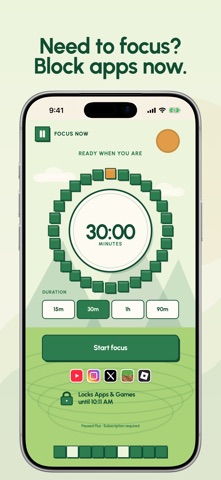
Paused protects the time you meant to keep. Choose the apps that pull you in, set the hours you want back, and they stay shielded — even when Paused isn't open.
FEATURES WITH PAUSED PLUS
The protection features below require paid Paused Plus access: a weekly or yearly subscription, or a one-time lifetime purchase. Apple Screen Time permission is required.
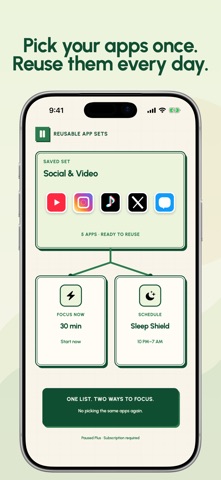
PROTECT YOUR DAY ON A SCHEDULE
- Build recurring windows like Deep Work, Mindful Morning, Evening Reset, or Sleep Shield.
- Pick apps and categories with Apple's own Screen Time picker.
- Set start and end times, choose your weekdays, and create windows that run past midnight.
- Reuse a selection you already made instead of picking the same apps twice.
OR PROTECT THE NEXT HOUR, RIGHT NOW
- Start a 15, 30, 60, or 90-minute session whenever you need one.
- The shield goes up immediately and lifts on time, whether or not Paused is running.
SET A DAILY LIMIT
- Give selected apps and categories a shared daily allowance. Usage already accumulated today counts; the allowance resets at midnight.
- Once the allowance is reached, those selections are blocked for the rest of the day.
- Turning off or removing an enabled limit requires a 10-minute cooldown and confirmation within five minutes. Protection stays on while you wait; confirming ends the current streak, not permanent progress.
WHEN YOU REACH FOR A BLOCKED APP
A Break Pass makes temporary access a deliberate choice. Name your reason, hold continuously for 10 seconds, then choose 15, 30, or 60 minutes. Releasing early keeps protection on.
Review the consequence before confirming: one pass is used and your active streak ends. Only the requested app, category, or website opens temporarily; other protected selections stay shielded. Earned blocks, outposts, and unlocked worlds are never spent or lost.
WATCH KEPT TIME TURN INTO SOMETHING
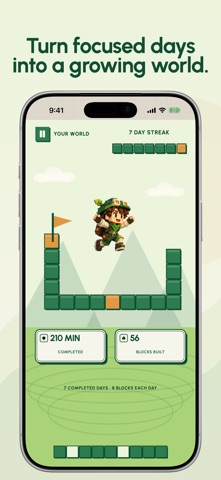
- The first completed Focus Now or Schedule session for each day earns eight permanent blocks and one streak day.
- Further sessions add to your minutes and session totals, not another block reward. Daily Limits do not earn blocks or complete the daily quest.
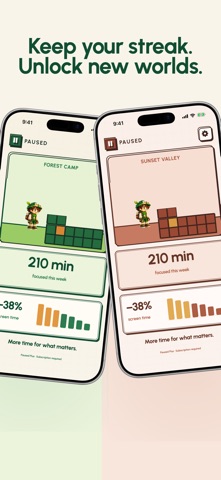
- Blocks build a voxel world that grows as you do. Unlock visual worlds through streak milestones.
- Interrupted sessions do not count as completed focus. Active schedule removal or deactivation also requires a cooldown.
PRIVATE BY DESIGN
Your app and category choices are handled by Apple and stay on your device. Paused never decodes or uploads the names of the apps you pick. Schedules, streaks, and progress live on your iPhone and keep working offline.
BUILT PROPERLY
iPhone and iPad, portrait and landscape. Dynamic Type and VoiceOver supported. Reduce Motion respected.
PAUSED PLUS ACCESS
Choose a recurring weekly or yearly subscription, or one-time lifetime access, from the plans shown in the app. Subscriptions auto-renew unless cancelled; manage or cancel them in your Apple Account settings. Lifetime access is a one-time purchase, not a subscription. Blocks and worlds are earned through focus, not bought. Your first saved protection plan stays inactive until Plus access is confirmed.
Terms of Use: https://paused.app/terms
Privacy Policy: https://paused.app/privacy
Safety and technology
Found in the app by AppBrain- Price
- Free
- App size
- 36.3 MB
- Content rating
- Everyone
Technologies used by Screen Time Control - Paused
Releases
Updates seen on the App Store- Version
- 1.0.8
- Launched
- September 2026
No changelog data
Alternatives
Similar apps and more from Worth A Try LLCAlternatives to Screen Time Control - Paused


More from Worth A Try LLC


Rankings
App Store top chartsApp Store Rankings for Screen Time Control - Paused
About the app and developer
About Screen Time Control - Paused
Screen Time Control - Paused is a productivity app developed by Worth A Try LLC.
User Ratings
Screen Time Control - Paused is rated 4.75 out of 5 stars. The rating is based on 4 ratings.
App Information
Screen Time Control - Paused is freely available from the App Store. The app size is 36.25 MB. The latest version available is 1.0.8. The last update was on October 8, 2026.
Technical Requirements
The app has a content rating of Everyone. The app has been available on the App Store since September 2026.
Developer information for Worth A Try LLC
Address:
Frequently asked questions about Screen Time Control - Paused
Is Screen Time Control - Paused free?
Yes. Screen Time Control - Paused is free on the App Store.
Is Screen Time Control - Paused still available?
Yes. Screen Time Control - Paused is on the App Store, and the last update we saw was on October 8, 2026.
How large is Screen Time Control - Paused?
Screen Time Control - Paused is 36.25 MB.
Is Screen Time Control - Paused suitable for children?
App Store rates the content of Screen Time Control - Paused as suitable for everyone.
How do people rate Screen Time Control - Paused?
Screen Time Control - Paused scores 4.75 out of 5 stars, from 4 ratings on the App Store.
Who made Screen Time Control - Paused?
Screen Time Control - Paused was developed by Worth A Try LLC. It is listed in the productivity category on the App Store.
What are the best alternatives to Screen Time Control - Paused?
People looking at Screen Time Control - Paused also look at these productivity apps: Tikku: To Do & Block Apps, LemonLog, Jottr: Thought Timeline, iMonth, LockSticky: LockScreen & Watch.