AppBrain
AppBrain
  • Apps
  • Apps being viewed right now Trending apps today Most popular apps All-time most installed apps Top rated apps iPhone and iPad apps
  • Intelligence ▾
    Intelligence overview → Track any Android app or your whole market
    Track & analyze
    Keyword Tracker & OptimizerTrack & improve Play rankings App Performance ReportOne-off PDF for any app StatisticsFree Android & Play market stats
    Promote your app
    Featured Apps App Links
  • Intelligence
  • Pricing
  • Dashboard
  • Sign up
  • Log in
App Store Apps > Productivity > Screen Time Control: PureFocus
App profile & analytics · Productivity · Data updated 2026-10-09
Screen Time Control: PureFocus icon

Screen Time Control: PureFocus

by Dmitry Vanyushkin · Free · Version 1.0.8
Availability On the App Store since April 2025 ↗
Rating on App Store
4.76/5
46 ratings
Rating
4.76
46 reviews
Best rank
–
not in the top lists
Last updated
December 24, 2025
1.0.8
AppBrain's verdict

It doesn't have enough ratings yet to judge what users think.

Screen Time Control: PureFocus is made and published by Dmitry Vanyushkin. AppBrain is an independent app data site and isn't affiliated with Dmitry Vanyushkin. The app name, icon, screenshots and description belong to Dmitry Vanyushkin and are shown as published on the App Store.

About Screen Time Control: PureFocus

Screen Time Control: PureFocus is a productivity app developed by Dmitry Vanyushkin.

What is the rating of Screen Time Control: PureFocus?

Screen Time Control: PureFocus is rated 4.76 out of 5 stars, based on 46 ratings.

Is Screen Time Control: PureFocus free?

Screen Time Control: PureFocus is free. The app size is 73.29 MB. The latest version available is 1.0.8. The last update was on December 24, 2025.

What are the requirements for Screen Time Control: PureFocus?

The app has a content rating of Everyone. The app has been available on the App Store since April 2025.

Description by Dmitry Vanyushkin (from the App Store)
Pure Focus – Stay Focused, Live Fully

In a world full of digital distractions, staying focused has never been more challenging. Constant notifications, social media feeds, and endless doomscrolling often derail productivity. Pure Focus is designed to help you regain control over your time and attention by blocking distracting apps, allowing you to concentrate on what truly matters. Whether you’re studying, working, or simply want to reduce unnecessary screen time, the app provides a simple and effective solution to live a more intentional and fulfilling life.

Main features:

► Flexible App Blocking Options

• Quick Session: Start focusing instantly with just one tap. Perfect for spontaneous work bursts.
• Daily Session Limits: Set a specific number of focus sessions per day to build consistent productivity habits.
• App Usage Limit: Define daily usage limits for selected apps. Once reached, the apps are blocked, ensuring you stay on track.
• Scheduled Blocking: Plan your focus time by scheduling app blocks during essential tasks, meetings, or study periods.

► Gamification and Achievements

Stay motivated with our built-in achievement system. Earn rewards for hitting focus milestones, maintaining streaks, and cutting down screen time. Turning focus into a game keeps you engaged and committed.

► Detailed Progress Tracking and Statistics

Monitor your habits and progress with comprehensive statistics. View session counts, streaks, and time saved on the home screen. Detailed reports provide insights into your focus patterns over time, helping you improve daily.

►Customization and User-Friendly Interface

Tailor Pure Focus to your needs with extensive customization options. Choose which apps to block, adjust time limits, and personalize session durations—all through a clean, intuitive interface that’s easy to navigate.

This isn’t just an app blocker; it’s a complete solution for reclaiming your time and boosting productivity. With flexible blocking modes, motivating achievements, and insightful progress tracking, staying focused becomes simple and rewarding.

Download Pure Focus today and take the first step toward a more focused, distraction-free life.

Contact Us: info@apppurefocus.com
Terms of Use: https://telegra.ph/Terms-of-Use-02-25-3
Privacy Policy: https://telegra.ph/Privacy-Policy-02-25-64
Show more Show less

Screenshots

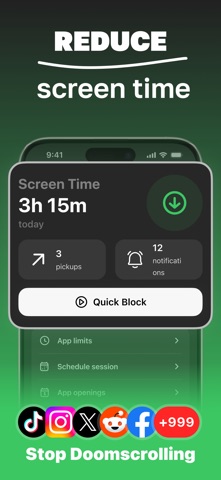
Screen Time Control: PureFocus Screenshot 1 of 7
Screen Time Control: PureFocus Screenshot 2 of 7
Screen Time Control: PureFocus Screenshot 3 of 7
Screen Time Control: PureFocus Screenshot 4 of 7
Screen Time Control: PureFocus Screenshot 5 of 7
Screen Time Control: PureFocus Screenshot 6 of 7
Screen Time Control: PureFocus Screenshot 7 of 7
Screenshots by Dmitry Vanyushkin, from the the App Store listing
Official page on the App Store

Changelog of Screen Time Control: PureFocus

No changelog data

Developer information for Dmitry Vanyushkin

Dmitry Vanyushkin

Address:

Share Screen Time Control: PureFocus

Comments on Screen Time Control: PureFocus for iOS

We don't have enough comments to show example comments. Please check back later.

App Store Rankings for Screen Time Control: PureFocus

This app is not ranked

Technologies used by Screen Time Control: PureFocus

Frequently asked questions about Screen Time Control: PureFocus

Is Screen Time Control: PureFocus free?

Yes. Screen Time Control: PureFocus is free on the App Store.

Is Screen Time Control: PureFocus still available?

Yes. Screen Time Control: PureFocus is on the App Store, and the last update we saw was on December 24, 2025.

How large is Screen Time Control: PureFocus?

Screen Time Control: PureFocus is 73.29 MB.

Is Screen Time Control: PureFocus suitable for children?

App Store rates the content of Screen Time Control: PureFocus as suitable for everyone.

How do people rate Screen Time Control: PureFocus?

Screen Time Control: PureFocus scores 4.76 out of 5 stars, from 46 ratings on the App Store.

Who made Screen Time Control: PureFocus?

Screen Time Control: PureFocus was developed by Dmitry Vanyushkin. It is listed in the productivity category on the App Store.

Today's trending apps Top new apps Apps other people are watching Price drops on Google Play Popular Productivity Apps
More hot apps 🔥
Overview Reviews Rankings Technology
AppBrain Intelligence premium content

Subscribe now to get full and unlimited access to AppBrain Intelligence. You'll have access to:

  • App Intelligence dashboard (performance timeline, competitor comparison, country rankings, insight cards)
  • Detailed ranking data per app
  • Full timeline per developer
  • Device market shares data per country
  • Unlimited keyword tracking
1 Month

$75/mo
(billed every month)

SAVE 0%
Subscribe
3 Months

$65/mo
($195 billed every 3 months)

SAVE 13%
Subscribe
1 Year

$57.50/mo
($690 billed every year)

SAVE 23%
Subscribe
Each subscription will automatically renew 3 days before the expiration date for the same time period. Subscriptions can be cancelled at any time before the renewal.

AppBrain is an app data site, we track rankings, ratings, installs for all apps and games on Google Play and the App Store. AppBrain doesn't host app files or APKs, all install links go directly to the official store. All trademarks are owned by their respective owners.

More apps

  • Top Android apps being viewed
  • View Paycheck: Paystub Generator
  • A+ Grade Calculator for Android
  • Mi Music

App statistics

  • Android statistics
  • Google Play Developer stats
  • Trending Android Apps
  • Trending iOS apps
  • Top popular Apps
  • Buy the best Android phone
  • Buy & sell app businesses

About AppBrain

  • Contact
  • Privacy
  • Documentation
  • DMCA takedowns
  • Articles
  • Blog
  • Android Interstitial Ads: Best practices to optimize your app's earnings
© 2010-2026 - AppBrain