

Screen Time Control: SugarLock
Screen Time Control: SugarLock is made and published by Timothy Sison. AppBrain is an independent app data site and isn't affiliated with Timothy Sison. The app name, icon, screenshots and description belong to Timothy Sison and are shown as published on the App Store.
AppBrain's verdict
- Last updated
- December 11, 2025
- Size
- 12.8 MB
User feedback
Ratings and reviews on the App StoreComments on Screen Time Control: SugarLock for iOS
We don't have enough comments to show example comments. Please check back later.
Store listing
By Timothy Sison, from the App Store


Description by Timothy Sison Written by the developer, not by AppBrain. Click to read.
Transform your iPhone into a minimalist phone that rewards healthy behavior instead of mindless scrolling.
TWO WAYS TO LOCK APPS & BUILD BETTER HABITS
Choose the quest mode that fits your lifestyle:
FOOD QUEST MODE - Perfect for Meal-Based Routines
• Take a photo of your meal to start a quest
• Selected apps lock for 3-4 hours
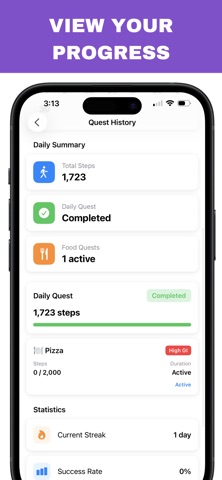
• Walk to progressively unlock each app
• Recognizes 300+ foods with AI (pizza, salad, sushi, and more)
• Flexible timing based on when you eat
• Combines food awareness with post-meal activity
Want to create a dumb phone experience after eating? Food Quest transforms your phone into a movement-driven device that only unlocks as you walk.
DAILY QUEST MODE - Classic App Locker with a Twist
• All selected apps automatically lock at midnight
• Walk throughout the day to unlock them progressively
• Each app has its own step goal
• Hit your daily targets for full access
• Perfect for building consistent routines
• Traditional screen time control meets fitness gamification
Daily Quest is the ultimate minimalist phone solution – your apps stay locked until you've earned them through movement.
POWERFUL APP LOCK FEATURES
Smart App Selection
• Choose exactly which apps to lock (social media, games, news, etc.)
• Premium: Unlimited app blocking
• Works with any iPhone app
Real-Time Tracking
• HealthKit integration for accurate step counting
• Live progress bars show unlock status
• Quest history with statistics
• 7-day activity charts
• Current streak tracking
You Stay in Control
• Emergency override phrase for urgent access
• Switch quest modes (24-hour cooldown prevents gaming the system)
• Customize step goals per app
• Full control over which apps to lock/unlock
Food Recognition Technology
• Built-in AI recognizes 300+ foods
• Pizza, burgers, salads, sushi, tacos, and more
• Food photos saved to your library for meal tracking
• Optional feature (Daily Quest works without it)
Beautiful Design
• Clean, motivating interface
• Animated progress indicators
• Quest completion celebrations
• Dark mode support
• Intuitive onboarding
WHY SUGARLOCK IS DIFFERENT
Most app lockers and screen time control apps just block access. That's frustrating and often leads to disabling the blocker entirely.
SugarLock flips the script: every app unlock is earned through physical activity. This creates positive reinforcement – you WANT to walk because it unlocks your apps. The result? Less phone addiction, more movement, better habits.
It's the perfect balance between a minimalist phone experience and staying connected when you need to be.
IDEAL FOR:
Breaking phone addiction and doomscrolling
Building a healthier relationship with your device
Post-meal walking habits (great for digestion & wellness)
Creating intentional "dumb phone" time
Productivity and deep focus sessions
Digital minimalism without going extreme
Combining fitness goals with screen time management
Anyone wanting an app locker that actually works
PRIVACY & SECURITY
Your data, your device, your control:
• All data stored locally on your iPhone
• No account required
• No data collected or sold
• HealthKit data never leaves your device
• Photos saved to your library only
• Complete transparency
We don't track you, monitor you, or monetize your data. Period.
HEALTHKIT INTEGRATION
SugarLock reads your step count via Apple HealthKit to track quest progress and unlock apps. Your health data remains private on your device and is never shared with third parties.
Terms of Use: https://rudeus.io/sugarlock/terms.html
Privacy Policy: https://rudeus.io/sugarlock/privacy.html
Safety and technology
Found in the app by AppBrain- Price
- Free
- App size
- 12.8 MB
- Content rating
- Everyone
Technologies used by Screen Time Control: SugarLock
Releases
Updates seen on the App Store- Version
- 1.0
- Launched
- December 2025
No changelog data
Alternatives
Similar apps and more from Timothy SisonMore from Timothy Sison


Rankings
App Store top chartsApp Store Rankings for Screen Time Control: SugarLock
About the app and developer
About Screen Time Control: SugarLock
Screen Time Control: SugarLock is a health & fitness app developed by Timothy Sison.
What is the rating of Screen Time Control: SugarLock?
Screen Time Control: SugarLock has no ratings yet.
Is Screen Time Control: SugarLock free?
Screen Time Control: SugarLock is free. The app size is 12.75 MB. The latest version available is 1.0. The last update was on December 11, 2025.
What are the requirements for Screen Time Control: SugarLock?
The app has a content rating of Everyone. The app has been available on the App Store since December 2025.
Developer information for Timothy Sison
Address: