

Screen Time Control: Unsway
Screen Time Control: Unsway is made and published by Ihor Bilohubov. AppBrain is an independent app data site and isn't affiliated with Ihor Bilohubov. The app name, icon, screenshots and description belong to Ihor Bilohubov and are shown as published on the App Store.
AppBrain's verdict
- Last updated
- July 23, 2026
Rankings
App Store top chartsApp Store Rankings for Screen Time Control: Unsway
Competitors
Similar apps and more from Ihor BilohubovAlternatives to Screen Time Control: Unsway


More from Ihor Bilohubov


Releases
Updates seen on the App Store- Version
- 1.0.0
- Launched
- July 2026
No changelog data
User feedback
Ratings and reviews on the App StoreComments on Screen Time Control: Unsway for iOS
We don't have enough comments to show example comments. Please check back later.
Technology
Found in the app by AppBrain- Price
- Free
- App size
- 41.0 MB
- Content rating
- Everyone
Technologies used by Screen Time Control: Unsway
About the app and developer
About Screen Time Control: Unsway
Screen Time Control: Unsway is a productivity app developed by Ihor Bilohubov.
User Ratings
The app has no ratings yet.
App Information
Screen Time Control: Unsway is freely available from the App Store. The app size is 41.01 MB. The latest version available is 1.0.0. The last update was on July 23, 2026.
Technical Requirements
The app has a content rating of Everyone. The app has been available on the App Store since July 2026.
Developer information for Ihor Bilohubov
Address:
Store listing
By Ihor Bilohubov, from the App Store




Description by Ihor Bilohubov Written by the developer, not by AppBrain. Click to read.
Choose the apps and websites that distract you. Start Quick Focus in seconds, use a timer that fits your day, or create automatic schedules for work, study, evenings, and sleep.
WHAT YOU CAN DO
• Block selected apps and websites
• Start a manual Quick Focus session whenever you need it
• Choose 30 minutes, 1 hour, until you turn it off, or a custom duration
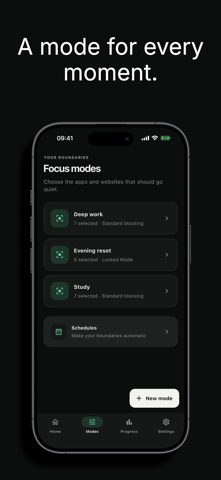
• Create focus modes for different moments
• Run schedules automatically in the background
• Use Locked Mode when you want a commitment you cannot end early
• See focused time, completed sessions, completion rate, and streaks
FREE AND PRO
Free includes one focus mode and manual Quick Focus. Unsway Pro unlocks additional modes, automatic schedules, Locked Mode, and full progress insights.
BUILT FOR PRIVACY
Unsway uses Apple’s Screen Time frameworks to apply your choices on your device. Your selected apps and websites are represented by private system tokens and are not sent to our analytics services.
Less pull. More intention.
Terms: https://unswayapp.com/terms/
Privacy: https://unswayapp.com/privacy/